3d Designer & Drafter

3D Designer & Drafter encountered a few fundamental issues during the design process. It addresses the process that comes with 3D designer and drafter with creating a separate drawing production regardless of the manufacturing process. There have been several delays seen in the process. For example, if a drawing comes with an incorrect dimension, it offers a production drawing that can rework with time and massively disrupted.

We have a team of 3D designer drafters that do the manufacturing work and integrate the complete product development process. It adds lots of intelligent 3D design and drafting software available. It makes sure that your design and manufacturing work is mainly used daily. There is much intelligent 3d design and drafting software available for producing accurate manufacturing drawings. Additionally, if we talk about design and drafting company today, it helps to resolve all problems with ease.

We offer two essential questions during the design process

1. is this product financially feasible?

The total cost to produce a product mainly influence a variety of factors. It primarily uses material and labour costs that seemingly offer small changes and significantly impact the overall cost structure. As a leading Australian design and drafting company, our costing ensure that no cost-related surprises come to you when your model goes into production.

Our team allows 3d designers/drafters to act in a better way. Our project managers and the Engineers pursue new product development that gives a clear cost perspective regarding compliance and the pre-calculated structures. It monitors the impact of changes as it is transparent and clear.

Additionally, it comes with advantages like cost-effective product costing. It comes with the ability to work with both original models and drawings. It uses 3D CAD programs or neutral formats like IGES or STEP. Here, the user can define different materials and make changes to drawing or relocate the manufacturer’s place. The model changes are displayed immediately in cost per piece.

2. can this product be manufactured?

Australian design and drafting company support 3d designer/drafter and mould makers and respect the feasibility of your products. In the development process, there are complicated shape models that change regularly. The export process and the data repairing have high error probabilities and inaccuracies.

There are a few reasons, like when mould makers wait until the final design of a product is established and develop the final form. The cost of valuable production time is also well-noted. We at Australian Design and Drafting are early to make form. In addition to this, we offer a correct form of geometry that covers sketches, audit and control of thickness. For example, Plastics can perform a detailed filling analysis by determining the optimum position of the injection points.

3d Designer & Drafter

The team ensures the proper filling pattern of the component, tracks the form weld lines and adds necessary points.3d designer/drafter can have a complete product development process and ensure effective communication between design and production during the entire development process. ASTCAD provides quality and cost-effective 3d design and drafting services across Australia. If you have any queries or inquiries regarding 3D modelling, Drop us an email at info@astcad.com.au or call us 1800 287 223 (Toll-Free) Australia Wide.

What is 3D draftsman?

A 3D draftsman, also known as a 3D drafter or 3D modeler, is a professional who specializes in creating three-dimensional models of objects, structures, or environments using computer-aided design (CAD) software. These models are used in various industries such as architecture, engineering, product design, animation, video games, and virtual reality.u003cbru003eu003cbru003e3D draftsmen play a crucial role in the design and visualization process. They interpret technical drawings, specifications, and concepts to create accurate and detailed 3D models. These models can range from simple geometric shapes to complex assemblies with intricate details. 3D draftsmen often work closely with architects, engineers, designers, and other stakeholders to ensure that the models meet the project requirements and specifications.u003cbru003eu003cbru003eTheir skills include proficiency in CAD software, an understanding of design principles, spatial awareness, attention to detail, and the ability to visualize objects and spaces in three dimensions. Additionally, they may possess knowledge of rendering techniques, animation, and simulation to create realistic and immersive visualizations.

What does a drafter do?

A drafter, often referred to as a drafting technician or CAD (Computer-Aided Design) drafter, plays a crucial role in the design and engineering process. Their primary responsibility is to create technical drawings and plans based on the specifications provided by engineers, architects, or designers. These drawings serve as blueprints for constructing buildings, products, machinery, or other structures.u003cbru003eu003cbru003eDrafters typically use specialized software such as AutoCAD or SolidWorks to create precise and detailed drawings. They must possess a strong understanding of technical principles, mathematics, and engineering concepts to accurately translate design concepts into technical drawings.u003cbru003eu003cbru003eu003cstrongu003eSome specific tasks that drafters might perform include:u003c/strongu003eu003cbru003e- Creating detailed drawings of architectural designs, including floor plans, elevations, and sections.u003cbru003e- Developing mechanical drawings that specify dimensions, materials, and assembly procedures for manufacturing processes.u003cbru003e- Producing electrical or electronic schematics for wiring systems and circuitry.u003cbru003e- Collaborating with engineers and architects to refine designs and ensure technical accuracy.u003cbru003e- Incorporating changes and revisions to existing drawings as needed during the design process.

CS

Claire Sutton

Architectural CAD Specialist & Technical Writer · BArch (Hons), QUT · ASTCAD, Brisbane

Claire has 10 years of experience in Revit BIM modelling, architectural documentation, and CAD conversion projects across Southeast Queensland and NSW. She has delivered NCC-compliant documentation for residential, commercial, and industrial facilities.

More articles by Claire Sutton →
How to be Best Drafter or Designer in your Field

Get set your new year resolutions by adding and establishing some professional goals. Setting goals are crucial progress, especially when it comes to business or career. Here are a few of my professional goals for 2016. These are the things that work well on becoming a better drafter and designer this year.

Best Drafter or Designer in your Field

If the above goals resonate with you, feel free to adopt and implement them in your professional career.There could always be something new to learn, and with all the resources available online, it would be more accessible than ever. One needs to learn something new about design, drafting, business, entrepreneurship, teamwork, marketing regularly.

Contribute, don’t consume

If you’re looking to work in a large office that is set from home as a freelancer, there would be a time when you’ll find yourself working as a team. There would be nothing worse than a passive team member. Consumes but never contributes, also make it a goal to become more active in your team and contribute.

Don’t be afraid to try new things

There’s this old saying, “If it isn’t broke, don’t fix it”, is true, but don’t let it stop you from trying new things. Sometimes it would be a good thing to get out of our comfort zone and try something new and different. Maybe it would be taken into a different design process, new marketing strategy or as simple as a new workstation layout. Trying new things is always an excellent way to challenge and help yourself grow.

Network more

In the last and a half year of running my drafting and design firm, we noticed networking is one crucial thing that’s needed to grow businesses with ease. Instead, it would help set up a workstation to meet new people and discuss the requirements. We should take this as an opportunity to find outside our comfort zone. Get ready to grow your network with another freelancer, business owner, drafter and designer.

Ask for help

Back to my first statement, “you don’t know everything”. Asking for help is not a sign of weakness but rather a vital growth step. It’s always important to have mentors from who you can seek advice. If you don’t have one already, make it a goal to find a mentor this year. Hey, maybe it’s going to be one of the new things that you try!

Take time off more often

It could be easy to forget about work/life balance when you’re passionate about what you do. Mainly, it’s true when working from home, let this year add a new year when you set aside a reasonable amount of time for your family and friends and get time to recharge.

Celebrate the wins

Always look for things that can be improved with fixing. It’s not necessarily a bad characteristic but can hurt you and your business. Therefore, why not celebrate our wins rather than be demotivated from our failures. Set a goal to celebrate the successes, even if they are small. When one finishes a project, celebrate it. Celebrate if you have landed a perfect job or found a new client.

How to be Best Drafter or Designer in your Field

  1. Master the Basics: Start by learning the fundamental principles of drafting and design. Understand the software tools used in your industry, such as AutoCAD, Adobe Creative Suite, or other specialized software.
  2. Education and Training: Pursue formal education or training in drafting and design. Consider enrolling in relevant courses, workshops, or obtaining a degree in a related field like architecture, engineering, graphic design, or industrial design.
  3. Practice Regularly: Practice is crucial to improving your skills. Dedicate time to drawing, designing, and drafting regularly. Take on personal projects to challenge yourself and explore new techniques.
  4. Seek Feedback: Share your work with mentors, peers, or online communities to receive constructive feedback. Being open to criticism will help you identify areas for improvement.
  5. Stay Updated: Design trends and software tools change rapidly, so make it a point to stay updated with the latest advancements and industry best practices. Follow design blogs, attend conferences, and participate in webinars to stay informed.
  6. Study Other Designers: Learn from the work of other successful designers in your field. Analyze their techniques, styles, and approaches to gain insights into what makes their designs stand out.
  7. Develop a Unique Style: While learning from others is essential, strive to develop your unique style and signature approach to design. Finding your creative voice can set you apart from others in the field.
  8. Collaborate and Network: Engage with other professionals in your industry, attend design events, and join professional organizations. Networking can open doors to new opportunities and expose you to different perspectives.
  9. Accept Challenges: Don’t be afraid to take on challenging projects that push your boundaries. Overcoming obstacles and tackling complex designs will help you grow as a drafter or designer.
  10. Be Persistent and Patient: Becoming the best in your field takes time and persistence. Keep working on improving your skills, and don’t get discouraged by setbacks or rejections.
  11. Showcase Your Work: Build a strong portfolio that showcases your best projects. Your portfolio will be a crucial tool in attracting clients or potential employers.
  12. Embrace Continuous Learning: The field of drafting and design is always evolving. Stay curious and keep learning new techniques and technologies throughout your career.

If you need help regarding design and drafting services, please do not hesitate to contact us at ASTCAD or call us at 1800 287 223 (Toll-Free) in Australia globally.


CS

Claire Sutton

Architectural CAD Specialist & Technical Writer · BArch (Hons), QUT · ASTCAD, Brisbane

Claire has 10 years of experience in Revit BIM modelling, architectural documentation, and CAD conversion projects across Southeast Queensland and NSW. She has delivered NCC-compliant documentation for residential, commercial, and industrial facilities.

More articles by Claire Sutton →
drafting service cad outsourcing

Are you looking for a CAD project to be outsourced? There are a lot of reasons to outsource. For example, if user have a big project that can’t be completed within a given time. Or you’ve lost your valuable CAD engineer. Or when the company is facing “growing pains.” Whatever may be the reason, outsourcing is one powerful tool for your company’s requirements. It offers a scalable CAD team whenever you require it and whenever you don’t need it.

The essential thing you need to determine is the CAD activity you require to outsource:

While each of these CAD Conversion activities requires different skill sets and skill levels, they all have in common the need for QC or quality control. Quality control is a process by which the organization reviews the quality with involvement in the production process under review. Additionally, the QC is practised in several different scenarios and business operations. The primary purpose of this paper that we discuss in QC is to apply to the various CAD Conversion processes.

What is CAD QC?

Quality control in CAD Conversion activities requires specified control, intelligent job management, defined processes, reliable performance, data integrity, and records maintenance. Our quality control personnel can perform CAD conversion that requires competence. It includes process skills, software knowledge, experience in the type of conversion needed, and other proven qualifications. It also adds up personal integrity, motivation and various desire to do a job in a better way.

There are lot of specific controls that need to be placed in a better way. It includes reviews for each converted file based on peers or superiors that do not involve in the actual conversion process. As customer reviews and feedback, we ensure that the customer’s standards are met.

Quality control in CAD conversion mainly emphasizes testing and then maintaining processes that guarantee conversion accuracy. Additionally, quality assurance especially ensures that 3D model or BIM comes with an accurate CAD Perfect representation. To avoid or minimize the issues, users lead to problems during the construction of the building of the product.

CAD Outsourcing

QC is significant when we talk about the construction or manufacturing organization. It can outsource its CAD conversion to various CAD-CAM Conversion Service providers. For any outsourced or contract work, connect to us. Government agencies award us for our excellent quality control issues. We are among the top reasons not to renew a CAD Conversion contract.

At this time, it’s not enough to have the CAD conversion service provider assurance. With the highest quality and accuracy, files are checked and rechecked. Another CAD conversion outsources company is dedicated to providing consistent and accurate work. It can process both in place to ensure that all CAD standards are followed, and all documents convert accurate

CAD conversion Service

When choosing the best CAD conversion, it can outsource companies based on their requirement. Especially if it’s your first time for CAD outsourcing, it is essential to find outsourcing that one can trust. You can send your project assets, and we are here to guide you from scratch. We make sure you get the best quality results. We are available in Australia and provide excellent CAD conversion services around Sydney, Brisbane, Melbourne, Gold Coast and Perth.

What is CAD conversion services?

CAD conversion services involve the process of converting designs, drawings, or sketches into digital formats compatible with Computer-Aided Design (CAD) software. This service is commonly used when transitioning from manual drafting methods to digital design, or when converting between different CAD software formats. CAD conversion services typically include tasks such as digitizing hand-drawn sketches, converting 2D drawings to 3D models, or migrating CAD files between different software platforms while ensuring accuracy and maintaining design integrity. This process is crucial in industries such as architecture, engineering, manufacturing, and construction, where precise digital representations of designs are essential for prototyping, visualization, and production.

What is CAD drawing services?

CAD drawing services involve the creation, modification, or optimization of drawings using Computer-Aided Design (CAD) software. These services are offered by professionals or companies skilled in using CAD software to produce accurate and detailed technical drawings for various purposes. CAD drawing services cover a wide range of applications, including architectural drafting, mechanical design, electrical schematics, civil engineering drawings, and more.u003cbru003eu003cbru003eu003cstrongu003eTypically, CAD drawing services include tasks such as:u003c/strongu003eu003cbru003eu003cstrongu003eCreating 2D drawings:u003c/strongu003e Drafting floor plans, elevations, sections, and other architectural or engineering drawings in 2D format using CAD software.u003cbru003eu003cstrongu003eDeveloping 3D models: u003c/strongu003eDesigning three-dimensional models of objects, products, or structures to visualize and analyze their spatial relationships, components, and functionality.u003cbru003eu003cbru003eu003cstrongu003eConverting hand-drawn sketches or blueprints into digital CAD format for easier editing, sharing, and storage.u003c/strongu003eu003cbru003eu003cstrongu003eModifying existing CAD drawings:u003c/strongu003e Updating or revising drawings based on client feedback, design changes, or new requirements.u003cbru003eu003cstrongu003eDetailing and annotation:u003c/strongu003e Adding dimensions, annotations, labels, and other metadata to clarify the information conveyed in the drawings.


CS

Claire Sutton

Architectural CAD Specialist & Technical Writer · BArch (Hons), QUT · ASTCAD, Brisbane

Claire has 10 years of experience in Revit BIM modelling, architectural documentation, and CAD conversion projects across Southeast Queensland and NSW. She has delivered NCC-compliant documentation for residential, commercial, and industrial facilities.

More articles by Claire Sutton →
3D CAD Conversion services

No matter what the industry is, it clearly shows that better workflows mean higher efficiency. It includes manufacturing, and efficiency is vital to stay competitive. Several lots of manufacturing business owners caught up in the everyday running business. It may not pay sufficient attention to workflow improvement. Additionally, it comes with an inefficient workflow that can increase costs and affect overall profitability.

3D CAD Conversion Services

Some manufacturers have realised that outsourcing 3D CAD conversion services can improve their workflow and profitability. The 3D CAD offers users the ability to look at apart from every possible angle and see precisely how one part relates to the other parts in an assembly. It has already begun to improve workflow by eliminating much of the trial-and-error part of the traditional manufacturing process.

Combining that workflow improvement with fast communication via the Internet makes it possible to save significant time and improve final quality.

One Scenario

A customer requires a manufacturing company with the 3D file of the part. They should be tooled with a request for a quote. They mainly use a 3D CAD conversion service and a manufacturing firm. This makes external engineers and machinists immediately look at the part to determine if there are any problems machining or special considerations to be taken care of. They can edit, convert, and model the file right then and there. It helps in improving the workflow along with the efficiency of the process.

Choose a reliable 3D CAD Conversion Services that contact the customer via email or set up an online conference. With this, the customer can correct problems in real-time. It enables the manufacturing firm that stays focused on their core business with manufacturing. Here the customer and the conversion service help to solve the potential problems. This workflow type helps save days and perhaps profits in the manufacturing process. 

Another Scenario

If we look for a more traditional process, the shop receives a 2D print that the machinist must manually convert into G-code. The time helps to save, and other errors need to be eliminated. Instead of a picture, the shop receives a 3D file into a format compatible with its CAM software package.

Enter into an ongoing relationship along with a conversion service. Additionally, the manufacturing company helps to eliminate the need and see the 2D print. The manufacturing company includes a link on their website to a pre-approved 3D CAD Conversion Service.

The workflow steps use the receipt of the 2D print for manufacturing-ready 3D files. It takes care of externally, and the machinist receives a file that he can work with directly. The customer is happy. The machinist is productive and set up for reducing hours to minutes. It is programming made by the machinist and is reduced to zero.

Mass Production

Mass production comes with producing large quantities of a product through a standardised process on a production line. Several different manufacturers and products use this type of manufacturing to create a better workflow. A CAD conversion service help with mass production by:Get ready to create a better workflow through outsourcing. Add a crucial part to each machine, and get the maximum amount of work possible. Our 3D models are used with 100% accurate and correct processes.

Create a workflow daily by making small changes that require to be made. Keep the model checking and conversion process separate as it helps in the manufacturing process.

Information of 3D CAD conversion services

3D CAD conversion services involve the process of converting 2D drawings, physical models, or other non-digital formats into accurate and detailed 3D CAD models. These services are typically offered by specialized firms or professionals who have expertise in CAD software and 3D modeling techniques. Here’s some information about 3D CAD conversion services:

  1. Conversion Process: The 3D CAD conversion process typically involves the following steps:

    a. Data Acquisition: The service provider collects the input data, which can include physical models, 2D drawings, sketches, or scanned images. The data may be in various formats such as PDF, DWG, or paper documents.


    b. Analysis and Interpretation: The service provider analyzes and interprets the input data to understand the design intent, dimensions, and relevant details. They assess the complexity and feasibility of the conversion process.


    c. CAD Modeling: Using specialized CAD software, the service provider creates a 3D model based on the input data. They convert the 2D information into a fully realized 3D representation, incorporating accurate dimensions, geometry, and design features.


    d. Quality Assurance: The service provider performs quality checks to ensure the accuracy and integrity of the 3D CAD model. They verify dimensions, check for any errors or inconsistencies, and make necessary adjustments to refine the model.


    e. File Delivery: Once the 3D CAD model is complete and approved, the service provider delivers the final files to the client. The files can be in various formats such as STEP, IGES, or native CAD formats, depending on the client’s requirements.
  2. Advantages of 3D CAD Conversion Services:

    a. Improved Design and Visualization: 3D CAD models provide a realistic and detailed representation of the design. Converting 2D data into 3D models enhances visualization, allowing for better understanding and assessment of the design concept.


    b. Enhanced Collaboration: 3D CAD models facilitate collaboration among stakeholders, such as designers, engineers, manufacturers, or clients. The 3D models can be easily shared, reviewed, and modified, enabling effective communication and decision-making.


    c. Iterative Design and Modification: 3D CAD models offer flexibility for iterative design and modifications. Design changes can be made easily in the digital environment, reducing the need for physical prototypes and costly rework.


    d. Compatibility with CAD Software: 3D CAD models can be seamlessly integrated with various CAD software and tools. This compatibility enables further design modifications, simulations, analysis, or manufacturing processes.


    e. Preservation and Archiving: Converting physical or 2D data into 3D CAD models allows for the preservation and archiving of design information. The digital models can be stored, retrieved, and reused for future reference or modifications.
  3. Applications of 3D CAD Conversion Services:

    a. Product Design and Development: 3D CAD conversion services are commonly used in product design and development. They help convert conceptual sketches or physical prototypes into detailed 3D models, supporting the product design process.


    b. Engineering and Manufacturing: 3D CAD models are essential for engineering and manufacturing applications. Converting 2D engineering drawings or physical components into 3D models enables design analysis, simulation, and manufacturing process planning.


    c. Architecture and Construction: 3D CAD conversion services are employed in the architectural and construction industries. They allow the conversion of 2D floor plans, elevations, or blueprints into 3D models, aiding in visualization, spatial planning, and design coordination.


    d. Legacy Data Conversion: 3D CAD conversion services can convert legacy data, such as older 2D drawings or physical models, into modern 3D CAD formats. This helps in digitizing and preserving historical design information.

3D CAD conversion services provide a valuable solution for converting non-digital data into accurate and usable 3D CAD models. They offer advantages in terms of design visualization, collaboration, flexibility, and compatibility with CAD software. These services find applications across various industries, supporting design, engineering, and manufacturing processes.

We haven’t found any ideal sustainable workflow that satisfies the needs of your business forever. The customers change the process of manufacturing along with using 3D modelling. As a leading ASTCAD service company, we provide quality CAD conversion services in Brisbane, Perth, Melbourne, Sydney, and Gold Coast.

What is CAD file conversion?

CAD file conversion refers to the process of converting Computer-Aided Design (CAD) files from one format to another. CAD files are typically created and edited using specialized software such as AutoCAD, SolidWorks, or CATIA, and they come in various file formats such as DWG, DXF, STEP, IGES, and others. CAD file conversion services enable users to translate CAD files between different formats to ensure compatibility, interoperability, and accessibility across various software platforms and systems.u003cbru003eu003cbru003eu003cstrongu003eCommon scenarios where CAD file conversion services are required include:u003c/strongu003eu003cbru003eu003cstrongu003eInteroperabilityu003c/strongu003e: When collaborating with clients, suppliers, or partners who use different CAD software, converting CAD files to a mutually compatible format facilitates seamless exchange of design data.u003cbru003eu003cstrongu003eLegacy data migrationu003c/strongu003e: When transitioning to new CAD software or upgrading to newer versions, converting legacy CAD files to the latest or preferred format ensures that historical design data remains accessible and usable.u003cbru003eu003cstrongu003eMulti-platform compatibilityu003c/strongu003e: Converting CAD files to widely supported formats allows users to work with the same design data on different operating systems or CAD software platforms.u003cbru003eu003cstrongu003eFile optimizationu003c/strongu003e: CAD file conversion services may also involve optimizing file size, reducing complexity, or improving performance by converting CAD files to more efficient formats or versions.

How to convert CAD to 3D?

Converting a CAD (Computer-Aided Design) file to a 3D model typically involves importing the CAD file into 3D modeling software and then manipulating or editing it to create a three-dimensional representation. Here’s a general guide on how to convert CAD to 3D:u003cbru003eu003cstrongu003eChoose the appropriate softwareu003c/strongu003e: Select a 3D modeling software that supports the CAD file format you’re working with. Some popular options include Autodesk Fusion 360, SolidWorks, Blender, Rhino 3D, and SketchUp.u003cbru003eu003cstrongu003eImport the CAD fileu003c/strongu003e: Open the 3D modeling software and import the CAD file into the workspace. Most software programs allow you to directly import common CAD file formats such as DWG, DXF, STEP, IGES, or STL. Depending on the software, you may need to go through a specific import process or use a dedicated import function.u003cbru003eu003cstrongu003ePrepare the CAD geometryu003c/strongu003e: Once imported, the CAD geometry will appear in the 3D modeling software. Depending on the complexity and quality of the CAD file, you may need to clean up the geometry, remove any unnecessary elements, and organize the components for easier manipulation.u003cbru003eu003cstrongu003eConvert to 3Du003c/strongu003e: Use the modeling tools provided by the software to extrude, revolve, loft, or otherwise manipulate the 2D CAD geometry into three-dimensional shapes. This may involve adding depth, creating surfaces, and joining or subtracting volumes to achieve the desired 3D form.u003cbru003eu003cstrongu003eAdd details and featuresu003c/strongu003e: Enhance the 3D model by adding details, features, textures, and other elements as needed. This could include adding fillets, chamfers, holes, patterns, or surface finishes to accurately represent the design.u003cbru003eu003cstrongu003eOptimize the modelu003c/strongu003e: Once the 3D model is complete, optimize it for your intended use. This may involve refining the geometry, reducing the polygon count, or optimizing the mesh for better performance or visualization.u003cbru003eu003cstrongu003eExport the 3D modelu003c/strongu003e: Once satisfied with the conversion, export the 3D model in the desired file format for further use or sharing. Common 3D file formats include STL, OBJ, FBX, or STEP, depending on the requirements of your workflow or the software you’ll be using the model with.


CS

Claire Sutton

Architectural CAD Specialist & Technical Writer · BArch (Hons), QUT · ASTCAD, Brisbane

Claire has 10 years of experience in Revit BIM modelling, architectural documentation, and CAD conversion projects across Southeast Queensland and NSW. She has delivered NCC-compliant documentation for residential, commercial, and industrial facilities.

More articles by Claire Sutton →
revit to autocad

Revit 2015 Exporting to AutoCAD DWG.

If you want to convert 3D Revit to 3D Autocad DWG, we have a simple and easy process.

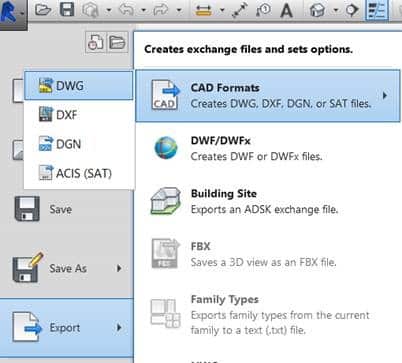
Open a Revit model, click on the Application menu, Export CAD format, then select dwg from the export.

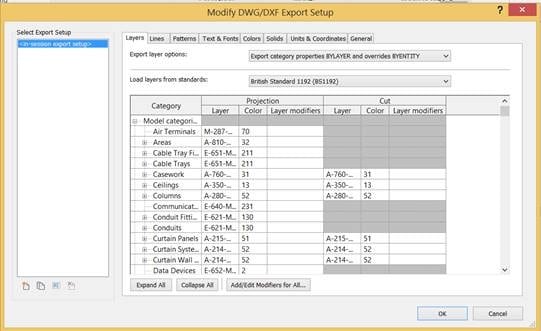
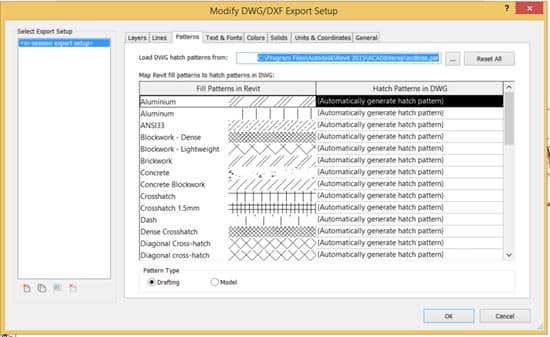
  • In the CADFormats menu, click on the three dots that open as modify DWG/DXF export setup from the display dialogue box.
  • Click on the Solids tab> Select ACIS solids, then click Next.
  • Again, click on Next to continue.
  • A dialogue box appears that define the folder that looks like a new DWG. Give an appropriate name that you like to add. Now, click on OK and proceed with the conversion.
  • On the lower-left side, you would see the Revit screen that shows the status bar for the progress of the conversion. As soon as it’s done, you’ll notice a new DWG.
  • Additionally, keep in mind that the Revit to DWG files conversion would make the file larger, more than 50MB Revit convert into 70MB DWG.
  • Now it’s time you can edit the converted file. Also, keep a note that objects are AutoCAD solids.

We are one of the leading Australian Design and Drafting service companies that provides quality CAD Conversion services around Brisbane, Melbourne, Sydney, Perth, and Gold Coast.

The process is, first select dwg from the export. CAD Formats menu.

revit to autocad convert drawing

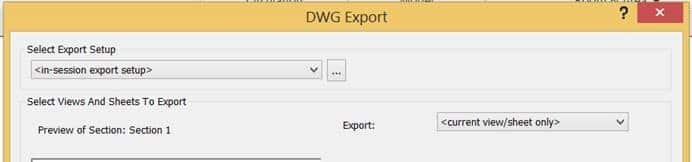
Then select the button to the right of Export Setup.

autocad dwg1

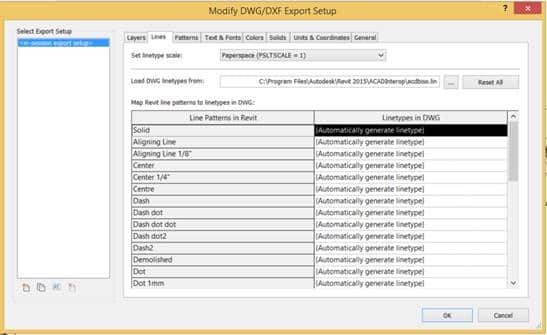
In the Dialogue box, change the load Layer Standards, to any standard you want. You also change other settings on the remaining Tabs.

autocad dwg2
autocad dwg3
autocad dwg4

When complete select ok

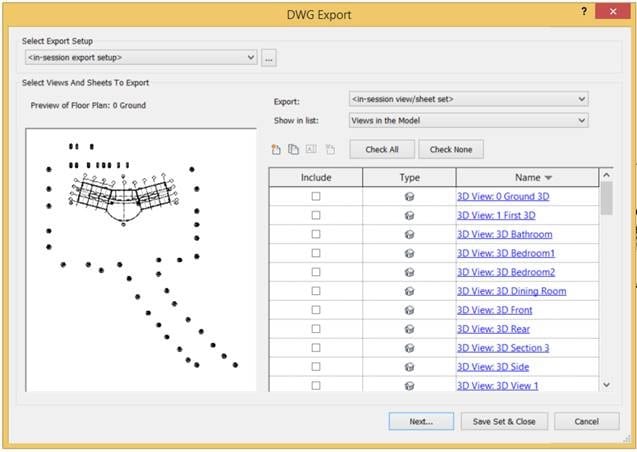
In the next dialogue box change the Export field to  <in session view/sheet set> and the Show in the list to Views in Model and all the views will appear in the dialogue box so that you can select the ones you wish to export

autocad dwg5

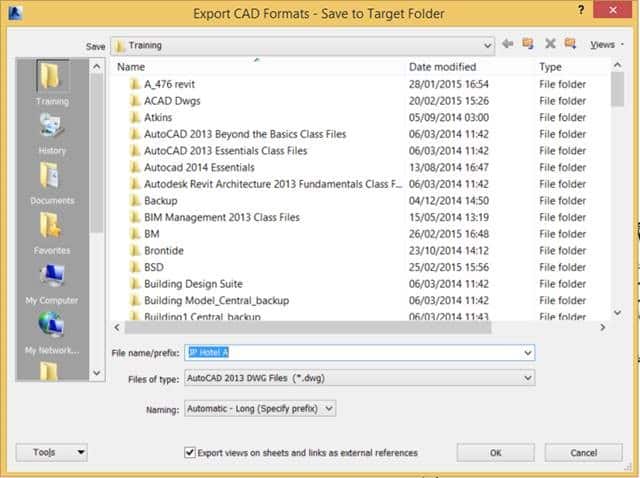
The final part of the process is to choose the location where you wish to save the DWG files and select OK

autocad dwg6

ASTCAD provides quality CAD Conversion services around Brisbane, Melbourne, Sydney, Perth, Gold Coast.

How do I export Revit layers to CAD?

Exporting Revit layers to CAD involves several steps:u003cbru003eu003cstrongu003eOrganize your Revit projectu003c/strongu003e: Ensure that your Revit project is properly organized with the elements you want to export placed on the appropriate layers.u003cbru003eu003cstrongu003eOpen the Revit projectu003c/strongu003e: Open your Revit project file.u003cbru003eu003cstrongu003eNavigate to the Export Settingsu003c/strongu003e: In Revit, go to the u0022Fileu0022 menu and select u0022Exportu0022 u003e u0022CAD Formatsu0022 u003e u0022DWGu0022 or u0022DXFu0022 depending on your preference.u003cbru003eu003cstrongu003eAdjust Export Settingsu003c/strongu003e: In the export dialog box, adjust the export settings according to your requirements. This includes selecting the version of CAD format, specifying the export units, setting up layers, etc.u003cbru003eu003cstrongu003eLayer Mappingu003c/strongu003e: Revit allows you to map Revit categories to specific layers in the CAD file during export. You can customize these mappings to ensure that the elements in Revit are exported to the correct layers in the CAD file.u003cbru003eu003cstrongu003eExportu003c/strongu003e: Once you have configured the export settings and layer mappings, click the u0022OKu0022 or u0022Exportu0022 button to begin the export process.u003cbru003eu003cstrongu003eSave the CAD Fileu003c/strongu003e: Choose a location and filename for the exported CAD file and save it.u003cbru003eu003cstrongu003eReview the Exported CAD Fileu003c/strongu003e: Open the exported CAD file in your CAD software to verify that the layers and elements have been exported correctly.

Can you convert a Revit file to AutoCAD?

Yes, you can convert a Revit file to AutoCAD by exporting it to a DWG (AutoCAD Drawing) or DXF (Drawing Exchange Format) file format. Here’s how you can do it:u003cbru003eu003cstrongu003eOpen your Revit projectu003c/strongu003e: Launch Revit and open the project file that you want to convert to AutoCAD.u003cbru003eu003cstrongu003eNavigate to the Export Settingsu003c/strongu003e: In Revit, go to the u0022Fileu0022 menu and select u0022Exportu0022 u003e u0022CAD Formatsu0022 u003e u0022DWGu0022 or u0022DXFu0022 depending on your preference.u003cbru003eu003cstrongu003eAdjust Export Settingsu003c/strongu003e: In the export dialog box, adjust the export settings according to your requirements. This includes selecting the version of CAD format, specifying the export units, setting up layers, etc.u003cbru003eu003cstrongu003eLayer Mappingu003c/strongu003e: Revit allows you to map Revit categories to specific layers in the CAD file during export. You can customize these mappings to ensure that the elements in Revit are exported to the correct layers in the CAD file.u003cbru003eu003cstrongu003eExportu003c/strongu003e: Once you have configured the export settings and layer mappings, click the u0022OKu0022 or u0022Exportu0022 button to begin the export process.u003cbru003eu003cstrongu003eSave the CAD Fileu003c/strongu003e: Choose a location and filename for the exported CAD file and save it.u003cbru003eu003cstrongu003eReview the Exported CAD Fileu003c/strongu003e: Open the exported CAD file in AutoCAD or any other CAD software that supports DWG or DXF formats to verify that the conversion was successful.


CS

Claire Sutton

Architectural CAD Specialist & Technical Writer · BArch (Hons), QUT · ASTCAD, Brisbane

Claire has 10 years of experience in Revit BIM modelling, architectural documentation, and CAD conversion projects across Southeast Queensland and NSW. She has delivered NCC-compliant documentation for residential, commercial, and industrial facilities.

More articles by Claire Sutton →
CAD drafter

Everyone that uses CAD needs a job but how do you know if a potential employer is right for you? It’s very difficult to hire the right person and it is equally challenging to find the right employer. As a worker, you are putting your faith and trust in your employer to create work for you, to keep the business running, to create an environment you can work in, and for the sake of your job. If your employer fails you are out of a job. It can be difficult to trust somebody else with your future. Make sure this job is right for you. Here are a few things you can do to help you vet out potential employers during the interview process.

CAD drafter

There are several typical job interview questions you should probably ask when seeking any job.

[fusion_builder_container hundred_percent=”yes” overflow=”visible”][fusion_builder_row][fusion_builder_column type=”1_1″ background_position=”left top” background_color=”” border_size=”” border_color=”” border_style=”solid” spacing=”yes” background_image=”” background_repeat=”no-repeat” padding=”” margin_top=”0px” margin_bottom=”0px” class=”” id=”” animation_type=”” animation_speed=”0.3″ animation_direction=”left” hide_on_mobile=”no” center_content=”no” min_height=”none”]

contract drafting service
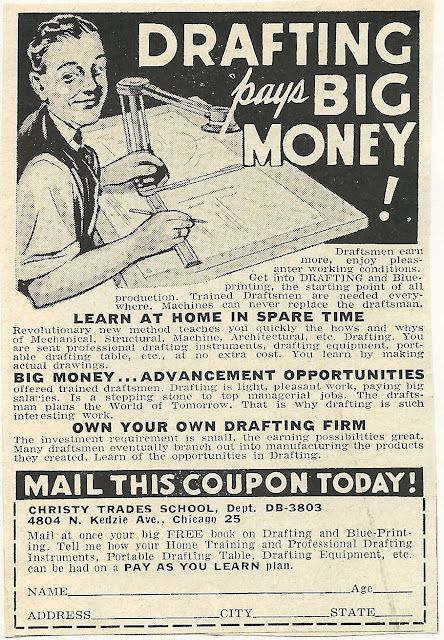
Drafting advertisement older times

What skills and experiences would make an ideal candidate? This question will tell you exactly what they are looking for. It also gives you the opportunity to sell yourself efficiently in that you won’t give them information they don’t need. Too much information may lead them to believe you are overqualified or don’t have the right set of skills. They may also mention something you didn’t realize they needed but can do.


Do you have any concerns about my qualifications? This is a tuff question to ask. It may expose your shortcomings out loud and that can be difficult to handle. However, it will tell you the issues you need to address in order to get the job. It creates an opportunity for you to demonstrate why you are the person for the job and removes fears they may have of hiring you. Don’t get offended by anything they list. They may be correct in their comments.


Who will I be working with? What group? What department? What role will I be filling? This question will help to eliminate some assumptions you have made about the position that may be incorrect. It will also give you an idea of the corporate structure of the company. Even small companies have corporate structures. Will you answer to one person specifically? Will you work in a group or independently?


Is this a new position or am I replacing somebody? This is important to know. You may be replacing a person that was fired for poor performance. Maybe somebody retired, or moved on to a different company. Perhaps the person before you was promoted. Maybe the company has new projects and needs additional workers. This will help you to fit in better when you start. It also lets you know what the current work is. Hopefully they can continue with the current workload and keep you employed. If a new position, or additional position, is be created for you make sure to ask about the current and future expected workload. Does the company have a reputation of hiring for a project then releasing you when work runs out? If you are replacing a person that was promoted then that means there is a good chance of advancement for you at this company. You can learn a lot from this one question.


What have past employees done to succeed in this position? If you are interviewing for a position that the company is creating, meaning it has never had a person perform these duties before, you may want to rephrase the question. This will give you an idea of what the company expects of you and what has worked for them. It can also create a dialog of how the company solves their issues and allow you to provide feedback on how might approach things.


What are the benefits? This may seem obvious but don’t forget to ask. Get specific with the details. How much will insurance cost? When will it be available? How is vacation time determined? Is any of this negotiable? Yes negotiate with them. You don’t have to accept their offer at face value. Wheel and deal! They might not budge but they definitely won’t if you don’t ask.


Will there be training? You don’t want your skill set to stagnate. You want to get better so that you will be worth more. A good employer also knows that they want employees that know what they are doing. Who wants to hire unskilled people? If they don’t offer training see if you can get them to add that as a benefit.


Why should I work here and not somewhere else? This is a chance for them to sell themselves. If they can’t why would you want to work there?


What will my salary be? This is where the dancing begins. Both sides are afraid to commit to a number for fear of giving away too much or not getting enough. The employer wants to pay as little as possible and you want to get paid as much as possible. This is obvious. Before you walk in to the interview determine what you want to make. There is no max so determine what you want and determine your minimum. Don’t start with the minimum because it is very rare that the employer will give you more than what you ask for. It does happen from time to time but if they feel they can get you for less they will try. Don’t ask for what you were making at your last job; go higher, at least a little bit. Make sure you feel that the pay fits the role and responsibilities. Never work for free.
What is the next step in the process? Save this for last. This is the essential last question and one you should definitely ask. It shows that you’re interested in moving along in the process and invites the interviewer to tell you how many people are in the running for the position.

There are more questions to ask when looking for a CAD related job. Some of those questions might be:

What CAD software will I be using? This may be an obvious question but it is vital to know what tool you will be using. If you can’t use that tool you may have a very difficult time in this new job. Also ask what programs are used in the office. If you can use multiple CAD programs that the company uses then you are a very valuable candidate for a position.What version (of the CAD software) are you on? What are your update plans? Versioning in CAD is very important. Stay current and be familiar with the latest versions of your CAD software. If the company doesn’t update often then you may fall behind in your skill sets. Ask why they haven’t updated recently. If they are up to date, ask when they updated and how often.


Is there company training for CAD? Does the company train its CAD users? If not ask why? Have they ever trained? Why did they stop? If they don’t train and won’t train you need to wonder why a company will hire and retain untrained workers. Why don’t they want efficiency to improve? Why don’t they value quality skills?
What type of hardware will you be using? Will you be doing CAD work on a toaster? How often are workstations updated?

There are many more questions that you can and probably should ask when interviewing for a CAD position. Think it through and prepare. Create a list before you go into your interview. Ask questions. It’s the only way for you to learn about this company before you decide to commit the bulk of your daily waking hours to them.

interviewing for a CAD drafter position

ASTCAD provides quality CAD drafter recruitment service around Brisbane, Melbourne, Sydney, Perth, Gold Coast.[/fusion_builder_column][/fusion_builder_row][/fusion_builder_container]


What is a CAD drafter?

A CAD drafter, or Computer-Aided Design drafter, is a professional who uses specialized software to create technical drawings and plans for various industries. CAD drafters typically work in fields such as architecture, engineering, manufacturing, and construction. They use CAD software to produce detailed drawings, blueprints, and schematics that are used in the design and development of products, buildings, machinery, and infrastructure projects. These drawings are essential for communicating design ideas, specifications, and dimensions to engineers, architects, and other professionals involved in the project. CAD drafters need to have strong technical skills, attention to detail, and a good understanding of design principles and industry standards.

What is the role of a CAD draftsman?

The role of a CAD draftsman is quite similar to that of a CAD drafter. A CAD draftsman, also known as a CAD technician or CAD operator, is responsible for creating technical drawings and plans using computer-aided design (CAD) software. Their primary role involves translating design concepts, sketches, and specifications into detailed drawings and schematics. These drawings are used by engineers, architects, and other professionals to guide the development, construction, or manufacturing of various products, structures, or systems.u003cbru003eu003cbru003eCAD draftsmen play a crucial role in the design and development process, as their drawings serve as the foundation for further planning, analysis, and implementation. They ensure that drawings adhere to industry standards, codes, and specifications, and they may collaborate closely with engineers, architects, and other team members to refine designs and address any issues or challenges that arise.u003cbru003eu003cbru003eIn addition to creating drawings, CAD draftsmen may also be involved in tasks such as updating and revising existing drawings, preparing documentation, and assisting with design reviews and presentations. They need to have strong technical skills, attention to detail, and a good understanding of design principles and CAD software tools. Effective communication and collaboration skills are also important, as CAD draftsmen often work as part of multidisciplinary teams.


CS

Claire Sutton

Architectural CAD Specialist & Technical Writer · BArch (Hons), QUT · ASTCAD, Brisbane

Claire has 10 years of experience in Revit BIM modelling, architectural documentation, and CAD conversion projects across Southeast Queensland and NSW. She has delivered NCC-compliant documentation for residential, commercial, and industrial facilities.

More articles by Claire Sutton →
2d drafting services

We are one of the best Australian Design & Drafting service companies that offer a cutting-edge 2D drafting solution. Without investing in expensive technology or going through any tedious recruitment headaches. If you’re looking for the importance of effective 2D drafting, then we offer various types of 2D drafting services. Additionally, there are numerous advantages provided by ASTCAD that comes with outsourcing.

Suppose you’re a firm that looks to draw out a design for a home, office, restaurant or any other type of building. Additionally, users can add a critical role that uses 2D drafting, offering a successful outcome.

We provide 2D drafting that uses one step that cannot be affordable to skip. It comes through encountering the problems when designing your building. Additionally, 2D drafting requires skills, time, and expertise. With outsourcing, one should not worry about doing 2D drafting. Users can outsource 2D drafting by adding ASTCAD service company. Now get big by saving time, effort and cost.

2D drafting services offered:

No matter what type of design plan users want, they can avail effective 2D drafting plan. It outsources ASTCAD services by offering the best mechanical engineers. 2D drafters come with their skills and knowledge to deliver cutting-edge 2D drafting services for your building. Users can avail of 2D drafting services for below following services:

  • Architectural drawings
  • Preliminary drawings
  • Millwork drawings
  • Structural design drawings
  • Engineering (MEP) drawings
  • Construction or working drawings
  • Assembly drawings
  • Shop drawings
  • Manufacturing drawings
  • Fabrication drawings
  • Presentation drawings
  • Machine drawings
  • Structural steel detailing

What makes ASTCAD the best place for 2D drafting?

Here’s why the ASTCAD company use Australia’s preferred location for 2D drafting:

  1. Use Latest 2D drafting software and tools: ASTCAD comes with the latest 2D drafting tools and software. It includes Autodesk, AutoCAD®, MicroStation®, SolidWorks®, Staad Pro®, Ansys®, 3DS Max®, VRay, Unigraphics/NX, X-Steel, Revit®, ProE®, CATIA®, ® Inventor® and to create world-class 2D drafts.
  1. Skilled 2D drafters: Outsource 2D drafting with the ASTCAD service company, and offer access to a professional team of drafters and engineers. It collaborates with the company, understanding the needs and offering satisfactory 2D drafting solutions.

We offer a 2D drafting solution with preliminary drawings, architectural drawings, and other structural drawings. Develop a firm base for using design plans.

  1. 2D drafting in CAD: We at ASTCAD comes with extensive knowledge of conducting 2D drafting in CAD, along with exact scaling and specifications added by you.
  2. Huge cost savings: By outsourcing, one can cut down current costs by 50%. It provides access to drawn 2D drafts that meet your expectations.

Outsource 2D drafting with ASTCAD services from payroll, mundane recruitment, and infrastructure-related hassles. If you want to outsource today, then 2D drafting service prefer to start with? If you are looking to outsource 2D drafting? If you have any queries on outsourcing or want to express your views. We at ASTCAD would be happy to serve you the best.

Opt for affordable 2D drafting services

The solution is simple. All you have to do is outsource to ASTCAD and you can avail a cutting edge 2D drafting solution, without having to invest in expensive technology or going through tedious recruitment headaches.  Read on to find out more about the importance of effective 2D drafting, the varied types of 2D drafting services offered by ASTCAD and the numerous benefits that comes with outsourcing.

If your firm is drawing out a design for an office, home, restaurant or any other type of building, then you would definitely be aware of the critical role that 2D drafting plays in the successful outcome of a building. 2D drafting is one step that you cannot afford to skip, even though you may encounter other problems when designing your building. Moreover, 2D drafting also requires time, skill and expertise. With outsourcing, you need not worry about doing 2D drafting anymore. You can simply outsource 2D drafting to ASTCAD and enjoy big savings on cost, time and effort.

2D drafting services offered :

No matter what type of design plan you want, you can avail an effective 2D drafting plan by outsourcing to ASTCAD. We have best mechanical engineers and 2D drafters who can put their skills and knowledge to deliver a cutting-edge 2D draft for your building. You can avail 2D drafting services for any one of the following:

  • Architectural drawings
  • Preliminary drawings
  • Millwork drawings
  • Assembly drawings
  • Shop drawings
  • Structural design drawings
  • Engineering (MEP) drawings
  • Presentation drawings
  • Machine drawings
  • Manufacturing drawings
  • Fabrication drawings
  • Structural steel detailing
  • Construction or working drawings

What makes ASTCAD a hot destination for 2D drafting?

Here’s why ASTCAD is the Australia’s preferred location for 2D drafting:

1. Latest 2D drafting software and tools: ASTCAD employ the very latest in 2D drafting tools and software, such as, AutoCAD®, MicroStation®, SolidWorks®, Staad Pro®, Ansys®, 3DS Max®, VRay, X-Steel, Revit®, ProE®, CATIA®, Autodesk® Inventor® and Unigraphics/NX to create world-class 2D drafts.

2. Skilled 2D drafters: Outsourcing 2D drafting to ASTCAD can give you access to a dedicated team of drafters and engineers who will collaborate with your company, understand your needs and provide you with a satisfactory 2D drafting solution. With a 2D drafting solution for your preliminary drawing, architectural drawing or structural drawing, you can develop a firm base for your design plans.

3. 2D drafting in CAD: ASTCAD  have an extensive knowledge of conducting 2D drafting in CAD, as per the exact scaling and specifications given by you.

4. Huge cost savings: By outsourcing, you can cut down on your current cost by a whopping 50% while getting access to professionally drawn 2D drafts that meet your expectations.

Outsource 2D drafting to ASTCAD today and experience freedom from mundane recruitment, payroll or infrastructure related hassles.

If you were to outsource today, which 2D drafting service would you prefer to start with? Have you outsourced 2D drafting before? If yes, how did it go? If you have a question on outsourcing or want to express your views, just leave a comment in the box below. We, at ASTCAD love to hear from you!


What is 2D drafting?

2D drafting is the creation of technical drawings or plans using two-dimensional representations. These drawings depict the layout, dimensions, and specifications of objects, buildings, machinery, or systems. In 2D drafting, lines, shapes, symbols, and text are used to communicate design details and instructions effectively.u003cbru003eu003cbru003eTraditionally, 2D drafting was done manually using drafting tools like pencils, rulers, and compasses on drafting paper. However, with advancements in technology, computer-aided design (CAD) software has become the primary tool for 2D drafting. CAD software allows designers and drafters to create, edit, and manipulate drawings digitally, increasing efficiency and accuracy in the drafting process.u003cbru003eu003cbru003e2D drafting is essential in various industries such as architecture, engineering, construction, manufacturing, and interior design. It is used to produce architectural plans, engineering drawings, electrical schematics, circuit diagrams, and more. These drawings serve as blueprints for construction, fabrication, or assembly, guiding the implementation of design concepts into physical reality.

What are the benefits of 2D drafting?

u003cstrongu003eThe benefits of 2D drafting include:u003c/strongu003eu003cbru003eu003cstrongu003eClarity and Precisionu003c/strongu003e: 2D drafting allows for clear and precise communication of design ideas, dimensions, and specifications, ensuring that all stakeholders understand the intended concept accurately.u003cbru003eu003cstrongu003eEfficiencyu003c/strongu003e: With the use of computer-aided design (CAD) software, 2D drafting significantly increases drafting efficiency compared to manual drafting methods. CAD tools offer features such as templates, symbols libraries, and automated dimensioning, speeding up the drafting process.u003cbru003eu003cstrongu003eCost-Effectivenessu003c/strongu003e: 2D drafting can be more cost-effective than 3D modeling, especially for simpler projects or when detailed 3D visualization is not necessary. It requires less computational power and can be performed using less expensive software packages.u003cbru003eu003cstrongu003eCompatibility and Interoperabilityu003c/strongu003e: 2D drawings are often compatible with various software applications and easily shareable across different platforms. This facilitates collaboration among team members, suppliers, contractors, and clients who may use different software tools or systems.u003cbru003eu003cstrongu003eDocumentation and Standards Complianceu003c/strongu003e: 2D drafting allows for the creation of standardized drawings that comply with industry-specific regulations, codes, and standards. These drawings serve as legal documents and reference materials throughout the project lifecycle.u003cbru003eu003cstrongu003eVersatilityu003c/strongu003e: 2D drafting can be applied to a wide range of industries and disciplines, including architecture, engineering, construction, manufacturing, electrical design, and interior design. It is adaptable to different project requirements and scales.u003cbru003eu003cstrongu003eAccessibilityu003c/strongu003e: Unlike 3D modeling, which may require specialized training and expertise, 2D drafting can be more accessible to beginners and individuals with basic drafting skills. Many CAD software programs offer user-friendly interfaces and tutorials to support learning and proficiency.u003cbru003eu003cstrongu003eHistorical Continuityu003c/strongu003e: While 3D modeling is becoming increasingly prevalent, 2D drafting remains an essential skill in many industries due to its historical continuity. Many legacy designs and documents are in 2D format, necessitating proficiency in 2D drafting for maintenance, renovation, or archival purposes.


CS

Claire Sutton

Architectural CAD Specialist & Technical Writer · BArch (Hons), QUT · ASTCAD, Brisbane

Claire has 10 years of experience in Revit BIM modelling, architectural documentation, and CAD conversion projects across Southeast Queensland and NSW. She has delivered NCC-compliant documentation for residential, commercial, and industrial facilities.

More articles by Claire Sutton →
CAD Drafters

Today’s CAD designers will have to obtain, at the very minimum, an associate’s degree. Course work in this career field should ideally begin in high school, with a focus on art, science, computer technologies, math, and drafting. Upon entering college, students should continue to pursue courses they were unable to obtain in high school, as well as more courses in composition, engineering, technical drawing, manufacturing design processes, and CAD architectural drafting and dimensioning computer classes.

For those desiring a bachelor’s degree, most universities do not offer a 4-year degree in CAD design. However, there are viable degree choices to gain the educational experience required, such as in mathematics, engineering, computer architecture, and computer science. Some students opt to start an internship with an employer, after obtaining their associate’s degree and while pursuing a bachelor’s degree, as this helps enable them to choose the most appropriate degree and courses.

Job Responsibilities of CAD Designers

The primary job responsibility of designers will be the middle men and women who will have to bridge the gap between top level engineers and architects, and production/construction processes. In addition, CAD designers have to know how to read drawings and schematics to be able to answer questions posed to them by production/construction staff. Further, designers are going to have to become experts in their particular industry segment, as well as be proficient in basic drafting and the latest CAD computer technologies.

Salary Outlook for CAD Designers

Salaries for CAD designers are largely related to specific CAD industries. According to the www.payscale.com Statistics, in 2015 starting salaries for CAD designers ranged from $51,038 to just over $62,000 annually. Designers who specialized in electrical fields commanded the higher starting salaries, while careers in mechanical, civil, and architectural related fields started at the lower end. It is important to remember that these are median salary ranges and other factors, like the cost of living in a particular area, influence the starting salaries being offered by employers.

For employers, CAD designers provide the opportunity to save money, since they can be tasked with the bulk of layout, modification, and change work, and they eliminate the need to have to pay a much more experienced professional to do this work. In addition, new designers provide employers the ability to train them to fit with their specific industry segment and processes. As a result, the turn-around time on projects is faster and is still completed accurately and precisely, allowing the business to take on more clients and expand their operations.

CAD Drafters

If you are looking for experienced CAD drafters designers to assist with projects or other CAD drafting services, please feel free to contact ASTCAD at 1800 287 223 or 07 3149 3547  today.

What degree do you need to be a CAD drafter?

To become a CAD drafter, you typically need at least an associate degree or a certificate in drafting or a related field. These programs are offered by community colleges, technical institutes, and vocational schools and usually take one to two years to complete.u003cbru003eu003cbru003eu003cstrongu003eCommon degree options include:u003c/strongu003eu003cbru003eu003cstrongu003eAssociate Degree in Drafting Technology: u003c/strongu003eThis program provides comprehensive training in CAD software, drafting techniques, and industry standards. It covers topics such as geometric dimensioning and tolerancing (GDu0026amp;T), technical drawing, and engineering principles.u003cbru003eu003cstrongu003eCertificate in Computer-Aided Drafting (CAD): u003c/strongu003eThis shorter program focuses specifically on CAD software skills and may be suitable for individuals who already have some background in drafting or a related field.u003cbru003eu003cbru003eWhile a degree or certificate is often the minimum requirement for entry-level CAD drafting positions, some employers may also prefer candidates with additional qualifications or specialized training. This could include specific certifications in CAD software (such as Autodesk AutoCAD or SolidWorks), as well as knowledge of industry-specific standards and regulations.u003cbru003eu003cbru003eUltimately, the specific educational requirements for CAD drafters can vary depending on the employer and the specific role, but a combination of formal education, relevant experience, and proficiency in CAD software is typically necessary to succeed in this field.

What qualifications do you need to be a CAD drafter?

u003cstrongu003eTo become a CAD drafter, you need a combination of education, skills, and qualifications. Here are the key qualifications typically required:u003c/strongu003eu003cbru003eu003cbru003eTo become a CAD drafter, you need a combination of education, skills, and qualifications. Here are the key qualifications typically required:u003cbru003eu003cstrongu003eEducation: u003c/strongu003eMost CAD drafters have at least an associate degree or a certificate in drafting, computer-aided design (CAD), or a related field. Some employers may prefer candidates with a bachelor’s degree in engineering, architecture, or a related discipline for more advanced positions.u003cbru003eCAD Software Proficiency: CAD drafters must be proficient in using CAD software, such as Autodesk AutoCAD, SolidWorks, Autodesk Inventor, CATIA, or Revit. They should be able to create, modify, and manipulate technical drawings and 3D models efficiently.u003cbru003eu003cbru003eTu003cstrongu003eechnical Drawing Skills:u003c/strongu003e CAD drafters need strong technical drawing skills to accurately interpret sketches, specifications, and other design information. They should understand geometric dimensioning and tolerancing (GDu0026amp;T) principles and be able to create detailed, precise drawings.u003cbru003eIndustry Knowledge: CAD drafters should have a good understanding of industry-specific standards, codes, and regulations relevant to the field they work in, whether it’s architecture, engineering, manufacturing, or another industry.u003cbru003eu003cbru003eu003cstrongu003eAttention to Detail:u003c/strongu003e Precision and attention to detail are essential qualities for CAD drafters. They must accurately translate design specifications into detailed drawings, ensuring that dimensions, annotations, and other elements are correct.u003cbru003eu003cbru003eu003cstrongu003eProblem-Solving Skills:u003c/strongu003e CAD drafters often encounter technical challenges or design issues that require problem-solving skills to resolve. They should be able to identify and address issues efficiently to produce high-quality drawings.u003cbru003eu003cbru003eu003cstrongu003eCommunication Skills:u003c/strongu003e CAD drafters need strong communication skills to effectively collaborate with engineers, architects, project managers, and other stakeholders. They must be able to communicate technical information clearly and concisely.u003cbru003eu003cbru003eu003cstrongu003eContinuous Learning: u003c/strongu003eCAD technology and industry standards evolve over time, so CAD drafters should be committed to ongoing learning and professional development to stay current with new software features, techniques, and best practices. Most CAD drafters have at least an associate degree or a certificate in drafting, computer-aided design (CAD), or a related field. Some employers may prefer candidates with a bachelor’s degree in engineering, architecture, or a related discipline for more advanced positions.u003cbru003eu003cbru003eu003cstrongu003eCAD Software Proficiency: u003c/strongu003eCAD drafters must be proficient in using CAD software, such as Autodesk AutoCAD, SolidWorks, Autodesk Inventor, CATIA, or Revit. They should be able to create, modify, and manipulate technical drawings and 3D models efficiently.u003cbru003eu003cbru003eu003cstrongu003eTechnical Drawing Skills:u003c/strongu003e CAD drafters need strong technical drawing skills to accurately interpret sketches, specifications, and other design information. They should understand geometric dimensioning and tolerancing (GDu0026amp;T) principles and be able to create detailed, precise drawings.u003cbru003eu003cbru003eu003cstrongu003e u003c/strongu003eCAD drafters should have a good understanding of industry-specific standards, codes, and regulations relevant to the field they work in, whether it’s architecture, engineering, manufacturing, or another industry.u003cbru003eu003cbru003eu003cstrongu003eAttention to Detail: u003c/strongu003ePrecision and attention to detail are essential qualities for CAD drafters. They must accurately translate design specifications into detailed drawings, ensuring that dimensions, annotations, and other elements are correct.u003cbru003eu003cbru003eu003cstrongu003eProblem-Solving Skills: u003c/strongu003eCAD drafters often encounter technical challenges or design issues that require problem-solving skills to resolve. They should be able to identify and address issues efficiently to produce high-quality drawings.u003cbru003eu003cbru003eu003cstrongu003eCommunication Skills: u003c/strongu003eCAD drafters need strong communication skills to effectively collaborate with engineers, architects, project managers, and other stakeholders. They must be able to communicate technical information clearly and concisely.u003cbru003eu003cbru003eu003cstrongu003eContinuous Learning:u003c/strongu003e CAD technology and industry standards evolve over time, so CAD drafters should be committed to ongoing learning and professional development to stay current with new software features, techniques, and best practices.


CS

Claire Sutton

Architectural CAD Specialist & Technical Writer · BArch (Hons), QUT · ASTCAD, Brisbane

Claire has 10 years of experience in Revit BIM modelling, architectural documentation, and CAD conversion projects across Southeast Queensland and NSW. She has delivered NCC-compliant documentation for residential, commercial, and industrial facilities.

More articles by Claire Sutton →

Cad Drafters Career Opportunities

CAD Drafters Career Opportunities – Over the past several decades, CAD drafters career opportunities were a valid position to pursue within the CAD design industry. With advances in technology and computer applications, career growth in this a particular segment has declined in recent years. The current expected outlook for this type of career field is only expected to grow at a rate of 1% through 2022, according to the Australian Bureau of Labor Statistics.

However, that does not necessarily mean there are not still career opportunities, so long as you have the right education and experience. In this post, we will review what a CAD drafter is, how this career field has changed, and where to find employment opportunities.

What Is a CAD Drafter?

When computers started to become more widely adapted within the CAD industry, not many engineers and architects had the experience or knowledge required to perform the task of transferring designs from paper to CAD software applications. Hence, the position of CAD drafter was created. A CAD drafter was the person responsible for converting the drawings and schematics from paper and recreating them in an appropriate software application, as well as making updates whenever modifications were made to the original drawings.

For people who were interested in computers, drawing, and design, this was a great career to pursue. In recent years, though, employers have started treating this job as an entry level position, because it does not involve having to fully understand the intricacies of the design process. Starting salaries are much lower today than they were five or even ten years ago, but, if you are looking to get into the CAD design industry, this is a great starting position while you continue to pursue your education and gain experience.

CAD Drafters Career Opportunities

The easiest way to get a position as a CAD drafter is through an internship program while you are working on your associate’s or bachelor’s degree in CAD design. Many businesses in the CAD industry are rethinking this type of position and questioning whether it is still necessary. Their philosophy stems from the fact that their architects and engineers are already using CAD apps, so why should they pay a drafter to make changes when the original designer can do it themselves?

On the other hand, not all employers want to pay a highly experienced architect or engineer to make changes and modifications to their original designs. As a result, this leaves career opportunities in the market, most of which are made readily available through internship programs. Additionally, many employers are reclassifying the position by calling those within this career field CAD designers.

CAD Drafters Career Opportunities

For more information about professional CAD drafting services or career opportunities, please feel free to contact ASTCAD at 1800 287 223 or 07 3149 3547 today.

Is CAD drafter a good career?

Whether CAD drafting is a good career depends on various factors, including individual preferences, skills, job market conditions, and industry trends.nnJob Outlook: The demand for CAD drafters can vary by industry and region. Researching the job market in your area and understanding industry trends can provide insights into job prospects.nSalary Potential: The salary potential for CAD drafters can vary based on experience, specialization, geographic location, and industry.nSkills Development: CAD drafting offers opportunities for continuous learning as software evolves.nCareer Advancement: With experience, CAD drafters can advance into roles such as senior drafter, CAD manager, design engineer, or project manager.

What is the highest paid CAD job?

The highest paid CAD jobs often involve specialized skills and extensive experience. Top roles include CAD Manager, Design Engineer, Architectural or Structural Drafter, Civil Engineer, Aerospace Engineer, Mechanical Engineer, and Industrial Designer.


CS

Claire Sutton

Architectural CAD Specialist & Technical Writer · BArch (Hons), QUT · ASTCAD, Brisbane

Claire has 10 years of experience in Revit BIM modelling, architectural documentation, and CAD conversion projects across Southeast Queensland and NSW. She has delivered NCC-compliant documentation for residential, commercial, and industrial facilities.

More articles by Claire Sutton →
Australian Design and drafting Services

CAD plays a vital role in understanding the plan for the electrical fittings and creating CAD drawings. Before CAD machines were found, the construction field needed architects that could elaborate with detailed drawings on a sheet of paper. There were many problems with the process. Not only is it fallacies drawing, but it pins down all the details by taking care of the different views and angles that come with particularly complex.

However, using electrical CAD drafting services makes it easier to handle the construction process. By following a few ways in which electrical CAD drafting turns out handy in construction.

Accurate drawings which can be scaled

It helps electrical CAD drafting to make the most detailed drawings. CAD software is often packed with a bundle of features. Not only you can change the scale, but you can make smart use of annotations and a few parameters with ensuring that you are making detailed and precise drawings.

With the help of electrical CAD drafting, you can handle the different details without the margin of error. When using CAD software, you will rely on the program for making all the drawings. It reduces the margin error significantly.

Adapt to various changes

In the construction field, making changes can be tough to visualise. Even when altering a very minute part of the design, you need to visualise how it will impact the rest of the structure. We may often end up missing crucial factors, which will lead to problems in the long run. However, with the support of electrical CAD drafting, you can make edits and modifications.

If there’s a need for some change in design, the user can implement it on a CAD drawing. They can analyse how the changes will impact the rest of the design. If there are huge ramifications, one can take another alternative. One needs to make minor changes in CAD software and thereby remodel with finesses.

Hence, when it comes to modifications, the constructions are underway. As it’s electrical CAD drafting that turns out to be handy in several ways.

Have a blueprint

It helps electrical CAD drafting with having a blueprint before one puts the plans into action. There are times when it has been seen that architects find it hard to visualise every single thing. However, the Cad software is well designed and finds a three-dimensional look. It helps to get a great deal with making a design feasible and looking good.

Electrical CAD Drafting In Construction Field

Since CAD started using architects, it adds importance that cannot be replaced. This makes it looks like part of the core construction process. The software offered a wide variety of use and made the construction process easier. It’s a lot more reliable and less prone to errors.

What is a CAD designer in electrical?

A CAD designer in electrical engineering is a professional who specializes in creating detailed technical drawings, plans, and diagrams using computer-aided design (CAD) software specifically tailored for electrical systems. CAD designers in electrical engineering play a crucial role in the design, development, and implementation of electrical systems in various applications such as buildings, industrial facilities, power plants, infrastructure projects, and more.u003cbru003eu003cbru003eu003cstrongu003eThe primary responsibilities of a CAD designer in electrical engineering include:u003c/strongu003eu003cbru003eu003cbru003eu003cstrongu003eDrafting and Design: u003c/strongu003eCreating detailed drawings, schematics, layouts, and diagrams to represent electrical components, systems, and installations. This involves using CAD software to accurately depict the arrangement, connections, and specifications of electrical elements such as wires, cables, switches, outlets, transformers, circuit breakers, and control panels.u003cbru003eu003cbru003eu003cstrongu003eCollaboration:u003c/strongu003e Working closely with electrical engineers, project managers, architects, and other stakeholders to understand project requirements, specifications, and constraints. CAD designers often collaborate to ensure that electrical designs meet technical standards, safety regulations, and project objectives.u003cbru003eu003cbru003eu003cstrongu003eDocumentation:u003c/strongu003e Generating documentation and technical specifications based on CAD drawings to communicate design intent, installation guidelines, and material requirements to construction teams, contractors, and maintenance personnel.u003cbru003eu003cbru003eu003cstrongu003eModification and Revision:u003c/strongu003e Updating and revising CAD drawings as needed to reflect design changes, feedback from stakeholders, or unforeseen issues encountered during the construction or implementation phase of a project.u003cbru003eu003cbru003eu003cstrongu003eQuality Assurance:u003c/strongu003e Conducting quality checks and reviews to ensure accuracy, consistency, and compliance with industry standards, codes, and regulations in electrical designs.

Which AutoCAD is used for electrical?

AutoCAD Electrical is the version of AutoCAD specifically designed for electrical engineering and drafting tasks. It provides specialized tools and features tailored to the needs of electrical designers, drafters, and engineers. Some key features of AutoCAD Electrical include:u003cbru003eu003cbru003eu003cstrongu003eElectrical Symbol Libraries: u003c/strongu003eAutoCAD Electrical includes a comprehensive library of electrical symbols, components, and parts commonly used in electrical schematics, diagrams, and layouts. These libraries simplify the process of creating accurate representations of electrical systems.u003cbru003eu003cbru003eu003cstrongu003eAutomated Drawing Functions: u003c/strongu003eThe software offers automation tools for generating and managing electrical drawings, such as automated numbering, wire numbering, component tagging, and cross-referencing. This helps streamline the drafting process and maintain consistency throughout the project.u003cbru003eu003cbru003eu003cstrongu003e u003c/strongu003eAutoCAD Electrical provides tools for creating and analyzing electrical circuits, including circuit builders, circuit checking, and error detection features. Designers can simulate and verify the functionality of electrical circuits directly within the software.u003cbru003eu003cbru003eu003cstrongu003eReal-Time Collaboration:u003c/strongu003e AutoCAD Electrical supports collaboration and data exchange with other team members and stakeholders through features like project sharing, cloud integration, and compatibility with other Autodesk products.u003cbru003eReporting and Documentation: The software includes tools for generating reports, bills of materials (BOMs), and other documentation required for electrical projects. Users can create customized reports to communicate design information effectively.


CS

Claire Sutton

Architectural CAD Specialist & Technical Writer · BArch (Hons), QUT · ASTCAD, Brisbane

Claire has 10 years of experience in Revit BIM modelling, architectural documentation, and CAD conversion projects across Southeast Queensland and NSW. She has delivered NCC-compliant documentation for residential, commercial, and industrial facilities.

More articles by Claire Sutton →
Get a free quote — 1800 287 223