1800 287 223 · info@astcad.com.au
future of 3D design

From 3D Max software to HoloLens, the future of 3D design keeps accelerating. In recent times, TV shows have been so inspiring that they made me think about how the future is shaped by adding new technology. Once we realise that, it won’t be science fiction anymore, but it will be reality. The entire generation expects certain things from future technology.

Additionally, the movies feature pieces of imaginary technology that later become a reality. It comes with a compact communications device, face-to-face voice chat, and other voice recognition. It uses a few concepts that mostly appear on the show in the real world. Talking about Holograms, it’s another instance of a technology that appeared in the movie and uses one piece of tech. The companies are continuously trying hard to develop a better design.

Microsoft Hololens


Oculus Rift and other augmented reality combined with Google Glass are the closest to bringing holograms into the world.Moving on, Microsoft’s Kinect developed a new platform that brings a simulated reality into both the workplace and living rooms. This new system is called HoloLens, which takes the shape of a pair of goggles rather than a holo suite. Unlike Oculus Rift, HoloLens does not attempt to trick your brain into thinking it’s someplace else. At the same time, it uses augmented reality (AR) to overlay holograms into your everyday space.

To use it every day, we add holograms everyone uses, from mechanics to brain surgeons. Some teachers find numerous ways to leverage holographic technology at every level of education. No doubt, there is an entertainment industry that might discover ways to use the technology for video games. We know it’s cool, but 3D printing is a king. What do you think about why we care about the HoloLens? HoloLens comes with new opportunities for 3D design. It sketches 3D images on a 2D surface with the HoloLens, designers, and engineers that design and develop using 3D parts in 3D.

Microsoft realises how much potential it needs to design the new platform. It includes instances for 3D design, including demos and other video marketing. One shouldn’t be surprised if the HoloLens shipped with 3D design software comes with haptic feedback tools. Users can add a pair of haptic gloves that suddenly comes with the ability to mould new parts, including a 3D mouse or stylus.

HoloLens and 3D Max Software: Possibilities for Engineering Design

Design

The design of HoloLens is inspiring. Also, the design engineers will go beyond traditional 3D monitors that are controlled via mouse or touch. It gives immersive 3D in the real world that uses gestures and voice. Holograms allow to visualise how something would look in the physical world. It can benefit of 3D editing and authoring capabilities, mimicking how you would interact with something in real life.

We create a physical mock-up or prototype just by using foam, clay and various other mediums for modelling. This is what we design with HoloLens. It comes with more tools and fewer constraints, adding it to the real world. One can share it with all holograms by collaborating it remotely. Users can even turn them into physical objects and HoloStudio’s 3D print compatibility.

Fix

To think about all the possibilities, one needs to find the field service and repair the products and machines. Withstanding next to an aircraft or vehicle, users can have digital instructions pinned as holograms. The 3D animation within the actual physical context available right in front of you brings remote colleagues or advisors along with HoloNotes on Skype. It allows them to see the environment from their tablet to troubleshoot and collaborate on a repair on the spot. The user has to draw instructions that appear as animations and helps through walk a new process.

Simulate

It comes with new ways to learn the powerful capability of HoloLens. In both field and design service training scenarios, users can learn, visualise and examine in 3D. Additionally, one can understand how a product works in the actual environment. It’s a different inspection performed on a product or individual tests that meet the product with safety standards. Moreover, it simulates an unsafe environment that practices what you’d do in that situation.

3D Design Service

For additional information about professional CAD drafting services, connect to ASTCAD Services company. Call on 1800 287 223 or 07 3149 3547 today and discuss your requirements.


JH

James Hartley

Senior Mechanical Engineer · BEng (Mechanical), UQ · Member, Engineers Australia · ASTCAD, Brisbane

James has 14 years of hands-on experience delivering CAD design, structural drafting, and engineering documentation across Australia’s mining, oil & gas, and manufacturing sectors. He specialises in SolidWorks, Autodesk Inventor, and AutoCAD for complex multi-discipline projects.

More articles by James Hartley →

engineers CAD drinks

Autodesk Introduces Whisky Drinks for AutoCAD and CAD Drinks for Engineers – Helping Them Plot Their Own Cocktails. Now Autodesk users can download their own copy of CAD drinks, and learn to mix cocktails with precision.

The DWG files contain all the information about the technique of mixing your drinks – simply by shaking them or by stirring with/without cracked ice. The schematics also suggest what glass to use, which ingredients go first and lists all the details of what to put in your glass and how, drawn right there – orange segment, pineapple chunk, onions, cherry, mint leaves, ice cubes, finely granulated sugar and the list goes on, all have a different recognizable graphics.

The drafts are drawn to scale in elevation, here alcoholic and non alcoholic drinks are colour coded and rendered and the files are available in downloadable DWG file formats. The info graphics are prepared to appeal to an architect/ engineers brain and are replete with instructions for mixing and consumption of the drinks.

CAD drinks promises fun hour for architects and engineers as they meet after work, and design their cocktails just like they design buildings and machines. Designed by an engineer Shaan Herley, the chart codes more than 70 cocktails in their classic form right from the traditional Martini, to the popular Pina Colada.

Download Whiskey Drinks AutoCAD DWG File

Engineer’s CAD Drinks for industries

It seems like you are looking for information about CAD (Computer-Aided Design) software used in the context of designing drinks for industries. However, the concept of “CAD Drinks” might be a bit unclear. Let me try to provide some information based on the given context.

In the food and beverage industry, including the beverage industry, CAD software is commonly used for various purposes, such as designing packaging, manufacturing equipment, and even planning layout and workflow in processing plants. Here are some potential applications of CAD in the drink industry:

  1. Packaging Design: CAD software can be used to create 2D and 3D models of beverage containers, such as bottles, cans, and tetra packs. Engineers and designers can use these models to optimise the shape, size, and functionality of the packaging.
  2. Equipment Design: CAD is utilised to design machinery and equipment used in the production and processing of beverages. This includes components like mixers, pumps, conveyors, and filling machines. Designers can model and simulate these machines to ensure efficient and safe operation.
  3. Factory Layout: CAD software can assist in planning and designing the layout of a beverage manufacturing facility. Engineers can create detailed floor plans that optimise space usage and workflow efficiency.
  4. Process Simulation: CAD tools with additional capabilities for process simulation can help engineers evaluate and optimise the beverage production processes. This may include heat transfer simulations for pasteurization or CFD (Computational Fluid Dynamics) for mixing and flow analysis.
  5. Label and Branding Design: CAD software can be used to create label designs for beverage bottles or packaging. Designers can visualise and iterate on label designs before production.
  6. Quality Control and Testing: CAD can be used to create test fixtures and moulds for quality control testing of beverage products.

It’s important to note that while CAD software is widely used in various industries, specific applications may vary depending on the unique requirements and processes of each industry and company.

Computer-Aided Design (CAD) has become an indispensable tool in the beverage industry, providing engineers, designers, and manufacturers with a wide range of applications to streamline and optimise their processes. From conceptualizing the initial design to final production, CAD software plays a vital role in enhancing product development, improving efficiency, and ensuring quality in the beverage manufacturing process.

One of the primary areas where CAD is extensively utilised is in packaging design. Engineers and designers can create intricate 3D models of beverage containers, exploring various shapes, sizes, and materials to find the most functional and visually appealing packaging solutions. These digital prototypes enable rapid iteration, cost-saving, and a reduction in material waste during the physical prototyping stage.

Moreover, CAD software aids in the development of machinery and equipment used in beverage production. Engineers can design complex processing equipment, such as blenders, filtration systems, and carbonation units, with precision and accuracy. By simulating the equipment’s performance in the CAD environment, potential issues can be identified and rectified before they become costly problems during actual production.

In large-scale beverage manufacturing plants, factory layout planning is critical for optimal workflow and resource management. CAD tools enable engineers to create comprehensive floor plans, visualising the placement of machinery, production lines, storage areas, and employee workstations. This ensures that the plant’s layout maximises space utilisation and minimises bottlenecks, leading to increased productivity and reduced downtime.

What type of engineers use CAD?

Several types of engineers use Computer-Aided Design (CAD) software in their work, including:
Mechanical Engineers: They use CAD to design mechanical systems, machinery, components, and products.
Civil Engineers: CAD helps them design infrastructure projects such as roads, bridges, dams, and buildings.
Electrical Engineers: CAD is used in the design of electrical systems, circuits, and components.
Aerospace Engineers: CAD is vital for designing aircraft, spacecraft, and related components.
Architectural Engineers: CAD assists in designing architectural structures, including buildings and interior spaces.
Automotive Engineers: CAD is used extensively in designing vehicles, their components, and systems.
Environmental Engineers: CAD aids in designing environmental systems and solutions, such as wastewater treatment plants and pollution control devices.
CAD software allows engineers from various disciplines to create detailed digital models of their designs, facilitating visualization, analysis, and collaboration throughout the design process.

Do engineering students use CAD?

Yes, engineering students often use CAD software as part of their academic curriculum. Many engineering programs include courses specifically dedicated to teaching CAD skills. These courses aim to familiarize students with CAD software and its applications in their respective fields of study.
Using CAD software allows engineering students to:
Gain practical skills: CAD software is widely used in industry, so learning it during their studies prepares students for their future careers.
Visualize concepts: CAD enables students to create digital models of engineering designs, helping them visualize complex concepts and understand how different components interact.
Design projects: Engineering students often have design projects as part of their coursework, and CAD software provides them with the tools to create detailed and accurate designs.
Collaborate with peers: CAD software allows students to collaborate with their classmates on group projects by sharing digital models and working on them together.


JH

James Hartley

Senior Mechanical Engineer · BEng (Mechanical), UQ · Member, Engineers Australia · ASTCAD, Brisbane

James has 14 years of hands-on experience delivering CAD design, structural drafting, and engineering documentation across Australia’s mining, oil & gas, and manufacturing sectors. He specialises in SolidWorks, Autodesk Inventor, and AutoCAD for complex multi-discipline projects.

More articles by James Hartley →
CAD Drafters

Today’s CAD drafters and designers will have to obtain, at the very minimum, an associate’s degree. Course work in this career field should ideally begin in high school, with a focus on art, science, computer technologies, math, and drafting. Upon entering college, students should continue to pursue courses they were unable to obtain in high school, as well as more courses in composition, engineering, technical drawing, manufacturing design processes, and CAD architectural drafting and dimensioning computer classes.

For those desiring a bachelor’s degree, most universities do not offer a 4-year degree in CAD design. However, there are viable degree choices to gain the educational experience required, such as in mathematics, engineering, computer architecture, and computer science. Some students opt to start an internship with an employer, after obtaining their associate’s degree and while pursuing a bachelor’s degree, as this helps enable them to choose the most appropriate degree and courses.

Job Responsibilities of CAD Drafters

The primary job responsibility of designers will be the middle men and women who will have to bridge the gap between top level engineers and architects, and production/construction processes. In addition, CAD designers have to know how to read drawings and schematics to be able to answer questions posed to them by production/construction staff. Further, designers are going to have to become experts in their particular industry segment, as well as be proficient in basic drafting and the latest CAD computer technologies.

Salary Outlook for CAD Designers

Salaries for CAD designers are largely related to specific CAD industries. According to the www.payscale.com Statistics, in 2015 starting salaries for CAD designers ranged from $51,038 to just over $62,000 annually. Designers who specialised in electrical fields commanded the higher starting salaries, while careers in mechanical, civil, and architectural related fields started at the lower end. It is important to remember that these are median salary ranges and other factors, like the cost of living in a particular area, influence the starting salaries being offered by employers.

For employers, CAD designers provide the opportunity to save money, since they can be tasked with the bulk of layout, modification, and change work, and they eliminate the need to have to pay a much more experienced professional to do this work. In addition, new designers provide employers the ability to train them to fit with their specific industry segment and processes. As a result, the turn-around time on projects is faster and is still completed accurately and precisely, allowing the business to take on more clients and expand their operations.

CAD Drafters

If you are looking for experienced CAD drafters designers to assist with projects or other CAD drafting services, please feel free to contact ASTCAD at 1800 287 223 or 07 3149 3547  today.

What degree do you need to be a CAD drafter?

To become a CAD drafter, you typically need at least an associate degree or a certificate in drafting or a related field. These programs are offered by community colleges, technical institutes, and vocational schools and usually take one to two years to complete.

Common degree options include:
Associate Degree in Drafting Technology: This program provides comprehensive training in CAD software, drafting techniques, and industry standards. It covers topics such as geometric dimensioning and tolerancing (GD&T), technical drawing, and engineering principles.
Certificate in Computer-Aided Drafting (CAD): This shorter program focuses specifically on CAD software skills and may be suitable for individuals who already have some background in drafting or a related field.

While a degree or certificate is often the minimum requirement for entry-level CAD drafting positions, some employers may also prefer candidates with additional qualifications or specialized training. This could include specific certifications in CAD software (such as Autodesk AutoCAD or SolidWorks), as well as knowledge of industry-specific standards and regulations.

Ultimately, the specific educational requirements for CAD drafters can vary depending on the employer and the specific role, but a combination of formal education, relevant experience, and proficiency in CAD software is typically necessary to succeed in this field.

What qualifications do you need to be a CAD drafter?

To become a CAD drafter, you need a combination of education, skills, and qualifications. Here are the key qualifications typically required:

To become a CAD drafter, you need a combination of education, skills, and qualifications. Here are the key qualifications typically required:
Education: Most CAD drafters have at least an associate degree or a certificate in drafting, computer-aided design (CAD), or a related field. Some employers may prefer candidates with a bachelor’s degree in engineering, architecture, or a related discipline for more advanced positions.
CAD Software Proficiency: CAD drafters must be proficient in using CAD software, such as Autodesk AutoCAD, SolidWorks, Autodesk Inventor, CATIA, or Revit. They should be able to create, modify, and manipulate technical drawings and 3D models efficiently.

Technical Drawing Skills: CAD drafters need strong technical drawing skills to accurately interpret sketches, specifications, and other design information. They should understand geometric dimensioning and tolerancing (GD&T) principles and be able to create detailed, precise drawings.
Industry Knowledge: CAD drafters should have a good understanding of industry-specific standards, codes, and regulations relevant to the field they work in, whether it’s architecture, engineering, manufacturing, or another industry.

Attention to Detail: Precision and attention to detail are essential qualities for CAD drafters. They must accurately translate design specifications into detailed drawings, ensuring that dimensions, annotations, and other elements are correct.

Problem-Solving Skills: CAD drafters often encounter technical challenges or design issues that require problem-solving skills to resolve. They should be able to identify and address issues efficiently to produce high-quality drawings.

Communication Skills: CAD drafters need strong communication skills to effectively collaborate with engineers, architects, project managers, and other stakeholders. They must be able to communicate technical information clearly and concisely.

Continuous Learning: CAD technology and industry standards evolve over time, so CAD drafters should be committed to ongoing learning and professional development to stay current with new software features, techniques, and best practices. Most CAD drafters have at least an associate degree or a certificate in drafting, computer-aided design (CAD), or a related field. Some employers may prefer candidates with a bachelor’s degree in engineering, architecture, or a related discipline for more advanced positions.

CAD Software Proficiency: CAD drafters must be proficient in using CAD software, such as Autodesk AutoCAD, SolidWorks, Autodesk Inventor, CATIA, or Revit. They should be able to create, modify, and manipulate technical drawings and 3D models efficiently.

Technical Drawing Skills: CAD drafters need strong technical drawing skills to accurately interpret sketches, specifications, and other design information. They should understand geometric dimensioning and tolerancing (GD&T) principles and be able to create detailed, precise drawings.

CAD drafters should have a good understanding of industry-specific standards, codes, and regulations relevant to the field they work in, whether it’s architecture, engineering, manufacturing, or another industry.

Attention to Detail: Precision and attention to detail are essential qualities for CAD drafters. They must accurately translate design specifications into detailed drawings, ensuring that dimensions, annotations, and other elements are correct.

Problem-Solving Skills: CAD drafters often encounter technical challenges or design issues that require problem-solving skills to resolve. They should be able to identify and address issues efficiently to produce high-quality drawings.

Communication Skills: CAD drafters need strong communication skills to effectively collaborate with engineers, architects, project managers, and other stakeholders. They must be able to communicate technical information clearly and concisely.

Continuous Learning: CAD technology and industry standards evolve over time, so CAD drafters should be committed to ongoing learning and professional development to stay current with new software features, techniques, and best practices.


CS

Claire Sutton

Architectural CAD Specialist & Technical Writer · BArch (Hons), QUT · ASTCAD, Brisbane

Claire has 10 years of experience in Revit BIM modelling, architectural documentation, and CAD conversion projects across Southeast Queensland and NSW. She has delivered NCC-compliant documentation for residential, commercial, and industrial facilities.

More articles by Claire Sutton →
CAD Drafters Career Opportunities

CAD Drafters Career Opportunities – A CAD drafter career has evolved enormously. Over the past several decades, CAD drafters career opportunities were a valid position to pursue within the CAD design industry. With advances in technology and computer applications, career growth in this a particular segment has declined in recent years. The current expected outlook for this type of career field is only expected to grow at a rate of 1% through 2022, according to the Australian Bureau of Labour Statistics.

However, that does not necessarily mean there are not still career opportunities, so long as you have the right education and experience. In this post, we will review what a CAD drafter is, how this career field has changed, and where to find employment opportunities.

What Is a CAD Drafter? Career Basics

When computers started to become more widely adapted within the CAD industry, not many engineers and architects had the experience or knowledge required to perform the task of transferring designs from paper to CAD software applications. Hence, the position of CAD drafter was created. A CAD drafter was the person responsible for converting the drawings and schematics from paper and recreating them in an appropriate software application, as well as making updates whenever modifications were made to the original drawings.

For people who were interested in computers, drawing, and design, this was a great career to pursue. In recent years, though, employers have started treating this job as an entry level position, because it does not involve having to fully understand the intricacies of the design process. Starting salaries are much lower today than they were five or even ten years ago, but, if you are looking to get into the CAD design industry, this is a great starting position while you continue to pursue your education and gain experience.

CAD Drafters Career Opportunities

The easiest way to get a position as a CAD drafter is through an internship program while you are working on your associate’s or bachelor’s degree in CAD design. Many businesses in the CAD industry are rethinking this type of position and questioning whether it is still necessary. Their philosophy stems from the fact that their architects and engineers are already using CAD apps, so why should they pay a drafter to make changes when the original designer can do it themselves?

On the other hand, not all employers want to pay a highly experienced architect or engineer to make changes and modifications to their original designs. As a result, this leaves career opportunities in the market, most of which are made readily available through internship programs. Additionally, many employers are reclassifying the position by calling those within this career field CAD designers.

CAD Drafters Career Opportunities

For more information about professional CAD drafting services or career opportunities, please feel free to contact ASTCAD at 1800 287 223 or 07 3149 3547 today.

Is CAD drafter a good career?

Whether CAD drafting is a good career depends on various factors, including individual preferences, skills, job market conditions, and industry trends.nnJob Outlook: The demand for CAD drafters can vary by industry and region. Researching the job market in your area and understanding industry trends can provide insights into job prospects.nSalary Potential: The salary potential for CAD drafters can vary based on experience, specialization, geographic location, and industry.nSkills Development: CAD drafting offers opportunities for continuous learning as software evolves.nCareer Advancement: With experience, CAD drafters can advance into roles such as senior drafter, CAD manager, design engineer, or project manager.

What is the highest paid CAD job?

The highest paid CAD jobs in Australia typically require specialized expertise and several years of experience. At ASTCAD, we see our senior positions—including CAD Managers, Design Engineers, and Structural Drafters—commanding premium salaries, particularly in mining, infrastructure, and aerospace sectors. Professionals with advanced BIM skills, project management experience, and expertise in specialized software like Revit often earn significantly more. Building strong technical abilities combined with leadership experience is key to reaching top earning potential in the Australian CAD industry.


CS

Claire Sutton

Architectural CAD Specialist & Technical Writer · BArch (Hons), QUT · ASTCAD, Brisbane

Claire has 10 years of experience in Revit BIM modelling, architectural documentation, and CAD conversion projects across Southeast Queensland and NSW. She has delivered NCC-compliant documentation for residential, commercial, and industrial facilities.

More articles by Claire Sutton →
CAD Design

VR CAD design is turning gaming technology into serious engineering capability. A common problem for parents who are raising teenage children is to pull them away from computer games so that they would do homework and other assignments. It may not be far-fetched to say that many teenagers are addicted to computer games. The APA (The American Psychiatric Association) has determined that enough evidence exists to propose the potential disorder of video game addiction as a “condition requiring further study”. Furthermore, the APA found out that excessive use of video games may have some or all of the symptoms of drug addiction or other proposed psychological addictions.

What could be the addictive element in computer gaming which controls teenage habits and behaviour? It is probably due to the element of Virtual Reality (VR), which makes a teenager feel immersed in a real environment in which gaming events occur.

The use of VR in gaming technology could be responsible for computer game addiction, and there are other possible uses of VR which could have negative results for society. However, there are many other uses of VR which could be useful and beneficial.

How Is VR CAD Design Being Implemented?

Research work is ongoing at Microsoft®, Google®, Facebook®, and other leading technical organisations to design electronic headsets that create high-definition holograms. The person who wears the headset will be immersed in a “real environment” in which a plethora of events could occur.

Because almost all human sensations such as smell, taste, pleasure, pain, will be simulated in addition to visual ability, the wearer of the headset will actually experience the “reality” of being in the simulated environment.

Positive types of events could include a trip to another planet, to a fancy restaurant to an amusement park, or to an imaginary paradise of fun and pleasure. Negative types of events could include escapism, isolation, and behaviour modification, virtual sex, committing a crime, or doing evil to an enemy.

When the line of demarcation between what is real versus what is virtual reality disappears, it does not take much motivation for a VR-addicted person to carry out fantasies, even if they are evil, in the real world. Could the mass shootings which appear frequently in the news foreshadow a troublesome future for society?

This article looks primarily at the positive uses of VR on CAD design, although the negative implications are also acknowledged. Specifically, the article addresses these questions:

  • How is VR being used for CAD work?
  • How is VR being used to control manufacturing tasks?
  • How is VR being used in non-CAD applications?

How is VR being used for CAD DESIGN work?

VR in CAD design provides the ability to “walk around” 3D renderings of mathematical models as if they actually exist in space. The wearer of the VR helmet can actually view all details of a 3D simulation of a design in a manner that is not possible even with powerful CAD workstations.

This capability provides virtual prototyping solutions which speed up the product development cycle.

As CAD-related VR technology matures to the point of accurately checking design quality and accuracies, the need for actual prototyping will be eliminated, and the time to market will be greatly accelerated.

The probability that CAD-related VR prototyping will become available is quite likely. The company Virtalis® is working with leading CAD providers like PTC, Siemens, Dassault Systems, and Autodesk to integrate VR into their software offerings.

According to Virtalis, two customers of CAD-based VR technology (BAE Systems® and Paccar Trucks®) report that VR has enabled them to do away with physical prototyping entirely.

How Is VR Being Used To Control Manufacturing Tasks?

  • Ford® has already used CAD-driven VR for automotive design and prototyping. The automotive design engineer who wears a VR headset is now able to spot design flaws that would otherwise be impossible to detect. Furthermore, the need to build physical prototypes has been reduced because of CAD-related VR technology.
  • BAE Systems uses VR in prototyping submarine subsystems.
  • Law enforcement is using VR to create virtual and realistic models of crime scenes without requiring the presence of detectives and investigators on the crime scene.

How Is VR Being Used In Non-CAD Applications?

  • Architects and the building construction industry can construct and evaluate virtual buildings and structures before committing time and money to the actual construction.
  • The petroleum industry is using virtual environments for training workers before assigning them to offshore sites such as platforms and offshore drilling rigs.
  • Medical schools are using VR to train doctors and dentists to perform “hands on” operations on virtual patients in a risk free environment, and to learn from their mistakes.
  • Paramedics are taught life-saving skills by placing them in simulated, high-pressure emergency environments.
  • Patients and soldiers are trained to deal with phobia by placing them in simulated pressure environments.
  • VR is used in flight simulation training of air force and civilian pilots.
  • VR is used to create simulated driving conditions when training truck drivers.

What Are Known Disadvantages Of VR?

These symptoms are possible side effects of computer-driven VR:

  • Behaviour modification, addiction,
  • Escapism and isolation,
  • Blurring of the distinction between the real world and virtually created environments.

These symptoms have been reported by the wearing of VR-driven headsets:

  • Motion sickness,
  • Headaches, drowsiness, dizziness, nausea.

Conclusions

There are clear and indisputable advantages to be gained by using VR for CAD design. Elimination of design flaws and inaccuracies will benefit both the product manufacturer and the consumer. The manufacturer spends less time and money on developing a reliable product, and the consumer pays less for a well-designed, less expensive, and reliable product.

Granted, there will be misuse of VR technology, and it will be necessary for legislative bodies and law enforcement to protect society from criminal behaviour.

Although harmful effects of VR on the human brain have been reported, they have not been studied sufficiently in order to deal with the effects. It is optimistic to assume that VR technology will mature without many adverse side effects.


What is the future scope of CAD design engineer?

The future scope of CAD design engineering appears promising, driven by technological advancements, industry demands, and evolving job requirements. Here are some key factors contributing to the future outlook of CAD design engineering:
Technological Advancements: CAD software continues to evolve, offering new features, capabilities, and integrations. Advancements in areas such as parametric modeling, generative design, virtual reality (VR), and cloud-based collaboration are enhancing the efficiency and effectiveness of CAD design processes.
Industry Demand: CAD design engineering plays a crucial role across various industries, including manufacturing, construction, aerospace, automotive, electronics, and healthcare. As these industries continue to innovate and evolve, the demand for skilled CAD professionals to design and develop products, structures, and systems is expected to remain strong.

Adoption of 3D Printing and Additive Manufacturing: The increasing adoption of 3D printing and additive manufacturing technologies is driving the demand for CAD design engineers who can create complex 3D models optimized for these processes. CAD design engineers with expertise in additive manufacturing principles and techniques are likely to be in high demand.

Integration with Industry 4.0 Technologies: CAD design engineering is becoming increasingly integrated with Industry 4.0 technologies such as the Internet of Things (IoT), artificial intelligence (AI), and digital twin simulation. CAD professionals who can leverage these technologies to streamline design processes, optimize product performance, and facilitate data-driven decision-making are well-positioned for the future.

Sustainability and Green Design: There is growing emphasis on sustainability and green design practices across industries. CAD design engineers who can develop eco-friendly designs, optimize material usage, and minimize environmental impact are likely to be sought after as organizations prioritize sustainability initiatives.

Cross-Disciplinary Collaboration: CAD design engineering often involves collaboration with professionals from diverse disciplines, including mechanical engineering, electrical engineering, architecture, and industrial design. CAD professionals who can effectively collaborate across disciplines, communicate technical concepts, and integrate feedback from stakeholders are valuable assets in multidisciplinary teams.

Is CAD designer a good career?

Whether CAD design is a good career depends on various factors, including individual interests, skills, job market conditions, and industry trends. Here are some considerations to help you evaluate whether a career as a CAD designer is a good fit for you:

Interest in Design and Technology: CAD designers typically work with computer-aided design (CAD) software to create detailed drawings, models, and plans for products, structures, or systems. If you have a passion for design, technology, and problem-solving, a career in CAD design may be fulfilling.

Job Market Demand: The demand for CAD designers can vary by industry and region. While some sectors may experience growth in CAD design opportunities due to technological advancements, infrastructure projects, or manufacturing needs, others may see slower growth or even declines. Researching the job market in your area and understanding industry trends can provide insights into job prospects.

Career Pathways: CAD design offers opportunities for specialization and career advancement. With experience and additional training, CAD designers can pursue roles such as senior designer, design engineer, CAD manager, or specialized designer in fields such as automotive design, aerospace engineering, architecture, or product design.

Skills Development: CAD design requires proficiency in CAD software, as well as strong spatial reasoning, attention to detail, and problem-solving skills. Continuous learning and skills development are essential for staying updated with new software features, industry standards, and design techniques.

Salary Potential: The salary potential for CAD designers can vary based on factors such as experience, specialization, geographic location, and industry. Entry-level positions may offer lower salaries compared to more experienced roles or positions in high-demand industries. Researching salary ranges for CAD design positions in your area can help you assess earning potential.

Job Satisfaction: Job satisfaction in CAD design can depend on factors such as the nature of the work, workplace culture, opportunities for creativity and innovation, and work-life balance. Assessing your interests, preferences, and values can help you determine whether a career in CAD design aligns with your personal and professional goals.


JH

James Hartley

Senior Mechanical Engineer · BEng (Mechanical), UQ · Member, Engineers Australia · ASTCAD, Brisbane

James has 14 years of hands-on experience delivering CAD design, structural drafting, and engineering documentation across Australia’s mining, oil & gas, and manufacturing sectors. He specialises in SolidWorks, Autodesk Inventor, and AutoCAD for complex multi-discipline projects.

More articles by James Hartley →
Cloud Based CAD

What Is Cloud-Based CAD?

What is Cloud Based CAD? Cloud based CAD — sometimes searched as CAD cloud based tools — means In a simplistic sense, it means that instead of having CAD software resident locally on CAD workstations or on local network servers, cloud-based solutions enable CAD software to be loaded and run remotely, and to be accessible on the internet to an approved CAD professional.

Before answering the question “How Quickly is Cloud Based CAD being adopted?”, it is useful to know whether there are incentives for CAD organisations to be interested in cloud-based CAD.

  • Is cloud-based computing a novelty, or does it provide benefits such as cost savings, improved productivity, and protection of intellectual property?
  • Are there disadvantages or drawbacks which should be considered before using cloud-based CAD, instead of locally based CAD?

Cloud CAD Adoption: Benefits and Drawbacks

Answers to these two questions will make it easier to interpret and understand existing data regarding adoption rates for cloud-based CAD. Specifically:

  • Is cloud-based CAD growing, shrinking, or at a standstill?
  • If cloud-based CAD is growing, will it continue to grow? If it is not growing, why is that the case?
  • If cloud-based CAD will grow, at what projected rate?

What Benefits and Drawbacks Does Cloud-based CAD Provide?

Some of the benefits of using cloud-based CAD are:

  • Reduced capital expenditure, because it reduces the need to purchase and maintain workstations
  • Reduced cost of licensing CAD software on individual workstations
  • Global access to CAD software, and elimination of the need to co-locate CAD personnel
  • Increased productivity and collaboration
  • Provision for data backup and recovery, and certain levels of security
  • Reduced energy usage and reduced carbon emissions

Some of the drawbacks are:

  • The risk of security breaches and the danger of losing sensitive business data to hackers
  • Availability issues due to downtime or system outages
  • Inadequate internet bandwidth for certain mission-critical projects
  • Loss of control over company data, and the risk of entrusting protection of company data to an external organisation
  • The potential for hacker intrusion and theft of sensitive, classified data

Is There Resistance To Adopting Cloud-based CAD?

The benefits of cloud based CAD seem compelling from a business viewpoint, even if there are some drawbacks. However, it appears from published reports that the current adoption rate of cloud-based CAD is probably between 20% and 30%. Although many businesses are seriously considering the adoption of cloud-based computing, either they have done so in a limited way, or they have not taken the plunge.

Since cloud-based computing provides many benefits, what reasons or concerns are delaying or resisting adoption of the service?

The three top concerns are:

  • Security (61%)
  • System Integration challenges (46%),
  • Information governance (35%).

This probably means that although many CAD organisations are carefully evaluating cloud-based offerings from many vendors, the organisations are in no hurry to adopt cloud-based CAD. This makes sense, because the potential for security breaches, the potential for hackers to steal sensitive company design data, and system performance issues are too risky to be taken lightly.

Until the drawbacks of cloud-based computing are resolved or eliminated, it makes sense for CAD organisations to:

  • Maintain software applications which handle sensitive company data on their own firewalled local servers,
  • Use cloud-based computing for handling data which does not require security clearance,
  • Use a combination of privately-maintained cloud computing together with locally-based computing (hybrid cloud computing).

It is necessary to define three main categories of cloud computing:

  1. Public cloud computing provides both computing resources and data management to the general public. The service is provided either freely or on a pay-per-usage model. This type of service is useful when security is not a major issue.
  2. Private cloud computing appeals to large enterprise organisations which have sensitive data, and require high levels of data protection and security clearance.
  3. Hybrid cloud computing uses the best of both public and private cloud computing. This is a good choice for CAD organisations which want to “test the water” before diving into fully-fledged cloud computing.

What Does Existing Data Say About Adoption Rates Of Cloud-based CAD?

The adoption rate for cloud-based computing depends on the type of software application. Although many types of cloud-based services are available, there are three main types:

  • SaaS (Software as a Service) or “on-demand” software migrates easily to the cloud, because security issues are minimal. Clients usually access SaaS with web browsers. The adoption rate is about 49%.

    Examples of SaaS are Google Apps, Microsoft Office 365, Twitter, Flickr, Dropbox, and Facebook.
  • PaaS (Platform as a Service) provides a computing platform on which software applications can be developed and deployed. Because PaaS provides a virtualized computing environment, software developers can focus on writing software without being concerned with attendant OS-driven tasks. The adoption rate is about 18%.

    Examples of PaaS are AWS (Amazon Web Services) Beanstalk, Google App Engine, Heroku, and Red Hat’s OpenShift.
  • IaaS (Infrastructure as a Service) provides scalable computing resources in a virtualized environment, and it manages cloud-enabled data.  Because IaaS clients have control over SaaS and PaaS clients, IaaS is the most likely candidate to be adopted by CAD organisations.

    IaaS could be used to develop applications for SaaS and PaaS environments. The adoption rate is about 28%.

    Examples of IaaS are Windows Azure, Rackspace, CloudSigma, HPCloud and Softlayer.

Is It Likely That The Adoption Rate Of Cloud-based CAD Will Grow?

A report by Cisco reveals that by 2018,

  • 31% of cloud workloads will use public cloud service,
  • 69% of cloud workloads will use private cloud service.

Furthermore,

  • 59% of cloud workloads will use SaaS, an increase of 41% from 2013,
  • 28% of cloud workloads will use IaaS, a decrease of 44% from 2013,
  • 13% of cloud workloads will use PaaS, a decrease of 15% from 2013.

If these projections hold true, the adoption rate of cloud-based CAD should either remain the same or decrease. Any more growth in the adoption of cloud-based CAD will probably occur as IaaS, within the realm of either private or hybrid cloud computing.


JH

James Hartley

Senior Mechanical Engineer · BEng (Mechanical), UQ · Member, Engineers Australia · ASTCAD, Brisbane

James has 14 years of hands-on experience delivering CAD design, structural drafting, and engineering documentation across Australia’s mining, oil & gas, and manufacturing sectors. He specialises in SolidWorks, Autodesk Inventor, and AutoCAD for complex multi-discipline projects.

More articles by James Hartley →

CAD Software and Entrepreneur

A new trend is developing in the CAD industry, led by Dassault Systems. The CAD vendor makes the Solidworks software suite accessible to startups, nonprofit organisations, and business incubators. It provides the same opportunities that lead by leading CAD companies, making it easier for startups and entrepreneurs to implement designs quickly. It helps in managing essential phases of product development.

To clarify, the CAD software and Entrepreneur provides the capability to implement essential phases of product design. It includes:

  • Concept Phase: The idea for a product is well-defined.
  • Feasibility Phase: Marketing, engineering and manufacturing studies determine its feasibility with product development and whether the product is marketable.
  • Development Phase: Engineering designs lead to creating product prototypes along with testing reveals. It’s designed to add robust products that function reliably.
  • Production Phase: Manufacturing and tooling facilities come with the online manufacturer of the product placed in the marketplace.
  • Product Support Phase: Supplies, Marketing, Distribution, and Sales departments that support establishing a footprint in the market to get the product.

Let’s understand in depth how and why Dassault Systems can lead CAD software providers by making CAD software freely available as a development tool for the entrepreneur. Topics covered are:

  • What’s the primary purpose of the incentive to offer free CAD software?
  • In what ways does the CAD software provide help to the entrepreneur?
  • Is there any success story that relates to the entrepreneurial program?

CAD for small businesses: the purpose behind the incentive to provide free CAD software and entrepreneur?

The primary purpose behind CAD software is to offer an easy process for hardware startups. Bootstrap startups that do not have enough funds to develop with getting products to market.

Dassault Systems comes with “free access” that licensed versions of their software suite available with establishing engineering institutions. It mainly uses software in the early stages of product development to save startup companies. It comes with significant design and production expenses that help businesses grow globally. The software suite enables entrepreneurs to solve product design issues by performing simulations, managing data and addressing environmental impact issues. Autodesk is one such tool that allows new businesses or startups to use the software freely.

In what ways does the CAD software support the entrepreneur?

Dassault Systems, Autodesk, and CAD companies use the below software offerings:

Startup and bootstrap programs have a better chance to bring their product ideas to fruition.

The time to market is shortened tools with accelerating design and manufacturing cycles. It saves production time and costs.

The tool is used without cost, and it becomes easier to create the next generation of entrepreneurs.

Features provided by the Solidworks software suite include:

3D design enables the entrepreneur to visualise design concepts with building functionality, safety and durability in designs. Simulation offers virtualisation of product designs under real-world performance conditions, including loadings and environmental conditions.

Incorporate electrical designs in product intent:

  • Product data management makes design data, drawings, parts, and files available with authorising project personnel.
  • Adding Technical communication to product details.
  • It comes with a remarkable and laudable rich set of features covering the CAD software suite available freely to entrepreneurs.

Are there success stories related to entrepreneurial programs?

It’s worth mentioning a few startups, small companies, incubators, and nonprofit organisations that benefit from CAD-sponsored entrepreneurial programs. It has used the entrepreneurial program that accelerates startup assistance over 100 companies. The incubator’s services include world-class mentorship, a support system from a motivated community, fellow entrepreneurs, training, media and marketing resources, free office space and funding opportunities. It comes with eligibility needs covering startup and early-stage.

The Copenhagen Wheel uses the entrepreneurial program to transform a bicycle into a clever electric hybrid. It multiplies pedalling power where the system captures energy during braking or downhill motion. When the rider pedals hard, it goes uphill. A downloadable software application enables the rider to customise the performance of the bicycle system.

Goldie Blox uses the entrepreneurial program that encourages and mould young girls into young inventors. One excellent way that Goldie Blox helps is by moulding the future engineers by providing role models that interesting, smart and relatable models. It motivates young girls to become inventors at an early age by building bundles from which the girls create innovative objects.

Nomiku uses the entrepreneurial program to design a device that cooks food at the right temperature and pressure. This device helps cook food in a sealed, airtight bag immersed in a water bath controlled at an optimum temperature. To date, Nomiku has raised over $1.3 million, and the original version of the product has sold 7,000 homes. The company rapidly expanded and offered recipes from a well-known chef.

  1. Design and Engineering Services: Entrepreneurs offering design or engineering services can utilise CAD software to create precise and detailed designs. They can develop 2D or 3D models of products, structures, or components, incorporating accurate measurements, geometric details, and design specifications. CAD software provides a platform for entrepreneurs to visualise and communicate their design concepts effectively to clients, stakeholders, or manufacturing partners.
  2. Prototyping and Product Development: CAD software enables entrepreneurs to design and prototype their products virtually before moving to physical production. They can create 3D models, test different design iterations, evaluate performance, and identify potential improvements or issues. This iterative process helps entrepreneurs refine their product designs, enhance functionality, and reduce the risk of costly errors during manufacturing.
  3. Customisation and Client Solutions: CAD software empowers entrepreneurs to provide customised design solutions for their clients. They can tailor the design to meet specific client requirements, incorporating custom features, dimensions, or aesthetic elements. CAD software allows entrepreneurs to quickly modify and adapt designs based on client feedback, ensuring client satisfaction and delivering personalized solutions.
  4. Collaboration and Communication: CAD software facilitates collaboration between entrepreneurs, their team members, and clients. They can share design files, collaborate in real-time, and receive feedback or input from stakeholders. This improves communication, reduces errors or misunderstandings, and ensures alignment between the entrepreneur and their clients throughout the design process.
  5. Manufacturing and Production Support: For entrepreneurs involved in manufacturing or production processes, CAD software integrates with computer-aided manufacturing (CAM) tools, enabling seamless data transfer for automated production processes. CAD models can be used to generate manufacturing instructions, toolpaths, and specifications, streamlining the production workflow and reducing errors.
  6. Documentation and Archiving: CAD software allows entrepreneurs to create comprehensive design documentation, including detailed drawings, parts lists, and assembly instructions. This documentation is crucial for maintaining accurate records, ensuring quality control, and facilitating future modifications or improvements to the design. CAD software provides a centralized platform for archiving design data, making it easily accessible for future reference.
  7. Scalability and Growth: CAD software is scalable, allowing entrepreneurs to expand their design capabilities as their business grows. They can invest in advanced CAD tools and features to handle more complex designs, collaborate with larger teams, or take on projects with greater complexity. This scalability enables entrepreneurs to meet the evolving needs of their clients and seize new opportunities.

Conclusions

The CAD software development program supports startups and entrepreneurs to succeed remarkably. The program offers help to make it easier to train future designers and innovators by adding the functionalities you asked for.

What are the advantages of using CAD in a business?

Using Computer-Aided Design (CAD) software offers numerous advantages to businesses across various industries:
Increased Efficiency: CAD software enables faster design iterations and modifications compared to traditional drafting methods, reducing the time required to develop new products or designs.
Accuracy: CAD systems provide precise measurements and geometric calculations, minimizing errors and ensuring designs meet specified requirements.
Cost Reduction: By streamlining the design process, CAD software helps reduce material waste and rework costs associated with errors, ultimately lowering overall project expenses.
Improved Collaboration: CAD allows multiple team members to work on the same project simultaneously, facilitating collaboration and reducing communication barriers between designers, engineers, and other stakeholders.
Enhanced Visualization: CAD software enables designers to create detailed 3D models, providing a better understanding of the final product’s appearance, functionality, and ergonomics.
Better Documentation: CAD systems generate accurate and comprehensive documentation, including drawings, bills of materials, and manufacturing specifications, which are essential for manufacturing, assembly, and quality control processes.
Simulation and Analysis: Many CAD tools include simulation and analysis features, allowing designers to test product performance, structural integrity, and other factors before manufacturing, thereby reducing the risk of costly errors and ensuring product reliability.
Flexibility and Adaptability: CAD designs are easily modifiable, allowing businesses to quickly respond to changes in market demands, customer preferences, or engineering requirements.
Integration with Manufacturing Technologies: CAD software can interface with various manufacturing technologies such as computer numerical control (CNC) machining, additive manufacturing (3D printing), and computer-aided manufacturing (CAM) systems, facilitating seamless transition from design to production.
Competitive Advantage: Adopting CAD technology can provide businesses with a competitive edge by enabling faster time-to-market, higher-quality products, and more innovative designs compared to competitors still using traditional drafting methods.

How to start business with AutoCAD?

Starting a business centered around AutoCAD involves several steps:
Identify Your Niche: Determine the specific industry or market segment you want to serve with your AutoCAD services. This could include architectural design, mechanical engineering, interior design, landscaping, or other fields.
Develop Your Skills: Ensure you have a strong understanding of AutoCAD software and its features. Consider taking formal training courses or obtaining certifications to enhance your proficiency.
Create a Business Plan: Outline your business goals, target market, services offered, pricing structure, marketing strategies, and financial projections in a comprehensive business plan. This plan will serve as a roadmap for your business and help attract potential investors or lenders if needed.
Set Up Your Workspace: Establish a dedicated workspace equipped with the necessary hardware and software for running AutoCAD efficiently. Ensure you have a powerful computer with sufficient RAM and processing power to handle complex design tasks.
Obtain Licenses and Software: Purchase the necessary licenses for AutoCAD software or subscribe to Autodesk’s AutoCAD subscription service. Ensure you are using legitimate software to avoid legal issues.
Build Your Portfolio: Create a portfolio showcasing your past AutoCAD projects and designs. Highlight your skills, expertise, and the quality of your work to attract potential clients.
Market Your Services: Develop a marketing strategy to promote your AutoCAD services to your target audience. Utilize online platforms such as your website, social media, and online marketplaces to showcase your portfolio and reach potential clients. Consider networking with professionals in your industry and attending relevant events or trade shows.
Provide Exceptional Service: Deliver high-quality designs and excellent customer service to build a positive reputation and foster long-term relationships with clients. Ensure you meet deadlines, communicate effectively, and address any client concerns promptly.
Stay Updated: Keep abreast of the latest developments and updates in AutoCAD software and related technologies. Continuously improve your skills and stay updated on industry trends to remain competitive in the market.
Scale Your Business: As your business grows, consider expanding your service offerings, hiring additional staff, or collaborating with other professionals to take on larger projects and meet increasing client demands. Continuously evaluate and adapt your business strategies to achieve long-term success.


JH

James Hartley

Senior Mechanical Engineer · BEng (Mechanical), UQ · Member, Engineers Australia · ASTCAD, Brisbane

James has 14 years of hands-on experience delivering CAD design, structural drafting, and engineering documentation across Australia’s mining, oil & gas, and manufacturing sectors. He specialises in SolidWorks, Autodesk Inventor, and AutoCAD for complex multi-discipline projects.

More articles by James Hartley →
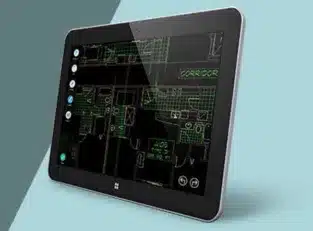
Mobile CAD Computing

When the PC (Personal Computer) was introduced in the late 1970s to early 1980s, the computing world witnessed progressive miniaturization of the PC into smartphones, laptops, and tablets that recently added to computerised watches. It comes with the availability of the internet along with cloud computing, which helps reduce computing power on individual computing devices.

Mobile CAD Computing

Additionally, packing computing power in a computing device access the computing power provided by servers, including distributed computing environment. Let’s say a consumer desktop or laptop isn’t suitable to run 3D CAD software. As CAD operations add complex computational procedures, it needs high performance using dedicated processors. Therefore, CAD workstations provide high-performance computational power adding snappy information that exchanges the networks in a cloud-based computing environment. A CAD engineer carries their workstation to meetings, design reviews, and business trips. All it requires is the mobility Mobile CAD Computing device, including:

  • Get performance compares to that of a CAD workstation
  • Get adequate graphics display size and resolution
  • Get a power adapter adding necessary attachments packed into a bag transported over reasonably long walking distances.

The mobile CAD computing device is referred to as a mobile CAD workstation. To get an answer, understand the following questions:

  • What are the capabilities of a typical mobile CAD workstation?
  • What is a mobile CAD workstation that performs well traditional workstation?
  • What are the advantages and disadvantages of using mobile CAD workstations?
  • What are the capabilities of a typical mobile CAD workstation?

Mobile CAD workstations available from CAD vendors covers high-performance mobile CAD workstation, including attributes:

  • It adds a lightweight, portable workstation that covers low voltage CPU, adding long battery life.
  • It should have a high-performance GPU (Graphics Processing Unit), including a high-resolution graphics display.
  • It uses a high-capacity drive and DVD drive and covers USB ports.
  • It uses an impractical list that adds popular mobile CAD workstations. 

The features add a high-performance mobile CAD workstation. The Lenovo ThinkPad 541 offer a mobile CAD workstation along with providing these features:

  • It comes with 5.57 pounds, uses 1-inch thickness, and comes with 6+ hours of battery life.
  • It primarily uses the 4th generation i7 Extreme CPU and optional NVidia Quadra K2100M GPU. It also comes with 32 MB RAM.
  • It uses 15.6-inch and 2880 x 120 high-resolution displays.
  • It uses 500 GB hard drive storage for improved performance.
  • It uses USB ports and an SD card reader.
  • It provides HDMI video output.
  • How does a mobile cad workstation perform as well as a traditional workstation?

The CAD analysts use the total CAD workstation market that comprises mobile and desktop workstations that continues to grow. Mobile CAD workstations come with the overall market. It adds mobile workstation sales that remain steady with 25% of the total workstation market.

A survey conducted by an industry research firm found that it grows mobile CAD workstations. This interest comes with declining desk-side PCs, consumers-class notebooks and workstations. Also, it finds several mobile CAD workstations that are used primarily for creating and editing CAD drawings. It uses accessing data and CAD drawings. Nevertheless, demands for mobile CAD workstations are expected to show strong growth in the next few years.

Before PCs became popular in the 1980s, most CAD workstations were RISC-based systems such as DEC Alpha, MIPS, PowerPC, and SPARC. Afterwards, CAD workstations used operating systems such as Microsoft Windows, GNU/Linux distributions, Apple Mac OS X, and Oracle Solaris. 

The features of a top-end high-performance CAD workstation include the following:

  • High-performance processors from 4 to 18 cores, with base clock, speed up to 3.5 MHz, 2.5 MB core of last level cache, and DDR4 registered DIMM support for up to 32 GB of RAM.
  • Graphics GPU with up to 12 GB of memory as in the NVidiaQuadro K6000 graphics card. A high-performance GPU is necessary for 3D animations and rendering. Investing in a high-performance processor for everyday CAD design work is more productive.
  • Up to 24-inch LED display with a minimum high-level resolution of 1280 x 720. Typically, a top-performance workstation supports multiple displays.
  • SSDs (Solid State Drives) instead of hard drives, or a combination of SSDs and hard drives.
  • It points virtualisedCAD workstations that add a more productive CAD development environment. It relies on cloud computing, adding hardware virtualization. Virtualized workstations add cost-effectiveness in terms of hardware maintenance and upgrade cycles. It comes with a mobile CAD workstation which cannot compete with a top-end CAD workstation in terms of performance. It uses good economic sense by using a mobile workstation in that cloud-based distributed computing environment. It comes in an atmosphere of virtualized workstations.

What are the main advantages and disadvantages of using mobile CAD workstations?

A mobile CAD workstation cannot match the performance of a top-end high-performance desktop CAD workstation. However, interest is growing in mobile CAD workstations, while interest is declining for desk-side PCs, workstations, and consumer-class notebooks. Mobile CAD workstations offer an advantage over unmatched traditional CAD workstations. It’s worthwhile to list a few benefits. Along with a mobile workstation, it offers complimentary performance with a desktop CAD workstation that provides mobility.

Getting a mobile CAD workstation used for project managers and executives comes with a primary interest in viewing, accessing, data and reviewing CAD drawings rather than creating them. The mobile CAD workstation is mainly used in field operations, adding CAD engineers that require to access and view data and CAD drawings.

What is CAD in computing?

In computing, CAD stands for Computer-Aided Design. CAD refers to the use of computer software and systems to assist in the creation, modification, analysis, or optimization of designs, typically in engineering, architecture, and manufacturing industries. CAD software allows designers and engineers to create precise and detailed drawings, models, and plans in a digital format.

Key features and capabilities of CAD software include:
2D Drafting: CAD software enables the creation of 2D drawings, plans, and schematics with precise measurements and annotations.
3D Modeling: CAD software supports the creation of three-dimensional models of objects, buildings, or mechanical components. These models can be manipulated, viewed from different angles, and analyzed for various purposes.
Parametric Design: Many CAD tools offer parametric modeling capabilities, allowing designers to define parameters and constraints that govern the behavior and dimensions of the model. This facilitates iterative design processes and ensures design consistency.
Visualization: CAD software often includes rendering capabilities to generate realistic images or animations of designs. Visualization tools help stakeholders, clients, or project teams better understand the proposed designs.
Simulation and Analysis: Some CAD software integrates simulation and analysis tools for testing the performance, structural integrity, or functionality of designs under different conditions.
Collaboration: CAD systems may include features for collaboration and version control, enabling multiple users to work on the same project simultaneously and track changes made to designs.

What is mobile CAD?

Mobile CAD refers to computer-aided design (CAD) software applications that are specifically designed to run on mobile devices such as smartphones and tablets. These mobile CAD apps allow users to create, view, edit, and share CAD drawings and models directly from their portable devices, offering flexibility and convenience for professionals who need to work on-the-go or in the field.
Key features and capabilities of mobile CAD apps include:
Drawing and Modeling: Mobile CAD apps provide tools for creating both 2D drawings and 3D models directly on the mobile device. Users can sketch, draw, and manipulate geometric shapes, lines, and curves using touch gestures.
Editing and Modification: Users can edit and modify existing CAD drawings and models, including changing dimensions, adding annotations, and applying transformations such as scaling, rotating, and mirroring.
File Compatibility: Mobile CAD apps support compatibility with standard CAD file formats such as DWG, DXF, and STL, allowing users to import and export drawings and models between mobile devices and desktop CAD software seamlessly.
Collaboration: Some mobile CAD apps include collaboration features that enable users to share drawings and models with colleagues or clients, collaborate in real-time, and provide feedback or annotations.
Integration with Cloud Services: Many mobile CAD apps integrate with cloud storage services such as Dropbox, Google Drive, or OneDrive, allowing users to store, access, and synchronize CAD files across multiple devices and platforms.
On-Site Use: Mobile CAD apps are particularly useful for professionals who need to work on-site, such as architects, engineers, construction managers, and surveyors. They can access and review CAD drawings and models directly at the project location, without the need for a desktop computer.


JH

James Hartley

Senior Mechanical Engineer · BEng (Mechanical), UQ · Member, Engineers Australia · ASTCAD, Brisbane

James has 14 years of hands-on experience delivering CAD design, structural drafting, and engineering documentation across Australia’s mining, oil & gas, and manufacturing sectors. He specialises in SolidWorks, Autodesk Inventor, and AutoCAD for complex multi-discipline projects.

More articles by James Hartley →
Design and drafting Services

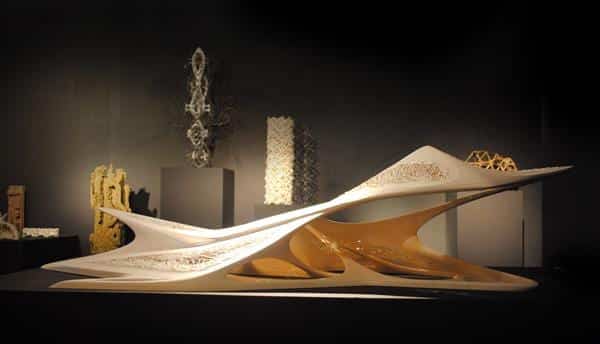
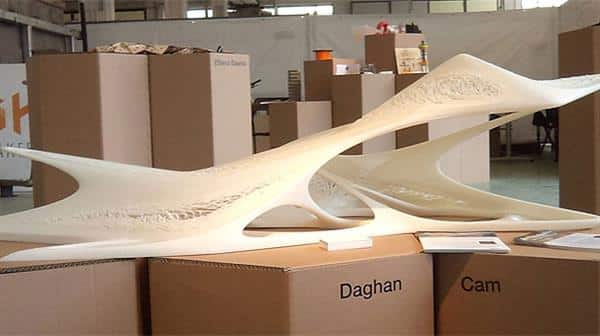
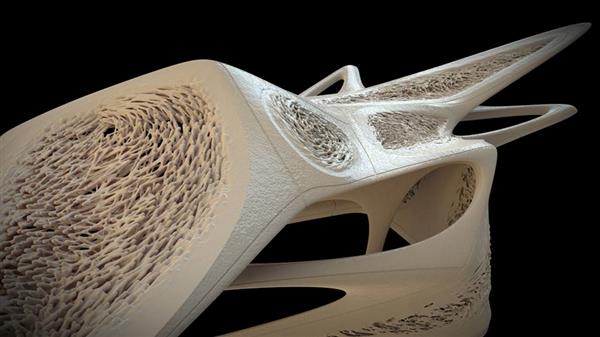
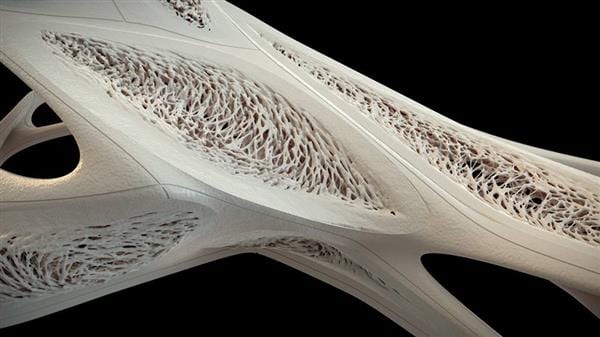
The architect developed stunning 3D printed architectural models

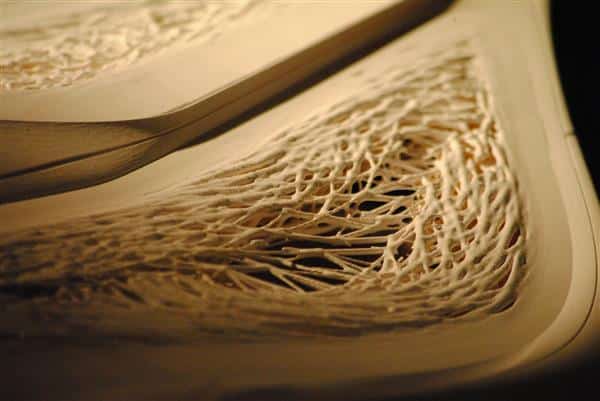
We have seen examples that prove that CAD design would be combined with 3D printing and produce fantastic artworks. It’s like a Turkish architect named Daghan Cam, and it depends on the software creation of art projects. It helps in computer simulation technology, primarily based on advanced algorithms. The robot creates an image processing training with a highly artistic 3D printed structure.

Architect developed stunning 3D printed architectural models

Daghan Cam is a pretty different architect. He founded his namesake architectural design company is based in London and Istanbul. At the University of London Bartlett School of Architecture faculty. Before this, he worked with famous architect Zaha Hadid, who worked and taught across Australia. In 2012, he receive an honorary Master of Architecture Degree with Distinction. Overall, Daghan Cam is a computational design, mechanical engineering and large-scale 3D printing specialist areas.

three dimensional design

From his architectural design, one can read keywords. One can see from the chart of the design model. It’s the essence design for futuristic and the Sydney Opera House. It is combined with the Milan Design Week to offer wide attention. Cam developed a GPU computing technology and algorithms combined to create fantastic and impressive models. The so-called GPU computing provides an app that calculates the part by heavy-handed GPU processing. It offers the remaining program in the CPU that is on the method. The method achieves unprecedented application performance.

The 3D printing effects comes with its unique programming through image processing robots. The team spent several years using a CUDA parallel programming model using NVIDIA GPU coded to develop these robots.

three dimensional design

Specifically, Cam design week offers an architectural model that use Quadro K6000 graphics and Tesla K40 GPU accelerators to support low accomplished superior computing power. The devices make the algorithm more sufficient to support such a gorgeous 3D shape creation. The Boston Corporation and Belgium 3D print vendors Materialize use the world’s largest stereolithography 3D printer. It prints the overall model time. You might ask that it’s a modern aesthetic that has become an actual building? As a senior architect, the answer is that it uses the least number of materials to reduce construction costs and add structural integrity.

three dimensional design
3d printing models

After the great success of Milan, the Bartlett School of Architecture supports the application of technology to its wider range of projects. The large-scale 3D print manufacturing technology and robotics optimise deep learning algorithms for real-time image processing and robotics.

3d printing models

You need to develop a robot construction technology to effectively build these structures with its own decisions. Some of them still rely on NVIDIA cuDNN and its deep neural network library. Industrial manufacturing robots are mainly used for training.

Finally, Cam explains: “It’s just a prototype or artwork that can be used in the construction industry. It aims to explore the creative fidelity conversion process from intention-to information processing.” It is used as 3D printing innovation to use in the construction industry.

What is a 3D printing model?

A 3D printing model, also known as a digital model or a 3D model, is a virtual representation of a physical object created using computer-aided design (CAD) software or acquired through 3D scanning techniques. These models are typically stored in digital file formats such as STL (stereolithography) or OBJ (object) files.

The 3D printing model contains all the necessary geometric information required to produce the object layer by layer using a 3D printer. This information includes the shape, dimensions, and often intricate details of the object.
Once a 3D printing model is created or obtained, it can be sent to a 3D printer, which interprets the digital information and constructs the physical object by depositing or solidifying material layer by layer according to the specifications outlined in the model.

How do I print a 3D model?

Printing a 3D model involves several steps, but here’s a basic guide to get you started:
Choose or Create a 3D Model: You can either design your own 3D model using CAD software like Tinkercad, Fusion 360, or Blender, or you can download a pre-made model from various online repositories like Thingiverse, MyMiniFactory, or GrabCAD.
Prepare the Model: If necessary, use slicing software to prepare the model for printing. Slicing software takes the 3D model and generates the toolpath instructions (G-code) that the 3D printer needs to create the object layer by layer. Popular slicing software includes Cura, Slic3r, and PrusaSlicer.
Load the Model into Slicing Software: Import your 3D model into the slicing software. Adjust settings such as layer height, infill density, and print speed according to your preferences and the capabilities of your printer.
Slice the Model: Use the slicing software to generate the G-code instructions for your specific 3D printer. This process divides the model into layers and calculates the paths the printer’s nozzle or laser will follow to create each layer.
Transfer G-code to Printer: Save the sliced G-code file to an SD card or connect your computer directly to the 3D printer if it supports USB connectivity. Transfer the G-code file to the printer.
Prepare the Printer: Ensure that your 3D printer is properly calibrated, and the print bed is clean and level. Load the filament (or resin, in the case of resin printers) into the printer according to the manufacturer’s instructions.
Start Printing: Use the printer’s interface to select the G-code file you transferred earlier. Start the printing process, and the printer will begin creating your object layer by layer.
Monitor the Print: Keep an eye on the print throughout the process to ensure everything is proceeding smoothly. Address any issues that arise, such as filament jams or adhesion problems.
Remove the Print: Once the print is complete, carefully remove it from the print bed. Depending on the type of printer and material used, you may need to use tools like a scraper or spatula to assist in removing the object.
Post-Processing (Optional): Depending on your preferences and the requirements of your print, you may need to perform post-processing tasks such as sanding, painting, or assembly to achieve the desired final result.


CS

Claire Sutton

Architectural CAD Specialist & Technical Writer · BArch (Hons), QUT · ASTCAD, Brisbane

Claire has 10 years of experience in Revit BIM modelling, architectural documentation, and CAD conversion projects across Southeast Queensland and NSW. She has delivered NCC-compliant documentation for residential, commercial, and industrial facilities.

More articles by Claire Sutton →
SketchUp Services

If you have not yet used SketchUp for your business, then it’s time you used the SketchUp software and reaped the benefits that it offers. With its accuracy of design and flexibility, builders, landscape designers, construction firms and the engineering industry, in general, have been able to effectively conceptualize, market and present their ideas. With the tool’s wide variety of visualisations, your company too can transform your imaginations into reality.[/fusion_text][fusion_text]Features of SketchUp

  • Easy to install and run, with a simple and uncluttered interface
  • Quick and easy modelling options
  • Rapid prototyping with 3D geometry abilities
  • Support from an active community
  • Comprehensive documentation
  • Wide range of colours and models to choose from
  • Options of pre-drawn components
  • Popular SketchUp modelling services

Cost Effective SketchUp Software Services

The SketchUp software can be used for a wide range of services, such as the following:

Through SketchUp, you can visualise real-life scenarios with the use of different options in colours, sizes and shapes. SketchUp services are extremely beneficial for architects, engineering firms, construction companies, builders, contractors, and landscape designers.

Benefits of SketchUp services

SketchUp has opened a whole range of design and modelling possibilities. However, if you and your team do not know how to use SketchUp, then learning and mastering the software can take up time and effort. This is where ASTCAD Design & Drafting comes in. Instead of trying to figure out the use of SketchUp on your own or hiring an expensive team of specialists, you now have the option of outsourcing SketchUp services to ASTCAD Design & Drafting. You will immediately get access to a dedicated team of professionals who have expertise in using SketchUp for designing and modelling. Outsourcing SketchUp can help your business leverage the following benefits:

1. Minimised cost

When you outsource to ASTCAD Design & Drafting, you can enjoy cost savings in terms of overhead cost and capital expenditure. You will also not have to make heavy investments in technology or infrastructure. Outsourcing can not only help you widen your profitability but can also help you minimise your cost by 60%.

2. Better resource optimisation

Through outsourcing, you can free up your time and resources, while tapping into the expertise on SketchUp artists. Your management can focus completely on your core business activities like sales, marketing and productivity, without having to supervise the outsourced SketchUp services.

3. Fast turnaround time and consistent services

ASTCAD Design & Drafting teams have the capability to work on a 24/7 basis and complete your SketchUp assignments within your timeline and budget constraints. Since the ASTCAD Design & Drafting team will have experience in using SketchUp, they can ensure that all your projects are completed without any setbacks.

4. Access to superior SketchUp skills

SketchUp artists from ASTCAD Design & Drafting have expertise and skill in using all the features of SketchUp. They are also constantly provided with training in order to effectively meet the SketchUp requirements of customers. Outsourcing can give you access to a skilled team of designers who will ensure your project is a success.

Why not give your business a competitive edge by outsourcing SketchUp services? We, at ASTCAD Design & Drafting, will be glad to assist you with your requirements. Get in touch with us for SketchUp services.


CS

Claire Sutton

Architectural CAD Specialist & Technical Writer · BArch (Hons), QUT · ASTCAD, Brisbane

Claire has 10 years of experience in Revit BIM modelling, architectural documentation, and CAD conversion projects across Southeast Queensland and NSW. She has delivered NCC-compliant documentation for residential, commercial, and industrial facilities.

More articles by Claire Sutton →
Get a free quote — 1800 287 223