DESIGN Australian Design & Drafting is one of the major Architectural CAD and Engineering Companies offering high-end Engineering Design Services. We provide extensive Engineering Design Services across all domains. Our team of Architects and Design Engineers strive to deliver high quality and optimum design solutions keeping in mind Australian Design Standards and Codes
ENGINEERING DESIGN SERVICES WE OFFER
We offer the following Engineering Design services
Architectural CAD Design Services
CAD Design and Development Drawings
Structural Design and Analysis
Mechanical CAD Design Services
Finite Element Analysis
HVAC Design Services
Plumbing Design Services
Electrical Design Services
Our Architects and Design Engineers are well acquainted with design standards applicable for each location or state. We also have a team of senior consultants apart from our in house team of Architects and Engineers. These consultants are experts with more than 10 years of experience in their respective fields. For all Mechanical CAD Design Services, Structural Design and Analysis requirements and Architectural CAD Design Projects, we confer with our consultants on the understanding of the project and assess pricing and execution plan as well. We consider your budget, project requirements, and feasibility to ensure that our design meets these needs.
Cybersecurity CAD concerns were unheard of less than two decades ago, when the primary goal of most CAD Design and Drafting organisations was to provide up-to-date CAD workstations and a pleasant working environment for their CAD engineers and designers. Even today, the training of a CAD engineer focuses on equipping the engineer with the ability to define engineering problems and to use CAD tools to solve the problems.
When a new CAD engineer is recruited by a CAD company, some of the most important lessons that the engineer may learn during orientation and training include the following:
Design projects should be performed with specific company-approved Suitable CAD workstations, and design tasks should be performed under well-defined company guidelines,
Security guidelines should be followed religiously in order to protect company information, and the exchange of design information should occur within well-established protocols,
Workstations and the work environment are fenced by a company firewall, and any attempts to work outside the system are considered as a violation of company policy.
The fact is that within the last decade, cyber terrorism has become prevalent and sophisticated. It is not only national governments and national defence systems, financial institutions, or infrastructure systems which are targets for cyber terrorism. CAD Design and Drafting companies also spend money and resources to protect themselves from cyber terrorism.
CAD Design and Drafting
In this article, we try to answer the question: “How CAD Design and Drafting Industry fighting New Cyber Threats?” Because a complete answer to the question is not within the scope of this article, only these topics will be considered:
What is a cyber-attack?
How could a cyber-attack be waged on a CAD system?
What damages could a CAD company suffer from cyber terrorism?
How could cyber-attacks on CAD organisations be prevented or minimised?
Cybersecurity CAD Basics: What is a Cyber-Attack?
A cyber-attack is a malicious action which is designed to disrupt or cripple the computer systems of infrastructures, computer networks, or personal computing devices. The attacker or cyber-terrorist uses sophisticated methods to avoid detection because of the attacker’s intention to establish a foothold in the targeted computer system in order to steal, alter or destroy information in the system.
The methods used by cyber-terrorists include the planting of malicious software (malware) or viruses in the targeted system. When a cyber-attack on a CAD organisation succeeds, the criminal or intruder could do the following:
Steal software or identities from the CAD organisation,
Create denial of service to CAD engineers,
Steal or destroy intellectual property.
How Could a Cyber-Attack Be Waged on a CAD System?
Because methods of cyber-attacks have become increasingly sophisticated, it is necessary for IT engineers who work for CAD organisations to stay up to date with new cyber-attack methods.
The CAD engineer is too busy performing design tasks to become pre-occupied with cyber- attacks. Nevertheless, the CAD engineer should be keenly aware of avenues or entry points which could be open to the cyber-terrorist. These avenues could become open to the cyber-terrorist by performing these seemingly innocent practices:
Opening email attachments which could include malicious malware,
Downloading software, multimedia material, or unknown data from the web.
Inserting flash drives into USB ports.
Once a cyber-terrorist accesses the intended target, the criminal can quickly accomplish several tasks.
Probe for vulnerabilities and additional network access within the organisation,
Use malware to establish additional breach points, so that the cyber-attack will be difficult to remove completely, even if the original point of attack is removed.
Establish network access; gather data such as account names and passwords. If the cyber-terrorist succeeds in cracking passwords, data can easily be collected from the victimized target.
Disguise the presence of planted malware on the network, in order to make it easier to return and steal more information, or to cause damage to the network.
What Damages Could a CAD company Suffer From Cyber terrorism?
It is not too difficult to imagine what types of damage a cyber-terrorist can cause to a CAD organisation.
The main types of damage which could ruin or severely damage a CAD organisation include:
Having designs stolen or destroyed. Even designs which are backed up within a cloud system will lose their proprietary status and could be exploited by competing organisations.
Suffering a denial-of-service attack which prevents CAD engineers from performing their work,
Having the network system brought down
Rather than try to enumerate other types of damage, it will suffice to mention vulnerabilities within CAD systems which have been exploited, or could be exploited by cyber terrorists.
The Stuxnet worm virus was used to target and damage Iranian centrifuges used to enrich uranium. The malware was sophisticated enough to make the technicians believe that the centrifuges were operating normally, while they were actually destroying themselves.
Malware in Bluetooth-enabled insulin pumps altered the dosage of insulin administered to a patient, with the intention of causing injury or death to the patent.
Malware planted within the software of a production machine could create defective parts while deceiving the production personnel into believing that they were producing acceptable parts.
The STL file format used for 3D Printing or AM (Additive Manufacturing) can be easily altered by malware so that 3D printers produce defective parts.
How Could Cyber-Attacks on CAD Organisations Be Prevented Or Minimised?
Cybersecurity or the ability to prevent new cyber-attacks or threats is a never-ending battle for IT professionals, because cyber crooks and terrorists are well trained, and they are always looking for new methods to practice their criminal behaviour. According to the viewpoint of a cybersecurity expert at CBIS (Washington DC-based Center for Strategic and International Studies), it may be more profitable for businesses to concentrate on detecting malware and on minimising the damage they can cause. CAD organisations could take additional steps to thwart the efforts of cyber terrorists. Some of these steps are:
CAD engineers should stay vigilant and should report any changes in the software environment to IT personnel.
CAD engineers should not open email attachments which do not come from well-known sources.
CAD engineers should not download data from sources outside their organisation without the approval of IT personnel.
All USB or flash drives should be scanned for malware before they communicate with workstations.
CAD organisations should create segmented networks.
CAD organisations should promptly identify and quarantine unrecognized data within the network until the data has been cleared for safety.
If you all need any help regarding design and drafting services, please don’t hesitate to contact us at ASTCAD or call us 1800 287 223 (Toll-Free) Australia Wide.
What are the 4 types of CAD?
Computer-Aided Design (CAD) encompasses various types of software used for designing, drafting, and modeling. The four primary types of CAD software are: 2D CAD: These programs are used for creating two-dimensional drawings and designs. They are often employed in fields such as architecture, engineering, and manufacturing for tasks like creating floor plans, schematics, and technical drawings.
3D CAD: 3D CAD software enables users to create three-dimensional models of objects or structures. This type of software is widely used across industries like automotive, aerospace, product design, and entertainment for visualizing and simulating designs before production.
Parametric CAD: Parametric CAD software allows designers to create models with parameters and constraints, enabling them to easily modify and update designs. Changes made to one part of the model can automatically propagate throughout the design, maintaining consistency and reducing errors. This type of CAD software is particularly useful for complex designs where interdependencies between components are critical.
Solid Modeling: Solid modeling CAD software represents objects as solid entities with volume and mass. Users can manipulate these solid objects to create complex shapes and assemblies. Solid modeling is commonly used in product design, mechanical engineering, and architecture for creating detailed and realistic 3D models of components and structures.
James has 14 years of hands-on experience delivering CAD design, structural drafting, and engineering documentation across Australia’s mining, oil & gas, and manufacturing sectors. He specialises in SolidWorks, Autodesk Inventor, and AutoCAD for complex multi-discipline projects.
Wondering how to become a drafter worth hiring? Set your professional resolutions by adding and establishing some professional goals. Setting goals are crucial progress, especially when it comes to business or career. Here are a few of my professional goals for 2016. These are the things that work well on becoming a better drafter and designer this year.
How to Become the Best Drafter or Designer in your Field
If the above goals resonate with you, feel free to adopt and implement them in your professional career.There could always be something new to learn, and with all the resources available online, it would be more accessible than ever. One needs to learn something new about design, drafting, business, entrepreneurship, teamwork, marketing regularly.
Contribute, don’t consume
If you’re looking to work in a large office that is set from home as a freelancer, there would be a time when you’ll find yourself working as a team. There would be nothing worse than a passive team member. Consumes but never contributes, also make it a goal to become more active in your team and contribute.
Don’t be afraid to try new things
There’s this old saying, “If it isn’t broke, don’t fix it”, is true, but don’t let it stop you from trying new things. Sometimes it would be a good thing to get out of our comfort zone and try something new and different. Maybe it would be taken into a different design process, new marketing strategy or as simple as a new workstation layout. Trying new things is always an excellent way to challenge and help yourself grow.
Network more
In the last and a half year of running my drafting and design firm, we noticed networking is one crucial thing that’s needed to grow businesses with ease. Instead, it would help set up a workstation to meet new people and discuss the requirements. We should take this as an opportunity to find outside our comfort zone. Get ready to grow your network with another freelancer, business owner, drafter and designer.
Ask for help
Back to my first statement, “you don’t know everything”. Asking for help is not a sign of weakness but rather a vital growth step. It’s always important to have mentors from who you can seek advice. If you don’t have one already, make it a goal to find a mentor this year. Hey, maybe it’s going to be one of the new things that you try!
Take time off more often
It could be easy to forget about work/life balance when you’re passionate about what you do. Mainly, it’s true when working from home, let this year add a new year when you set aside a reasonable amount of time for your family and friends and get time to recharge.
Celebrate the wins
Always look for things that can be improved with fixing. It’s not necessarily a bad characteristic but can hurt you and your business. Therefore, why not celebrate our wins rather than be demotivated from our failures. Set a goal to celebrate the successes, even if they are small. When one finishes a project, celebrate it. Celebrate if you have landed a perfect job or found a new client.
How to be How to Become the Best Drafter or Designer in your Field
Master the Basics: Start by learning the fundamental principles of drafting and design. Understand the software tools used in your industry, such as AutoCAD, Adobe Creative Suite, or other specialised software.
Education and Training: Pursue formal education or training in drafting and design. Consider enrolling in relevant courses, workshops, or obtaining a degree in a related field like architecture, engineering, graphic design, or industrial design.
Practice Regularly: Practice is crucial to improving your skills. Dedicate time to drawing, designing, and drafting regularly. Take on personal projects to challenge yourself and explore new techniques.
Seek Feedback: Share your work with mentors, peers, or online communities to receive constructive feedback. Being open to criticism will help you identify areas for improvement.
Stay Updated: Design trends and software tools change rapidly, so make it a point to stay updated with the latest advancements and industry best practices. Follow design blogs, attend conferences, and participate in webinars to stay informed.
Study Other Designers: Learn from the work of other successful designers in your field. Analyse their techniques, styles, and approaches to gain insights into what makes their designs stand out.
Develop a Unique Style: While learning from others is essential, strive to develop your unique style and signature approach to design. Finding your creative voice can set you apart from others in the field.
Collaborate and Network: Engage with other professionals in your industry, attend design events, and join professional organisations. Networking can open doors to new opportunities and expose you to different perspectives.
Accept Challenges: Don’t be afraid to take on challenging projects that push your boundaries. Overcoming obstacles and tackling complex designs will help you grow as a drafter or designer.
Be Persistent and Patient: Becoming the best in your field takes time and persistence. Keep working on improving your skills, and don’t get discouraged by setbacks or rejections.
Showcase Your Work: Build a strong portfolio that showcases your best projects. Your portfolio will be a crucial tool in attracting clients or potential employers.
Embrace Continuous Learning: The field of drafting and design is always evolving. Stay curious and keep learning new techniques and technologies throughout your career.
If you need help regarding design and drafting services, please do not hesitate to contact us at ASTCAD or call us at 1800 287 223 (Toll-Free) in Australia.
Claire has 10 years of experience in Revit BIM modelling, architectural documentation, and CAD conversion projects across Southeast Queensland and NSW. She has delivered NCC-compliant documentation for residential, commercial, and industrial facilities.
Any big projects success depends on cost effective CAD solutions. Project Managers are very careful when it comes to spending money and it should be that way since its one of the best important resource of projects. Increasing the profitability and decreasing the overhead cost becomes most important factors for any successful projects. We are going to examine how Civil engineering firm can able to achieve cost effective solution with 3D CAD design and drafting.
When cutting down cost implement successfully, Engineering firm already half on their mark to achieve goals. some of them can get the fact wrong, Cost controlling is not just not doing certain things to save money, but it is doing things more efficiently. Most engineering firms would use 3D CAD for designing and drafting purposes to do things more efficiently, and thus, control the costs. It is easier said than done, so let’s see how it’s done.
Cost Effective CAD Solutions for Civil Engineering
With 3D CAD, things are built virtually from scratch. Prototyping is made easier. Even before the building is built, you can virtually check the strength of the building. But, what has this got to do with costs? There’s a relation, suppose if you just didn’t do calculate the strength of the building properly, and the building collapsed due to some minor natural forces. It can cost you a lot, isn’t it? There are instances where this has happened, we will discuss that in some other article later on. So, my point is that with 3D CAD, we can simulate environmental factors. And when important elements are factored in, flaws can be eliminated. You are avoiding heavy costs.
In 3D CAD, you can start working on elements individually. You can make changes to an element individually. So, chances of screwing some element when working on another are rare. And revisions are easy. 3D CAD comes along with 3D mouse, this would enable you to govern the tasks better with more precision. With more precision, the design cycles will be shorter. And when design cycles are shorter, you are saving the time, Again! Yes, people are performing the tasks at a great speed with 3D CAD.
This is saving you time, and if you are saving time, you can work on additional projects. You would require fewer people with 3D CAD relatively. There, you are saving bucks again! Someone who says he doesn’t want to save time would be lying. It’s all about being efficient and saving time. And saving time is cutting down costs. And one who does save the time will be a champion.
Cost Effective CAD Solutions for Civil Engineering
Are you looking for an expert who could probably take care of your CAD drafting and designing concerns in civil engineering? ASTCAD services is in the CAD drafting and drawing industry from last 10 years. So, no worries about the quality of the work ASTCAD has to offer. ASTCAD can help you out in cost control with its 3D CAD services. ASTCAD just does the job like an extended in-house team with a lower turn-around time. And yes, we have advanced tools like Revit, Civil 3D, Tekla, etc.
So, want to save costs and grow your business? We can even offer you a free trial project that will help you understand the quality of the work that we have to offer with CAD.
There are numerous within your means Computer-Aided Design (CAD) options accessible for civil engineering professionals. These tools provide a vary of aspects for designing, analysing, and documenting civil engineering projects. Here are some alternatives to consider:
AutoCAD LT: This is a lighter and greater low priced model of AutoCAD, which is a broadly used CAD software. AutoCAD LT affords 2D drafting and detailing tools, making it appropriate for developing technical drawings and documentation.
DraftSight: DraftSight is a 2D drafting and 3D plan software program that affords a acquainted person interface for these transitioning from different CAD platforms. It gives vital aspects for creating, editing, and annotating drawings.
LibreCAD: LibreCAD is an open-source 2D CAD utility that is appropriate for small to medium-sized civil engineering projects. It’s simple and gives fundamental drawing and enhancing tools.
BricsCAD: BricsCAD provides a comparatively cheap choice to AutoCAD with complete 2D and 3D drafting capabilities. It’s recognised for its compatibility with AutoCAD archives and presents a vary of specialised modules for civil engineering design.
FreeCAD: FreeCAD is an open-source parametric 3D CAD modeller. While it is extra centred on 3D modelling, it can be used for primary civil engineering duties and is specifically beneficial for designing buildings and components.
NanoCAD: NanoCAD is a free and budget-friendly CAD software program that presents 2D drafting and graph tools. It’s appropriate for growing technical drawings, schematics, and architectural plans.
CMS IntelliCAD: CMS IntelliCAD is an low cost CAD software program with AutoCAD compatibility. It presents 2D and 3D drafting competencies and is regularly used with the aid of civil engineers and architects.
SketchUp Free: While notably regarded for architectural design, SketchUp Free can additionally be used for fundamental civil engineering projects. It’s a 3D modelling device that is handy to research and affords each free and paid versions.
QCAD: QCAD is a 2D CAD software program it is easy and intuitive. It’s mainly beneficial for growing technical drawings, schematics, and plans.
Tinkercad: Tinkercad is a browser-based 3D modelling device that is basic and appropriate for fundamental civil engineering format tasks. It’s free and handy online.
To schedule a personal meeting with our Representative or contact Sales Team on: 1800 287 223 (1800AUSCAD)
Civil engineering is a broad field with various specializations. Here are seven types of civil engineers:
Structural Engineers: They design and analyze structures such as buildings, bridges, dams, and towers to ensure they can withstand environmental loads and remain safe and stable. Geotechnical Engineers: These engineers study the behavior of earth materials like soil and rocks and their interaction with structures. They assess site conditions for construction projects and design foundations and earthworks. Transportation Engineers: They focus on designing and improving transportation systems, including roads, highways, railways, airports, and public transit systems, to ensure efficient and safe movement of people and goods. Environmental Engineers: Environmental engineers work to protect the environment and public health. They deal with issues like water and air pollution, waste management, and environmental remediation, designing solutions to minimize negative impacts and promote sustainability. Water Resources Engineers: These engineers manage water resources such as rivers, lakes, groundwater, and stormwater. They design systems for water supply, flood control, irrigation, and wastewater treatment. Construction Engineers: Construction engineers manage construction projects from planning to completion. They coordinate resources, schedules, and budgets to ensure projects are completed safely, on time, and within budget. Coastal Engineers: Coastal engineers specialize in managing coastal areas and addressing challenges related to erosion, flooding, and coastal infrastructure. They design coastal protection structures, such as seawalls and breakwaters, to mitigate the impacts of coastal hazards.
what is civil engineering?
Civil engineering is a branch of engineering that deals with the design, construction, and maintenance of infrastructure and built environments. It encompasses a wide range of projects, including buildings, bridges, roads, railways, airports, dams, water supply systems, wastewater treatment plants, and more.
Civil engineers are responsible for ensuring that these structures and systems are safe, sustainable, and efficient. They work on projects from the planning and design stages through construction and maintenance, considering factors such as materials, environmental impact, economic feasibility, and regulatory requirements.
Key areas within civil engineering include structural engineering, geotechnical engineering, transportation engineering, environmental engineering, water resources engineering, construction engineering, and coastal engineering, among others. Civil engineers play a crucial role in shaping the physical infrastructure of societies and improving the quality of life for communities around the world.
James has 14 years of hands-on experience delivering CAD design, structural drafting, and engineering documentation across Australia’s mining, oil & gas, and manufacturing sectors. He specialises in SolidWorks, Autodesk Inventor, and AutoCAD for complex multi-discipline projects.
The overall appearance includes the shape, pattern, configuration, and ornamentation applied to a product to give a unique visual appearance. A design isn’t to protect the way a product works. But if you’re looking to preserve the way a product works is by distinguishing your business.
Moreover, a trademark distinguishes businesses from other traders in a visual way. A type of trademark is confused with a design in a shape trademark. It’s a three-dimensional shape used to distinguish the goods or services from one trader to another.
Your design IP rights:
To be entitled as an owner of a design, you must be:
That person that conceived the designer, the employer of the designer who made the Design while working for you.
The person contracted the designer to make the Design.
That person to whom the designer assigned the Design in writing.
Where two or more people own interests in a design, they must apply jointly.
The owner may be an individual, a company, an association or a partnership. However, if applying as a company, association or partnership, do not apply using a trading name or a trust.
The process for applying for registration of your Design involves several steps. One needs to ensure that you understand and complete each step to process quickly. There is a number of things before starting an application.
What a design right gives you
Design registration intends to protect designs that have an industrial or commercial use. A registered design offers you, the owner, exclusive rights to commercially use, license or sell it.
What design is
A design comes with an overall appearance of a product. The visual features come with a form of Design that covers the shape, pattern, configuration, and ornamentation. A product offers something manufactured with ease. The mechanics show how a product works or operates that isn’t protected with the right Design. But it protects the patent that Few designs cannot be registered legally. It includes designs for medals, layouts with integrated circuits, Australian currency and scandalous Designs.
Eligibility – deciding who owns the design
To be entitled as a design owner that offers:
A person who conceived the designer.
The designer’s employer, if the designer made the Design while working for you.
The person who contracts the designer to make the Design.
The person to whom the designer assigned the Design in writing.
The two or more people share common interests in a design.
The owner as an individual, a company, an association or a partnership applies as a company, association or partnership. They do not involve using a trading name or a trust.
Is my design new and distinctive?
The Design adds new and distinctive to be registered.
The new Design can be identical to any design previously disclosed anywhere in the world. It includes anything published anywhere in the world used in Australia.
Distinctive is not to be substantially similar to the overall impression where any design disclosed anywhere in the world. It includes anything published anywhere in the world or publicly used in Australia.
It supports an application stating how the Design adds new and distinctive, but this isn’t mandatory.
International design protection
If the application is filed in another country within six months of filing the Australian application, the date of your Australian application will apply to that country as well. The only case the country you use is a member of the International Convention.
One must prepare representations of the Design with complete forms and style needed by the foreign country.
Don’t publicise your design
It’s hard not to tell something about what you’re proud of or excited about, but one needs to keep Design a secret if one is looking to protect it.
For your Design to register to determine ‘new’ or ‘distinctive’, one can’t publish it anywhere in the world or publicly use it while applying to register it.
Design search
Before one submits a design application, they search for previously registered designs. It determines whether your proposed Design for new and distinctive is worth registering or not.
A search determines if a similar design is registered already.
Australian design search
Australian design search includes up-to-date information, including all applications and registrations from 1986. All registrations captured from 1973 to 1985 remain active in 1985.
One uses the search tool that helps determine who owns a design if you want to obtain a licence that uses the Design, buy the Design, or loan money to the owner of a valuable Design by taking a mortgage over it.
International designs databases
The European Patent Organisation and the United States Patent and Trademark Office hold the two largest international design databases.
The World Intellectual Property Organisation (WIPO) links to the sites of international IP offices.
Has the design been mortgaged?
The secured party designs all security interest mortgage records on the national Personal Property Securities Register. The register finds whether there is a mortgage over a design with no longer a legal securities register. It claims security interests that include mortgages available through Australian design search.
Seeking a search professional
An essential part of design search is interpreting the often-complex search results, and using these databases effectively is a specialised skill that can sometimes be time-consuming and costly.
If you need specific assistance, professional searches, or advice from intellectual property (IP) professionals and search firms, connect with us.
Drawings preparations:
Drawings and images come with essential design registration. The drawings or photographs include good quality and accuracy that shows the overall visual features of your design as applied to the product.
The requirements for representations
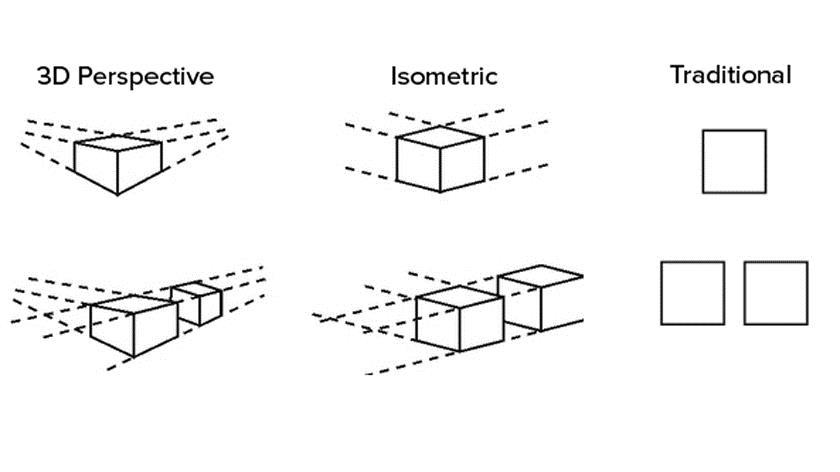
There is no need for a specific view number. However, one must offer sufficient views with a full display Design.
We offer traditional views and accept perspective or isometric views.
The views show precisely the same Design. It mainly applies to colour. As colour usually adds a visual feature to the Design.
The representations should be consistent enough to work properly if your application includes a statement for newness with distinctiveness.
Key points for drawings
Drawings should be accurate, not sketches, and should work on A4 size paper.
It should show the Design in question with no descriptive wording or dimensions. However, the labelling views come with ‘perspective view’ or ‘rear views.
It uses broken or dashed lines when highlighting product elements that bear the design’s visual features. It covers the parts of the Design that refer to the newness and distinctiveness.
It provides a pattern that applies to part of a surface, stitching and perforations features established in an environmental context.
It covers shading and cross-hatching used as a visual feature of the Design.
Key points for photographs or digital images
Photographs or digital images should be in a clear form.
It should show the product against a contrasting background and avoid matter that’s irrelevant to the Design for A4 or mounted on A4 white paper.
Other details
It adds multiple design applications for each Design that indicates each Design showing a separate sheet.
Complex products
Sometimes a design applies to a part of a complex product that is readily assemble and disassembled from that product. Suppose the position qualifies as a product, then broader protection gains by defining it as a stand-alone part. As Australian Design and drafting, we help clients from Australia with patent design and drafting services. Our strict NDA agreement allows for protecting innovator rights. Contact us for more information.
James has 14 years of hands-on experience delivering CAD design, structural drafting, and engineering documentation across Australia’s mining, oil & gas, and manufacturing sectors. He specialises in SolidWorks, Autodesk Inventor, and AutoCAD for complex multi-discipline projects.
This is a 2-part Australian patent application guide and Drawing specification for the patent application
Part 1: Australian Patent Application Guide for Australia
Patent Benefits:
The protection provided by the Australian patent system is a major contributor to the success of new inventions and the millions of dollars in earnings that they generate.
Some of the benefits are:
It gives you the right to stop others from manufacturing, using and/or selling your invention in Australia without your permission.
It lets you license someone else to manufacture your invention on agreed terms or take legal action against people who are using your invention without your permission.
It encourages Australians to continue their research, to develop new and innovative products, exploit new technology and promotes the transfer of technology to Australia.
It gives our trading partners the incentive to provide similar rights and thereby protect our exports in markets overseas.
If you want to protect the way your invention works then patenting may be the most appropriate option.
If your invention is new, not publicly disclosed and has commercial potential, then you are ready to consider what type of patent will suit your needs.
Types of patents:
There are two types of patents granted in Australia – standard and innovation. You need to research them thoroughly before deciding which one suits your needs.
There are differences in the cost of the patents, the length of protection they offer, the time they take to process and the type of invention they seek to cover.
In order to have a patent granted on your invention, you need to file what is known as a complete application. Prior to filing a complete application, you can also file a provisional application. While a provisional application will not result in an enforceable granted patent it can be useful in establishing an early priority date.
Provisional applications
As a general rule, the priority date for your invention is the date on which you first filed a patent application that described your invention in detail. To get the earliest possible priority date on your invention, you can file a provisional application.
A provisional application doesn’t give you patent protection on its own (there are no ‘provisional patents’), but it’s useful in establishing an early priority date if you operate in a highly competitive industry where constant innovation requires you to get the jump on competitors.
A provisional application also gives you time to determine whether your invention is worthy of further time, money and effort associated with filing a complete application for a patent. It is also cheaper to file a provisional application than a standard complete application. You can read more information on time and costs.
Although the technical or scientific details of your provisional application are not published, we will publish details (the invention title and applicant name) in the Australian Official Journal of Patents at filing.
If you wish to claim priority from your provisional application you must file a complete standard or innovation application within 12 months of lodging your provisional application.
Remember – filing a provisional application on its own does not give you patent protection
All provisional applications lapse after 12 months. If you do not file a complete application associated with the provisional or file a PCT application within this 12 month period, you will lose any priority that your provisional application may have provided.
Standard patent
the standard patent gives long-term protection and control over an invention. It lasts for up to 20 years from the filing date of your complete application (or up to 25 years for pharmaceutical substances).
The invention claimed in a standard patent must be new (novel), involve an inventive step and be able to be made or used in industry.
An inventive step means that the invention is not an obvious thing to do for someone with knowledge and experience in the technological field of the invention.
Your invention must differ in some way from existing technology, but the difference must have resulted from something more than the simple application of published information and/or standard background knowledge.
Before a standard patent is granted, the complete application has to be examined by IP Australia. Examination before the grant of a standard patent is mandatory and can take from six months to several years (depending on the circumstances).
Innovation patent
An innovation patent lasts up to 8 years and is designed to protect inventions that do not meet the inventive threshold required for standard patents. It is a relatively quick and inexpensive way to obtain protection for your new device, substance, method or process.
An innovation patent is usually granted within a month of filing the complete application. This is because there is no examination before it is granted.
The innovation patent requires an innovative step rather than an inventive step, to protect an incremental advance on existing technology that may not qualify for standard patent protection rather than a groundbreaking invention.
An innovative step exists when the invention is different from what is known before and the difference makes a substantial contribution to the working of the invention.
If you want protection for an invention with a short market life that might be superseded by newer innovations, such as computer-based inventions, an innovation patent is worth considering.
Important: Examination of an innovation patent will only occur if requested by the patentee, a third party or if the Commissioner of Patents decides to examine the patent. An innovation patent is only legally enforceable if it has been examined by us, been found to meet the requirements of the Patents Act, and has been certified.
Benefits of the innovation patent
If it is examined and certified, the innovation patent offers the same level of protection as a standard patent in preventing others from copying your invention.
Unlike a standard patent, you only pay to have an innovation patent examined when you need to stop others from copying your invention.
Limitations of the innovation patent
The innovation patent is granted without examination, which means the validity of the application is not verified by us. This may make the patent more difficult to sell or license until the patent has been examined and certified.
Also, you are unable to go to court to enforce the innovation patent until it has been examined and certified.
An innovation patent can only be applied for in Australia. You have to apply separately to other countries if you want to enforce the patents overseas.
Standard vs innovation patent
There are three main differences between standard and innovation patents.
The innovation patent is a relatively inexpensive form of IP protection. It is quick and easy to obtain for inventions that have a short commercial life or that offer comparatively small advances over existing technology but which do not have the inventive step required to get a standard patent.
The standard patent provides longer protection for inventions that have a longer development and commercialisation cycle. An innovation patent may be granted for the same subject matter as a standard patent but it has a shorter term of protection – 8 years as opposed to 20.
It is not necessary to have an innovation patent examined before grant (or even at any time after grant). However, an innovation patent must be examined and certified before you can enforce your rights. A standard patent application must be examined and a patent then granted before you can enforce your rights. In both cases, a fee must be paid prior to examination. Failure to pay the examination fee results in the standard patent application lapsing or the innovation patent ceasing.
Can an innovation patent be converted to a standard patent?
You can convert an innovation patent to a standard patent application in the period before it is accepted, but you have to be quick. That’s because an innovation patent is accepted after a brief formalities check, which is usually within one month.
The quick guide to innovation versus standard patents
Innovation patent
Standard patent
Your invention must:
Be new, useful and involve an innovative step
Be new, useful and involve an inventive step
The application should include:
A title, description, up to 5 claims, drawings (if applicable), an abstract and forms
A title, description, any number of claims, drawings (if applicable), an abstract and forms
A patent is granted if:
The application satisfies formality requirements (note: a ‘granted’ innovation patent cannot be enforced unless examined)
The application is examined and found to satisfy the relevant requirements of the Patents Act 1990
Examination:
Optional. Examination can be requested by you or anyone else
Mandatory. The relevant requirements of the Patents Act 1990 must be met before a patent is granted. Can only be requested by the applicant.
Certification:
If the innovation patent complies with the relevant requirements of the Patents Act 1990 in examination; only after certification can the patent be enforced
N/A
Publication in the Australian Official Journal of Patents:
At grant and again at certification
18 months from earliest priority date and again at acceptance
Protection period:
Up to eight years, if annual fees paid
Up to 20 years, if annual fees paid (or up to 25 years for pharmaceuticals)
How long does the process take?
Approximately 1 month for grant. Six months for examination if you make a request.
Six months to several years depending on circumstances
Applying for a patent can be a complex and time-consuming process.
We have outlined all the steps that need to be taken in order to ensure that the process is smooth.
Search patent databases, sales brochures and magazines to ensure your invention has not been created by someone else. If your invention was publicly known before you apply for a patent, you won’t be able to get a patent.
Decide which type of patent best suits your invention. You may wish to file a provisional application first; then decide between filing a standard, innovation or an international patent (PCT) application.
Once it is filed, your application is checked and published. Please note that fees are payable at different stages of the patent process. An innovation patent is checked to ensure it satisfies the formality requirements, then granted and published in the official journal. A standard patent is normally published in the official journal before the examination.
The examination is mandatory before a standard patent can be granted and must be requested by the applicant. An innovation patent will be examined if the examination is requested but this is not a requirement for an innovation patent to be granted. Examination of an innovation patent can only happen after it is granted. For either innovation or standard patent to be enforceable, it must have been examined. The examination can also be expedited for standard patents or expedited under the Global Patent Prosecution Highway (GPPH).
Acceptance and grant of an innovation patent occur if it has satisfied the formality requirements. It is then published as such in the official journal. If the examination is requested and found successful then the innovation patent will be certified and published once again. A standard patent application is accepted once it has been examined and is then published. The standard patent is then granted if it is not opposed.
Pay annual fees to maintain your patent. Innovation patents can be renewed for up to eight years and standard patents can be renewed for up to 20 years (up to 25 years for pharmaceuticals).
Some common problems
Many patent applications that are filed without professional help are not successful for one or more of the following reasons:
The original patent specification, whether provisional or complete, does not describe the invention properly.
The invention is not new because the applicant disclosed it to the public before applying for a patent.
The invention is not new because the applicant disclosed it to the public after filing a provisional application that did not adequately describe the invention; i.e. the provisional application did not provide an effective priority date.
The invention is not new when compared with things that are already known; e.g. it has been published in an earlier patent document.
The application is for something that is not patentable, such as a principle or idea, rather than its practical adaptation.
Standard patent application process
Applications for standard patents are called complete applications. A complete application is necessary to actually have a patent granted whereas a provisional application provides you with a priority date and signals your intention to lodge a complete application.
The subject matter of a complete application for a standard patent needs to be new (novel), inventive, and useful. The term of the standard patent is 20 years.
The invention will be referenced against background knowledge in its technical field. This is sourced from common work practices as well as standard texts and handbooks, technical dictionaries and other material in the field.
To be eligible for patent protection your invention must:
involve novelty (be new)
the invention has not been publicly disclosed in any form, anywhere in the world before the earliest priority date (the date at which the application is first filed)
involve an inventive step
the invention must not be obvious for someone with knowledge and experience in the technological field of the invention
The process of granting a standard patent usually takes up to 5 years.
Filing the application
You can request a patent for your invention using eServices or by using a Patent Request form.
In order to keep the priority date of a provisional application, you need to apply for your standard patent with 12 months of filing your provisional. If you have a patent application overseas (a convention application) and want similar protection in Australia, you will need to file your patent application within 12 months of filing your overseas application.
Your application form needs to be accompanied by a patent specification.
Publication of details
Details (including the invention title) of the unexamined standard patent application (level AU-A) is published in the Australian Official Journal of Patents about 18 months after the application’s earliest priority date.
Published patent applications are made available to the public through our website and are sent to certain libraries and overseas patent offices.
The publication is an important step for two reasons:
It sets the date after which anyone using your invention without permission is unlawfully infringing your patent. That is, once you have a granted standard patent, you can take legal action for any infringements that occurred on and after the publication date
The contents of your standard patent application are no longer confidential. Your invention becomes part of the knowledge of the general public and may therefore subsequently assist in advancing industry and technology.
Note: Publication of a patent does not guarantee that the patent is valid.
If your standard application is accepted, the patent is republished as an AU-B level publication. If your accepted standard application is subsequently amended, it is republished as an AU-C level publication.
Requesting examination of standard patent applications
After a standard patent application is submitted you must request examination within 5 years of the filing date. Typically, after 4 years from filing your application, we will direct you to request examination if you have not done so already. You must request examination within 2 months of the date of this direction or your application will lapse.
You can request examination (either voluntarily or after being directed to do so) by completing and submitting a Request for Examination and paying fees.
Once the examination is requested you can normally expect a reply within about 12 months, depending on our workload.
After examination, either an adverse report or a notice of acceptance is mailed. If it is an adverse report, you will have the opportunity to make changes to your application to overcome the objections in the report.
In response to your changes, subsequent adverse reports may be issued until all objections have been overcome. Once all objections are overcome, your application will be accepted.
If no response is filed within 21 months from the date of the first adverse report, your complete application will lapse.
Similarly, if you have not successfully addressed all the issues in the adverse reports within 21 months from the date of the first adverse report, your complete application will lapse
Important: If you request an examination on or after 15 April 2013, you will only have 12 months from the date of the first adverse report to overcome the objections or your application will lapse.
Acceptance, opposition and grant of the standard patent
Once all objections in the examination report are overcome, your application for a standard patent is accepted. Before the patent is granted, other parties (opponents) have three months to start opposition proceedings.
The most common reasons for opposing the grant of standard patents are:
the application is identical or very similar to another patent application
the patent applicant is not the true owner of the application
The opponent must show that your standard patent if granted, would be invalid.
When an opposition is filed, the patent applicant and the opponent each have an opportunity to submit evidence.
A hearing is then held before a Hearing Officer, who decides whether or not the opposition succeeds. If the opposition is successful, the patent applicant is usually given an opportunity to amend their patent application to overcome the problems.
If either party disagrees with the Hearing Officer’s decision, they can file an appeal with the Federal Court of Australia.
Less than 2% of accepted standard applications are opposed, but if your application is opposed, you should consider consulting an IP professional.
If no opposition is filed and the acceptance fees are paid, your accepted standard application is sealed and a patent deed is sent to you.
What happens if I miss a deadline?
You may need to apply for an extension of time to restore a patent or patent application that has lapsed or ceased because you failed to pay a fee or take some other action in time.
For example, perhaps you have lost your priority rights because you did not file a complete application within 12 months of your provisional application.
To gain an extension of time you must explain in a declaration the chain of events that caused you to fail to take the action you should have done. You will need to pay any fees associated with your extension of time request and pay any unpaid fees (e.g. renewal fees). The outcome of this request will be assessed on a case by case basis. There is no guarantee that you will get the extension of time you requested.
Applications for innovation patents are called complete applications. A complete application is necessary to actually have a patent granted whereas a provisional application provides you with a priority date and signals your intention to lodge a complete application.
An innovation patent provides fast protection and is suitable for a device, substance, method or process that does not have the inventive step requirement needed to obtain a standard patent.
The owner of any new and useful invention that involves an innovative step can file an innovation patent application. The process to get a granted innovation patent is not as astringent a process as for a standard patent.
To be eligible for an innovation patent protection your invention must:
involve novelty (be new); which means that the invention has not been publicly disclosed in any form, anywhere in the world before the earliest priority date (the date at which the application is first filed)
involve an innovative step; which means the invention is different from what is known before and the difference makes a substantial contribution to the working of the invention
A simple formalities check is conducted to ensure your application is in order. Generally, within 1 month you’ll receive notification formally granting you an innovation patent (provided you with the filing fees are paid).
Please note that the innovation patent is granted without substantive examination. We do not assess whether the patent is valid, which may make it more difficult to sell or licence.
Filing the application
You can request a patent for your invention using eServices or by using a Patent Request form.
In order to keep the priority date of a provisional application, you need to apply for an innovation patent within 12 months of filing your provisional. If you have an overseas patent application (a convention application) and want similar protection in Australia, you will need to apply for your innovation patent within 12 months of filing your overseas application.
PATENT SPECIFICATIONS
The purpose of a specification is to describe your invention.
It should contain as much detail as possible, including:
the technical features that are essential to the way your invention works
the best way or ways you know of putting your invention into practice
examples or drawings if they help describe the invention
end with claims that define your invention.
You can search for examples of specifications online through AusPat. AusPat will allow you to search by filters including patent application number or accepted patent numbers.
Stay tuned for Part No. 2 Drawing specification for a patent application in Australia
Australian Design and drafting helping clients all over from Australia for patent design and drafting needs. We have a strict NDA agreement that allows protecting innovator rights. Contact us for more details.
James has 14 years of hands-on experience delivering CAD design, structural drafting, and engineering documentation across Australia’s mining, oil & gas, and manufacturing sectors. He specialises in SolidWorks, Autodesk Inventor, and AutoCAD for complex multi-discipline projects.
Are you looking for a CAD project to be outsourced? There are a lot of reasons CAD outsourcing makes sense. For example, if user have a big project that can’t be completed within a given time. Or you’ve lost your valuable CAD engineer. Or when the company is facing “growing pains.” Whatever may be the reason, outsourcing is one powerful tool for your company’s requirements. It offers a scalable CAD team whenever you require it and whenever you don’t need it.
The essential thing you need to determine is the CAD activity you require to outsource:
While each of these CAD Conversion activities requires different skill sets and skill levels, they all have in common the need for QC or quality control. Quality control is a process by which the organisation reviews the quality with involvement in the production process under review. Additionally, the QC is practised in several different scenarios and business operations. The primary purpose of this paper that we discuss in QC is to apply to the various CAD Conversion processes.
What is CAD Outsourcing QC?
Quality control in CAD Conversion activities requires specified control, intelligent job management, defined processes, reliable performance, data integrity, and records maintenance. Our quality control personnel can perform CAD conversion that requires competence. It includes process skills, software knowledge, experience in the type of conversion needed, and other proven qualifications. It also adds up personal integrity, motivation and various desire to do a job in a better way.
There are lot of specific controls that need to be placed in a better way. It includes reviews for each converted file based on peers or superiors that do not involve in the actual conversion process. As customer reviews and feedback, we ensure that the customer’s standards are met.
Quality control in CAD conversion mainly emphasises testing and then maintaining processes that guarantee conversion accuracy. Additionally, quality assurance especially ensures that 3D model or BIM comes with an accurate CAD Perfect representation. To avoid or minimise the issues, users lead to problems during the construction of the building of the product.
CAD Outsourcing
QC is significant when we talk about the construction or manufacturing organisation. It can outsource its CAD conversion to various CAD-CAM Conversion Service providers. For any outsourced or contract work, connect to us. Government agencies award us for our excellent quality control issues. We are among the top reasons not to renew a CAD Conversion contract.
At this time, it’s not enough to have the CAD conversion service provider assurance. With the highest quality and accuracy, files are checked and rechecked. Another CAD conversion outsources company is dedicated to providing consistent and accurate work. It can process both in place to ensure that all CAD standards are followed, and all documents convert accurate
CAD conversion Service
When choosing the best CAD conversion, it can outsource companies based on their requirement. Especially if it’s your first time for CAD outsourcing, it is essential to find outsourcing that one can trust. You can send your project assets, and we are here to guide you from scratch. We make sure you get the best quality results. We are available in Australia and provide excellent CAD conversion servicesaround Sydney, Brisbane, Melbourne, Gold Coast and Perth.
What is CAD conversion services?
CAD conversion services involve the process of converting designs, drawings, or sketches into digital formats compatible with Computer-Aided Design (CAD) software. This service is commonly used when transitioning from manual drafting methods to digital design, or when converting between different CAD software formats. CAD conversion services typically include tasks such as digitizing hand-drawn sketches, converting 2D drawings to 3D models, or migrating CAD files between different software platforms while ensuring accuracy and maintaining design integrity. This process is crucial in industries such as architecture, engineering, manufacturing, and construction, where precise digital representations of designs are essential for prototyping, visualization, and production.
What is CAD drawing services?
CAD drawing services involve the creation, modification, or optimization of drawings using Computer-Aided Design (CAD) software. These services are offered by professionals or companies skilled in using CAD software to produce accurate and detailed technical drawings for various purposes. CAD drawing services cover a wide range of applications, including architectural drafting, mechanical design, electrical schematics, civil engineering drawings, and more.
Typically, CAD drawing services include tasks such as: Creating 2D drawings: Drafting floor plans, elevations, sections, and other architectural or engineering drawings in 2D format using CAD software. Developing 3D models: Designing three-dimensional models of objects, products, or structures to visualize and analyze their spatial relationships, components, and functionality.
Converting hand-drawn sketches or blueprints into digital CAD format for easier editing, sharing, and storage. Modifying existing CAD drawings: Updating or revising drawings based on client feedback, design changes, or new requirements. Detailing and annotation: Adding dimensions, annotations, labels, and other metadata to clarify the information conveyed in the drawings.
Claire has 10 years of experience in Revit BIM modelling, architectural documentation, and CAD conversion projects across Southeast Queensland and NSW. She has delivered NCC-compliant documentation for residential, commercial, and industrial facilities.
Temporary outsource services for 3D CAD modelling are often required by manufacturing companies, during busy times. In this type of service, the manufacturers look for companies with CAD and 3D Modelling know-how along with someone who understand the way they do business, meaning a focus on Modelling, Assembly, Drafting, Die Design, Tool Design, Sheet Metal Design and analysis of products is priority.
Additionally, manufacturers require the CAD operators with whom they work to be able to integrate mechanical engineering into the CAD and 3D Modelling technology. Most often this requires additional knowledge of CAM. CAM refers to Computer Aided Manufacturing, and in this context is most often referred to in conjunction with CAD, i.e.; CAD/CAM. CAD / CAM is a term that refers to computer systems that are used to both design and manufacture products. CAM software is most often used for product development, machine-tooling, and manufacturing, and is another area that continues to demand expert 3D Modelling Services.
Often the organisations that utilise CAD/CAM technologies also require extremely high accuracy. Industries such as aerospace, shipbuilding and automobile manufacturers have stringent accuracy requirements. These types of designers/manufacturers employ manufacturing processes that use three-dimensional models to determine the viability and tolerances of their designs, and exceptionally high accuracy is required.
Residency Requirements
For certain Australian manufacturers, such as aerospace, finding an outsource company that meets certain bidding requirements, often including security-clearance or 3D modelling outsource services within the Australia requires additional vetting. Just being CAD experts is not enough!
One way to insure that the service you choose for 3D Modelling meets all of these criteria is to deal only with a CAD services company that has been awarded with the Quality certificate and who is authorised and certified by the Australian Department of Defence for CAD Conversion work. This certification ensures accuracy, company integrity and knowledge.
Software Requirements
While you may need proficiency in only one 3D CAD software program, when you choose a 3D Modelling company that is experienced in a variety of 3D programs such as Revit; SolidWorks; Catia; and any other specialty that your firm requires, you’re more likely dealing with a company that has a large knowledge base, many technicians, and the ability to address nearly any 3D modelling problem.
This type of high-quality CAD outsourcing and 3D Modelling services can help you reduce expenses, improve workflow, have a better-managed business infrastructure, be more competitive, profitable and successful.
Can Outsourcing 3D Modelling Services Help your Company?
If you’re struggling to keep up with deadlines, need higher productivity, and want to improve your bottom line, then your company may be a candidate for 3D CAD Model outsourcing. Using a Australia based company will help to ensure a positive outcome. Staying in the Australia will help to reduce your worries about what will happen when you outsource CAD projects.
The internet makes finding CAD outsource companies easy. It may take you a bit more time to winnow out the off-shore companies, but it’s worth the effort. When you’re evaluating how to improve your company, consider how much time you’ll get back by outsourcing. Then, consider how much easier it will be if there’s no language barrier, no time difference and no worries about the way you do business. Make sure you ask if the company is based in the Australia!
Outsource your Drafting requirements to ASTCAD today and experience freedom from mundane recruitment, payroll or infrastructure related hassles.
Types of 3D Modelling Services in Australia
Australian 3D modelling services span a wide range of sectors. The most common types include:
Architectural 3D modelling — buildings, interiors and landscapes for visualisation and planning.
Product design modelling — consumer products, industrial equipment and prototypes for design and manufacturing.
3D animation and VFX — animations and visual effects for film, advertising and games.
Character modelling — 3D characters for games, animation and virtual reality.
Medical and scientific visualisation — anatomical and scientific models for training, research and education.
VR and AR experiences — immersive 3D environments for virtual and augmented reality applications.
When comparing providers, look at sector experience, software capability and quality-control process — the same criteria we outlined above for outsourced 3D modelling services.
What are 3D modeling services?
D modeling services involve creating three-dimensional digital representations of objects, characters, environments, or architectural structures using specialized software. These services are utilized across various industries such as animation, gaming, architecture, engineering, manufacturing, and advertising. Here are some common types of 3D modeling services: Product Modeling: This involves creating 3D models of physical products or prototypes. It’s often used in product design, manufacturing, and marketing to visualize and iterate on product concepts before production. Character Modeling: Character modeling focuses on creating 3D models of characters for use in animation, gaming, virtual reality, and other digital media. Character modelers typically focus on details like anatomy, clothing, facial expressions, and rigging for animation. Architectural Visualization: Architects and designers use 3D modeling services to create realistic renderings and visualizations of architectural designs. This allows stakeholders to better understand and evaluate proposed buildings or interior spaces before construction begins.
What is 3D modeling vs rendering?
3D modeling and rendering are two distinct but interconnected processes within the realm of computer graphics: 3D Modeling: 3D modeling involves creating a digital representation of objects or environments in three dimensions using specialized software. Modelers use various techniques to construct these digital models, including polygonal modeling (using vertices, edges, and faces to create shapes), sculpting (manipulating digital clay-like materials to form shapes), and procedural modeling (generating models algorithmically). The purpose of 3D modeling is to define the geometry, structure, and appearance of objects or scenes within a virtual environment. Modelers often work with wireframes, surfaces, and textures to bring their creations to life. Rendering: Rendering is the process of generating a 2D image or animation from a 3D model by simulating the effects of light, materials, and camera settings within a virtual scene. Renderers use specialized software to calculate the interaction of light rays with surfaces, textures, and environments to produce realistic or stylized images. The rendering process takes into account factors such as light sources, shadows, reflections, refractions, textures, and camera angles to create the final visual output. Rendered images or animations can be used for various purposes, including visualizing architectural designs, creating special effects for films or games, and producing marketing materials for products.
James has 14 years of hands-on experience delivering CAD design, structural drafting, and engineering documentation across Australia’s mining, oil & gas, and manufacturing sectors. He specialises in SolidWorks, Autodesk Inventor, and AutoCAD for complex multi-discipline projects.
Everyone that uses CAD needs a job but how do you know if a potential employer is right for you? It’s very difficult to hire the right person and it is equally challenging to find the right employer. As a worker, you are putting your faith and trust in your employer to create work for you, to keep the business running, to create an environment you can work in, and for the sake of your job. If your employer fails you are out of a job. It can be difficult to trust somebody else with your future. Make sure this job is right for you. Here are a few things you can do to help you vet out potential employers during the interview process.
CAD drafter interview questions
There are several typical job interview questions you should probably ask when seeking any job.
What skills and experiences would make an ideal candidate? This question will tell you exactly what they are looking for. It also gives you the opportunity to sell yourself efficiently in that you won’t give them information they don’t need. Too much information may lead them to believe you are overqualified or don’t have the right set of skills. They may also mention something you didn’t realise they needed but can do.
Do you have any concerns about my qualifications? This is a tuff question to ask. It may expose your shortcomings out loud and that can be difficult to handle. However, it will tell you the issues you need to address in order to get the job. It creates an opportunity for you to demonstrate why you are the person for the job and removes fears they may have of hiring you. Don’t get offended by anything they list. They may be correct in their comments.
Who will I be working with? What group? What department? What role will I be filling? This question will help to eliminate some assumptions you have made about the position that may be incorrect. It will also give you an idea of the corporate structure of the company. Even small companies have corporate structures. Will you answer to one person specifically? Will you work in a group or independently?
Is this a new position or am I replacing somebody? This is important to know. You may be replacing a person that was fired for poor performance. Maybe somebody retired, or moved on to a different company. Perhaps the person before you was promoted. Maybe the company has new projects and needs additional workers. This will help you to fit in better when you start. It also lets you know what the current work is. Hopefully they can continue with the current workload and keep you employed. If a new position, or additional position, is be created for you make sure to ask about the current and future expected workload. Does the company have a reputation of hiring for a project then releasing you when work runs out? If you are replacing a person that was promoted then that means there is a good chance of advancement for you at this company. You can learn a lot from this one question.
What have past employees done to succeed in this position? If you are interviewing for a position that the company is creating, meaning it has never had a person perform these duties before, you may want to rephrase the question. This will give you an idea of what the company expects of you and what has worked for them. It can also create a dialogue of how the company solves their issues and allow you to provide feedback on how might approach things.
What are the benefits? This may seem obvious but don’t forget to ask. Get specific with the details. How much will insurance cost? When will it be available? How is vacation time determined? Is any of this negotiable? Yes negotiate with them. You don’t have to accept their offer at face value. Wheel and deal! They might not budge but they definitely won’t if you don’t ask.
Will there be training? You don’t want your skill set to stagnate. You want to get better so that you will be worth more. A good employer also knows that they want employees that know what they are doing. Who wants to hire unskilled people? If they don’t offer training see if you can get them to add that as a benefit.
Why should I work here and not somewhere else? This is a chance for them to sell themselves. If they can’t why would you want to work there?
What will my salary be? This is where the dancing begins. Both sides are afraid to commit to a number for fear of giving away too much or not getting enough. The employer wants to pay as little as possible and you want to get paid as much as possible. This is obvious. Before you walk in to the interview determine what you want to make. There is no max so determine what you want and determine your minimum. Don’t start with the minimum because it is very rare that the employer will give you more than what you ask for. It does happen from time to time but if they feel they can get you for less they will try. Don’t ask for what you were making at your last job; go higher, at least a little bit. Make sure you feel that the pay fits the role and responsibilities. Never work for free. What is the next step in the process? Save this for last. This is the essential last question and one you should definitely ask. It shows that you’re interested in moving along in the process and invites the interviewer to tell you how many people are in the running for the position.
There are more questions to ask when looking for a CAD related job. Some of those questions might be:
What CAD software will I be using? This may be an obvious question but it is vital to know what tool you will be using. If you can’t use that tool you may have a very difficult time in this new job. Also ask what programs are used in the office. If you can use multiple CAD programs that the company uses then you are a very valuable candidate for a position.What version (of the CAD software) are you on? What are your update plans? Versioning in CAD is very important. Stay current and be familiar with the latest versions of your CAD software. If the company doesn’t update often then you may fall behind in your skill sets. Ask why they haven’t updated recently. If they are up to date, ask when they updated and how often.
Is there company training for CAD? Does the company train its CAD users? If not ask why? Have they ever trained? Why did they stop? If they don’t train and won’t train you need to wonder why a company will hire and retain untrained workers. Why don’t they want efficiency to improve? Why don’t they value quality skills? What type of hardware will you be using? Will you be doing CAD work on a toaster? How often are workstations updated?
There are many more questions that you can and probably should ask when interviewing for a CADposition. Think it through and prepare. Create a list before you go into your interview. Ask questions. It’s the only way for you to learn about this company before you decide to commit the bulk of your daily waking hours to them.
interviewing for a CAD drafter position
ASTCAD provides quality CAD drafter recruitment service around Brisbane, Melbourne, Sydney, Perth, Gold Coast.[/fusion_builder_column][/fusion_builder_row][/fusion_builder_container]
What is a CAD drafter?
A CAD drafter, or Computer-Aided Design drafter, is a professional who uses specialized software to create technical drawings and plans for various industries. CAD drafters typically work in fields such as architecture, engineering, manufacturing, and construction. They use CAD software to produce detailed drawings, blueprints, and schematics that are used in the design and development of products, buildings, machinery, and infrastructure projects. These drawings are essential for communicating design ideas, specifications, and dimensions to engineers, architects, and other professionals involved in the project. CAD drafters need to have strong technical skills, attention to detail, and a good understanding of design principles and industry standards.
What is the role of a CAD draftsman?
The role of a CAD draftsman is quite similar to that of a CAD drafter. A CAD draftsman, also known as a CAD technician or CAD operator, is responsible for creating technical drawings and plans using computer-aided design (CAD) software. Their primary role involves translating design concepts, sketches, and specifications into detailed drawings and schematics. These drawings are used by engineers, architects, and other professionals to guide the development, construction, or manufacturing of various products, structures, or systems.
CAD draftsmen play a crucial role in the design and development process, as their drawings serve as the foundation for further planning, analysis, and implementation. They ensure that drawings adhere to industry standards, codes, and specifications, and they may collaborate closely with engineers, architects, and other team members to refine designs and address any issues or challenges that arise.
In addition to creating drawings, CAD draftsmen may also be involved in tasks such as updating and revising existing drawings, preparing documentation, and assisting with design reviews and presentations. They need to have strong technical skills, attention to detail, and a good understanding of design principles and CAD software tools. Effective communication and collaboration skills are also important, as CAD draftsmen often work as part of multidisciplinary teams.
Claire has 10 years of experience in Revit BIM modelling, architectural documentation, and CAD conversion projects across Southeast Queensland and NSW. She has delivered NCC-compliant documentation for residential, commercial, and industrial facilities.
It is no secret that managing Gigabytes of CAD data can be tough. Especially if you’re a new comer to a company that contains years of legacy data, you’ll probably be spending at least 2 hours a day on non-essential task, which is sorting out your files.
Solidworks Cad
What’s more, every department in a company (or dare I say every employee in a company), has their own way of sorting their files. Yes, a company may enforce a rule that any files checked into the server of the company follows a certain nomenclature, but who is going to enforce it?
Poor Data Management leads to many issues such as:
Poor Decisions based on faulty or poor information
Duplicated efforts because one users did not know that the work he is doing was already done by someone else and it was in the company’s data storage
Lost of sales because customer’s cant get the information in time and leaves in frustration
Lost of productivity as employees disturbs other employees for data that is already there but can’t find them
This is where a data management needs to be more than just a security center. It needs to be an intelligent vault. Introducing an intelligent PDM system, called SOLIDWORKS Product Data Management(PDM).
Nothing screams horror than sifting through an assembly with 1000s of parts just so that you pull it out replace with another. Another concern would also be to pinpoint where a particular standard part is used (Important if you need to replace a part thought to be standard with a revised version).
The default Microsoft search function may not be able to help you find you the parts you want as search function are based on how the OS indexes the files. With SOLIDWORKS PDM, all your CAD files are promptly indexed to make the search function more powerful and accurate. With the ability to give you where the files has been used and the history of the file, you can quickly and efficiently get the information you need!
If you are in an organisation whereby a few engineers work on a same project, you would most likely fall in the trap of working on a file in which someone else is working on at the same time. At the end of the day when it comes to putting it all together, nothing fits! Back to the drawing board….
Solidworks Cad Data Management
PDM controls the flow of all the documents, making sure each users knows the status of the file. If one person is working on a file, others may still view it, but not work on it until the initial user is done. Think of PDM as your friendly traffic police, making sure the flow of documents keeps moving without a hiccup.
Sometimes when a particular step goes idle, due to:
Awaiting confirmation on the green light
Awaiting confirmation that a correction is needed
Awaiting for other departments to make a move
The user may also forget about his/her own movement in the project, and they are not aware of the status of the steps mentioned above.
With PDM, the process workflow defined in the PDM system keeps you updated about what steps are currently in progress and who is in charge. Built in is also the Notification Capability, which reminds the person-in-charge to keep the process going, so that no time is wasted!
The biggest concern about any data management solution is whether:
Is it easy to manage?
Do I need to hire an IT person to constantly look over it?
Be assured that the PDM solution will keep your data safe, organised and compliant.
One of the biggest roadblocks to adopting a data management systems is the fear that users may not get used to the system, which locks them out from the pool of data. Well that is not the case with PDM. With its tight integration with Windows, accessing files is as easy as using Windows explorer, opening folders to access the files. With its structured way of checking in/out of files, you will be assured that any files being opened or entered the vault is following company protocol.
It’s a step-by-step method which keeps all your files organised and populated with essential date.
File history is always difficult to track unless the right discipline is instilled in the user. By default, most users when it comes to editing an old file will just save the new version over it, completely destroying the older version of the file. What happens is that:
Nobody knows what changes were made
Nobody knows who made the changes
And if the new version is not acceptable and need to revert back, its not possible! (Time wasted in recreating the old version)
So why not let PDM do that with you? It keeps track of the entire history of your files, AUTOMATICALLY! Let engineers do the designing, and PDM on the file management.
SOLIDWORKS Enterprise PDM includes:
> File management: centralised file vaulting capabilities to manage and control electronic intellectual property and product design data
> Revision management: track changes, maintain a complete revision history of a design’s evolution, and avoid the errors of manual approaches
> Bill of materials (BOM) management: a range of tools for making BOM information management more efficient, enabling you to export BOM data in multiple ways to use in downstream applications and systems
> Distributed collaboration: keep people connected, up to date, and working on the same set of data, regardless of their location
> Regulatory compliance: helps you comply with government regulatory requirements or industry standards for controlled development processes and product documentation
> Design reuse: create a framework for quickly locating and reusing or repurposing existing design data
> Engineering change management: significantly reduce the time needed to complete your design approval and engineering change order (ECO) processes with the automated electronic workflow system
> Secure file vaulting: securely control access to sensitive or proprietary product information
> Enterprise scalability: easily connect the design data needs of your entire enterprise, whether for just a few users in a single location or hundreds of contributors working in multiple locations around the world
If you would like to know more about PDM, CAD Data Management please feel free to contact us at +61 731 493 547 or email info@astcad.com.au, and our EPDM experts would be happy to help!
ASTCAD provides quality solidworks drafting service around Brisbane, Sydney, Melbourne, Perth, GoldCoast. We also provide affordable contract Solidworks drafter, Solidworks designer with short notice!..
What is CAD data management?
CAD data management refers to the process of organizing, storing, and controlling computer-aided design (CAD) files and related data throughout their lifecycle. This includes managing various types of CAD files, such as 2D drawings, 3D models, assemblies, and associated documents. The goals of CAD data management typically include: Organization: Ensuring that CAD files are stored in a logical and structured manner so that they can be easily located and accessed when needed. Version Control: Tracking different versions of CAD files to avoid confusion and ensure that the latest version is always being used. Access Control: Controlling who can access, view, edit, and delete CAD files to maintain data security and prevent unauthorized changes. Collaboration: Facilitating collaboration among team members by providing tools for sharing CAD files, tracking changes, and managing concurrent design activities. Data Integrity: Ensuring the accuracy, consistency, and completeness of CAD data throughout its lifecycle, including during creation, modification, and archiving. Integration: Integrating CAD data management with other systems and processes, such as product lifecycle management (PLM), enterprise resource planning (ERP), and document management systems, to streamline workflows and improve efficiency.
What is solidworks product data management?
SolidWorks Product Data Management (PDM) is a software solution provided by Dassault Systèmes SolidWorks Corporation for managing SolidWorks CAD files and other related design data. It is designed to streamline the process of managing design and engineering data throughout its lifecycle, from initial creation to final production.
SolidWorks PDM offers a range of features and capabilities, including: File Management: Organizing SolidWorks CAD files, assemblies, drawings, and other documents in a centralized repository, making it easy to locate, access, and share data. Version Control: Tracking different versions of files and managing revisions to ensure that the correct and up-to-date versions are always being used. Revision Control: Managing revisions to files, including assigning revision numbers, tracking changes, and maintaining a history of revisions for audit purposes. Workflow Management: Defining and automating workflows for design processes, such as review and approval workflows, to ensure that tasks are completed efficiently and according to established procedures. Access Control: Controlling access to files and data, including defining user permissions and access rights to ensure data security and prevent unauthorized changes. Collaboration: Facilitating collaboration among team members by providing tools for sharing files, communicating feedback, and coordinating design activities. Integration: Integrating with other SolidWorks products, such as SolidWorks CAD software, as well as with third-party applications and systems, to streamline data exchange and improve interoperability.
James has 14 years of hands-on experience delivering CAD design, structural drafting, and engineering documentation across Australia’s mining, oil & gas, and manufacturing sectors. He specialises in SolidWorks, Autodesk Inventor, and AutoCAD for complex multi-discipline projects.
We are one of the best Australian Design & Drafting service companies to outsource drafting services to, offering cutting-edge 2D drafting solution. Without investing in expensive technology or going through any tedious recruitment headaches. If you’re looking for the importance of effective 2D drafting, then we offer various types of 2D drafting services. Additionally, there are numerous advantages provided by ASTCAD that comes with outsourcing.
Suppose you’re a firm that looks to draw out a design for a home, office, restaurant or any other type of building. Additionally, users can add a critical role that uses 2D drafting, offering a successful outcome.
We provide 2D drafting that uses one step that cannot be affordable to skip. It comes through encountering the problems when designing your building. Additionally, 2D drafting requires skills, time, and expertise. With outsourcing, one should not worry about doing 2D drafting. Users can outsource 2D drafting by adding ASTCAD service company. Now get big by saving time, effort and cost.
Outsourced 2D drafting services offered:
No matter what type of design plan users want, they can avail effective 2D drafting plan. It outsources ASTCAD services by offering the best mechanical engineers. 2D drafters come with their skills and knowledge to deliver cutting-edge 2D drafting services for your building. Users can avail of 2D drafting services for below following services:
Here’s why the ASTCAD company use Australia’s preferred location for 2D drafting:
Use Latest 2D drafting software and tools: ASTCAD comes with the latest 2D drafting tools and software. It includes Autodesk, AutoCAD®, MicroStation®, SolidWorks®, Staad Pro®, Ansys®, 3DS Max®, VRay, Unigraphics/NX, X-Steel, Revit®, ProE®, CATIA®, ® Inventor® and to create world-class 2D drafts.
Skilled 2D drafters: Outsource 2D drafting with the ASTCAD service company, and offer access to a professional team of drafters and engineers. It collaborates with the company, understanding the needs and offering satisfactory 2D drafting solutions.
We offer a 2D drafting solution with preliminary drawings, architectural drawings, and other structural drawings. Develop a firm base for using design plans.
2D drafting in CAD: We at ASTCAD comes with extensive knowledge of conducting 2D drafting in CAD, along with exact scaling and specifications added by you.
Huge cost savings: By outsourcing, one can cut down current costs by 50%. It provides access to drawn 2D drafts that meet your expectations.
Outsource 2D drafting with ASTCAD services from payroll, mundane recruitment, and infrastructure-related hassles. If you want to outsource today, then 2D drafting service prefer to start with? If you are looking to outsource 2D drafting? If you have any queries on outsourcing or want to express your views. We at ASTCAD would be happy to serve you the best.
Opt for affordable 2D drafting services
The solution is simple. All you have to do is outsource to ASTCAD and you can avail a cutting edge 2D drafting solution, without having to invest in expensive technology or going through tedious recruitment headaches. Read on to find out more about the importance of effective 2D drafting, the varied types of 2D drafting services offered by ASTCAD and the numerous benefits that comes with outsourcing.
If your firm is drawing out a design for an office, home, restaurant or any other type of building, then you would definitely be aware of the critical role that 2D drafting plays in the successful outcome of a building. 2D drafting is one step that you cannot afford to skip, even though you may encounter other problems when designing your building. Moreover, 2D drafting also requires time, skill and expertise. With outsourcing, you need not worry about doing 2D drafting anymore. You can simply outsource 2D drafting to ASTCAD and enjoy big savings on cost, time and effort.
2D drafting services offered :
No matter what type of design plan you want, you can avail an effective 2D drafting plan by outsourcing to ASTCAD. We have best mechanical engineers and 2D drafters who can put their skills and knowledge to deliver a cutting-edge 2D draft for your building. You can avail 2D drafting services for any one of the following:
Architectural drawings
Preliminary drawings
Millwork drawings
Assembly drawings
Shop drawings
Structural design drawings
Engineering (MEP) drawings
Presentation drawings
Machine drawings
Manufacturing drawings
Fabrication drawings
Structural steel detailing
Construction or working drawings
What makes ASTCAD a hot destination for 2D drafting?
Here’s why ASTCAD is the Australia’s preferred location for 2D drafting:
1. Latest 2D drafting software and tools: ASTCAD employ the very latest in 2D drafting tools and software, such as, AutoCAD®, MicroStation®, SolidWorks®, Staad Pro®, Ansys®, 3DS Max®, VRay, X-Steel, Revit®, ProE®, CATIA®, Autodesk® Inventor® and Unigraphics/NX to create world-class 2D drafts.
2. Skilled 2D drafters: Outsourcing 2D drafting to ASTCAD can give you access to a dedicated team of drafters and engineers who will collaborate with your company, understand your needs and provide you with a satisfactory 2D drafting solution. With a 2D drafting solution for your preliminary drawing, architectural drawing or structural drawing, you can develop a firm base for your design plans.
3. 2D drafting in CAD: ASTCAD have an extensive knowledge of conducting 2D drafting in CAD, as per the exact scaling and specifications given by you.
4. Huge cost savings: By outsourcing, you can cut down on your current cost by a whopping 50% while getting access to professionally drawn 2D drafts that meet your expectations.
Outsource 2D drafting to ASTCAD today and experience freedom from mundane recruitment, payroll or infrastructure related hassles.
If you were to outsource today, which 2D drafting service would you prefer to start with? Have you outsourced 2D drafting before? If yes, how did it go? If you have a question on outsourcing or want to express your views, just leave a comment in the box below. We, at ASTCAD love to hear from you!
What is 2D drafting?
2D drafting is the creation of technical drawings or plans using two-dimensional representations. These drawings depict the layout, dimensions, and specifications of objects, buildings, machinery, or systems. In 2D drafting, lines, shapes, symbols, and text are used to communicate design details and instructions effectively.
Traditionally, 2D drafting was done manually using drafting tools like pencils, rulers, and compasses on drafting paper. However, with advancements in technology, 2D drafting (CAD) software has become the primary tool for 2D drafting. CAD software allows designers and drafters to create, edit, and manipulate drawings digitally, increasing efficiency and accuracy in the drafting process.
2D drafting is essential in various industries such as architecture, engineering, construction, manufacturing, and interior design. It is used to produce architectural plans, engineering drawings, electrical schematics, circuit diagrams, and more. These drawings serve as blueprints for construction, fabrication, or assembly, guiding the implementation of design concepts into physical reality.
What are the benefits of 2D drafting?
The benefits of 2D drafting include: Clarity and Precision: 2D drafting allows for clear and precise communication of design ideas, dimensions, and specifications, ensuring that all stakeholders understand the intended concept accurately. Efficiency: With the use of 2D drafting (CAD) software, 2D drafting significantly increases drafting efficiency compared to manual drafting methods. CAD tools offer features such as templates, symbols libraries, and automated dimensioning, speeding up the drafting process. Cost-Effectiveness: 2D drafting can be more cost-effective than 3D modeling, especially for simpler projects or when detailed 3D visualization is not necessary. It requires less computational power and can be performed using less expensive software packages. Compatibility and Interoperability: 2D drawings are often compatible with various software applications and easily shareable across different platforms. This facilitates collaboration among team members, suppliers, contractors, and clients who may use different software tools or systems. Documentation and Standards Compliance: 2D drafting allows for the creation of standardized drawings that comply with industry-specific regulations, codes, and standards. These drawings serve as legal documents and reference materials throughout the project lifecycle. Versatility: 2D drafting can be applied to a wide range of industries and disciplines, including architecture, engineering, construction, manufacturing, electrical design, and interior design. It is adaptable to different project requirements and scales. Accessibility: Unlike 3D modeling, which may require specialized training and expertise, 2D drafting can be more accessible to beginners and individuals with basic drafting skills. Many CAD software programs offer user-friendly interfaces and tutorials to support learning and proficiency. Historical Continuity: While 3D modeling is becoming increasingly prevalent, 2D drafting remains an essential skill in many industries due to its historical continuity. Many legacy designs and documents are in 2D format, necessitating proficiency in 2D drafting for maintenance, renovation, or archival purposes.
Claire has 10 years of experience in Revit BIM modelling, architectural documentation, and CAD conversion projects across Southeast Queensland and NSW. She has delivered NCC-compliant documentation for residential, commercial, and industrial facilities.