
Engineering & CAD drafting insights.
The ASTCAD Engineering Design and Drafting Blog — practical tutorials, software guides, Australian standards walkthroughs and engineering case studies from our team. Over 200 articles covering CAD drafting, BIM, FEA, mechanical design and structural detailing.

Editor’s pick this week.

Construction Detail Drawings: What They Show and How to Read Them
A general arrangement drawing tells the builder what goes where. A detail drawing tells them how it actually goes together. Most of the questions raised on site, and most of the variations that follow, trace back to a...
Read articleLatest from the blog.

Everything You Always Wanted to Know About 3D Scanning –…
Converting Raw Point Clouds into CAD Formats: Files brought into parametric modelers Processing 3D data into polygonal models and dumb so...

Everything You Always Wanted to Know About 3D Scanning –…
Converting Raw Point Clouds into CAD Formats You've read your overview, figured out how to collect data, and now that you have this data,...

Everything You Always Wanted to Know About 3D Scanning –…
Now that you have a basic idea about how 3D scanning and modelling work, let’s really get started. Before you can have a 3D model, you ...

Everything You Wanted to Know About 3d Scanning – The…
With passing time, we meet many people who find our work interesting as we use 3D scanning technologies. We at ASTCAD Service company off...

How to use Autocad feature Visual Accuracy
The new release of AutoCAD 2016 features certain significant improvements. These improvements include a more comprehensive canvas, richer...

CAD Drafting and Residential Design
Imagine being able to walk through your new home or office building, go into every room, try out different colors on the walls or make ch...
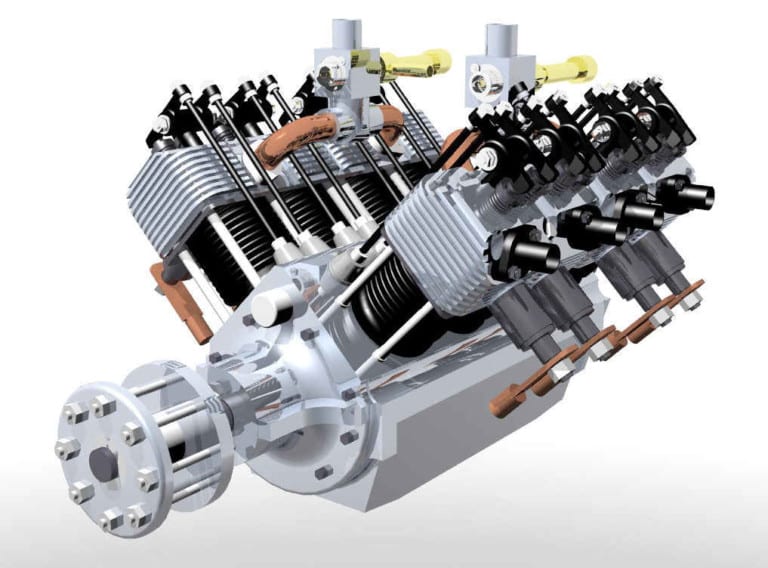
How CAD Technology benefits from Dynamic Modeling?
How CAD Technology benefits from Dynamic Modeling Alexander Pope, in the 17th century, coined the phrase “A little knowledge is a dange...

How Music Industry impacted by 3D Printing?
Digital preservation of works for books, and arts, were stored while talking about music, pictures and movies. One advantage of storing i...
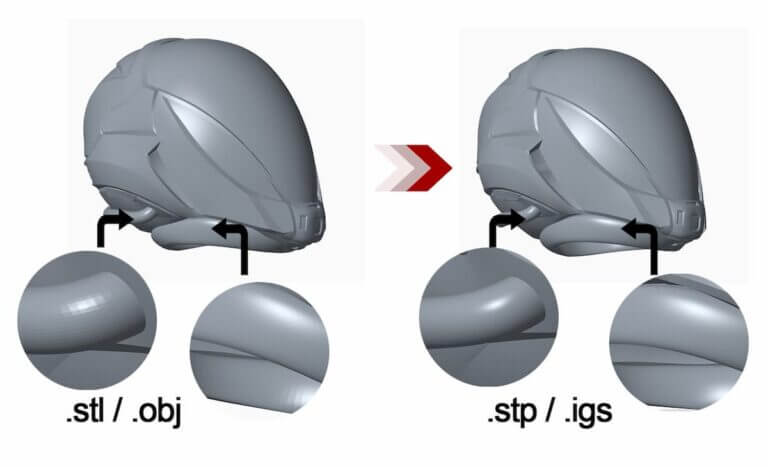
IGES vs STEP: Which CAD File Format Should You Use?
IGES and STEP are both neutral CAD file formats for exchanging 3D models between different software. STEP is the modern standard and hand...

The New Dimension in Electrical Design Evolution or Revolution?
how electrical engineers moved from paper sketches to 3d Electrical Design Evolution - Hi Folks! Its chilling winter here in Australia, s...

SolidWorks Drafting & Modelling Services in Australia
SolidWorks Drafting & Modelling Services At ASTCAD, we provide expert SolidWorks drafting and SolidWorks modelling services to suppor...

What are the Main fundamental Issues for 3d Designer/Drafter?
3D Designer & Drafter encountered a few fundamental issues during the design process. It addresses the process that comes with 3D des...
What the ASTCAD CAD drafting blog covers
The ASTCAD CAD drafting blog is written by working drafters and engineers, which shapes what gets published: practical tutorials on AutoCAD, SolidWorks and Revit workflows, plain-language explainers on Australian drafting standards like AS 1100 and AS 4100, career guidance for drafters entering or advancing in the industry, and honest assessments of the technology waves — AI, automation, 3D printing — as they actually land in Australian drawing offices. Case-study articles walk through real project decisions, and conversion guides cover the file-format questions every multi-software office hits weekly.
How to use this blog
Articles are organised by discipline and linked between related topics, so a reader arriving on a DWG conversion guide will find the neighbouring articles on CAD standards and software selection without hunting. If you are researching a service — structural drafting, 3D scanning, BIM — the relevant articles link through to the service pages where our team can pick up the conversation. New articles are published regularly; the most useful entry points are linked below.
If there is a CAD, drafting or engineering documentation topic you want covered — or a question a client keeps asking you — tell us through the contact page. Reader questions have driven several of the most-read articles on this blog.
The blog also serves a quieter purpose: it is where we document the recurring questions from real client projects — the DWG version conflicts, the standards interpretation debates, the software licensing traps — so the next person searching that exact problem finds a straight answer written by someone who solved it last month. If an article here saved you an afternoon, that is the metric we publish against.
For readers who prefer a starting map: the standards articles anchor the reference material, the how-to-read-drawings guides serve site teams, the software tutorials serve drafters, and the career series serves people entering the industry. Everything else radiates from those four clusters.
New: AS 4100 Base Plate Design: The Limit State Procedure, Step by Step.
Tutorial: Step-by-step — creating your first CAD drawing.
Guide: CAD automation — a step-by-step implementation guide.