James Hartley is a Senior Mechanical Engineer at ASTCAD with over 14 years of hands-on experience delivering CAD design, structural drafting, and engineering documentation across Australia's mining, oil & gas, and manufacturing sectors. He holds a Bachelor of Engineering (Mechanical) from the University of Queensland and is a member of Engineers Australia. James specialises in SolidWorks, Autodesk Inventor, and AutoCAD for complex multi-discipline projects, and has led drafting deliverables for Tier 1 mining contractors and precision manufacturers across Brisbane, Perth, and the Hunter Valley. His work spans fabrication drawings, FEA-linked assemblies, pipe stress analysis documentation, and AS1100-compliant engineering drawing sets. When he's not working through a SolidWorks assembly, he writes practical guides to help engineers and project managers get more out of their CAD workflows.
The overall appearance includes the shape, pattern, configuration, and ornamentation applied to a product to give a unique visual appearance. A design isn’t to protect the way a product works. But if you’re looking to preserve the way a product works is by distinguishing your business.
Moreover, a trademark distinguishes businesses from other traders in a visual way. A type of trademark is confused with a design in a shape trademark. It’s a three-dimensional shape used to distinguish the goods or services from one trader to another.
Your design IP rights:
To be entitled as an owner of a design, you must be:
That person that conceived the designer, the employer of the designer who made the Design while working for you.
The person contracted the designer to make the Design.
That person to whom the designer assigned the Design in writing.
Where two or more people own interests in a design, they must apply jointly.
The owner may be an individual, a company, an association or a partnership. However, if applying as a company, association or partnership, do not apply using a trading name or a trust.
The process for applying for registration of your Design involves several steps. One needs to ensure that you understand and complete each step to process quickly. There is a number of things before starting an application.
What a design right gives you
Design registration intends to protect designs that have an industrial or commercial use. A registered design offers you, the owner, exclusive rights to commercially use, license or sell it.
What design is
A design comes with an overall appearance of a product. The visual features come with a form of Design that covers the shape, pattern, configuration, and ornamentation. A product offers something manufactured with ease. The mechanics show how a product works or operates that isn’t protected with the right Design. But it protects the patent that Few designs cannot be registered legally. It includes designs for medals, layouts with integrated circuits, Australian currency and scandalous Designs.
Eligibility – deciding who owns the design
To be entitled as a design owner that offers:
A person who conceived the designer.
The designer’s employer, if the designer made the Design while working for you.
The person who contracts the designer to make the Design.
The person to whom the designer assigned the Design in writing.
The two or more people share common interests in a design.
The owner as an individual, a company, an association or a partnership applies as a company, association or partnership. They do not involve using a trading name or a trust.
Is my design new and distinctive?
The Design adds new and distinctive to be registered.
The new Design can be identical to any design previously disclosed anywhere in the world. It includes anything published anywhere in the world used in Australia.
Distinctive is not to be substantially similar to the overall impression where any design disclosed anywhere in the world. It includes anything published anywhere in the world or publicly used in Australia.
It supports an application stating how the Design adds new and distinctive, but this isn’t mandatory.
International design protection
If the application is filed in another country within six months of filing the Australian application, the date of your Australian application will apply to that country as well. The only case the country you use is a member of the International Convention.
One must prepare representations of the Design with complete forms and style needed by the foreign country.
Don’t publicise your design
It’s hard not to tell something about what you’re proud of or excited about, but one needs to keep Design a secret if one is looking to protect it.
For your Design to register to determine ‘new’ or ‘distinctive’, one can’t publish it anywhere in the world or publicly use it while applying to register it.
Design search
Before one submits a design application, they search for previously registered designs. It determines whether your proposed Design for new and distinctive is worth registering or not.
A search determines if a similar design is registered already.
Australian design search
Australian design search includes up-to-date information, including all applications and registrations from 1986. All registrations captured from 1973 to 1985 remain active in 1985.
One uses the search tool that helps determine who owns a design if you want to obtain a licence that uses the Design, buy the Design, or loan money to the owner of a valuable Design by taking a mortgage over it.
International designs databases
The European Patent Organisation and the United States Patent and Trademark Office hold the two largest international design databases.
The World Intellectual Property Organisation (WIPO) links to the sites of international IP offices.
Has the design been mortgaged?
The secured party designs all security interest mortgage records on the national Personal Property Securities Register. The register finds whether there is a mortgage over a design with no longer a legal securities register. It claims security interests that include mortgages available through Australian design search.
Seeking a search professional
An essential part of design search is interpreting the often-complex search results, and using these databases effectively is a specialised skill that can sometimes be time-consuming and costly.
If you need specific assistance, professional searches, or advice from intellectual property (IP) professionals and search firms, connect with us.
Drawings preparations:
Drawings and images come with essential design registration. The drawings or photographs include good quality and accuracy that shows the overall visual features of your design as applied to the product.
The requirements for representations
There is no need for a specific view number. However, one must offer sufficient views with a full display Design.
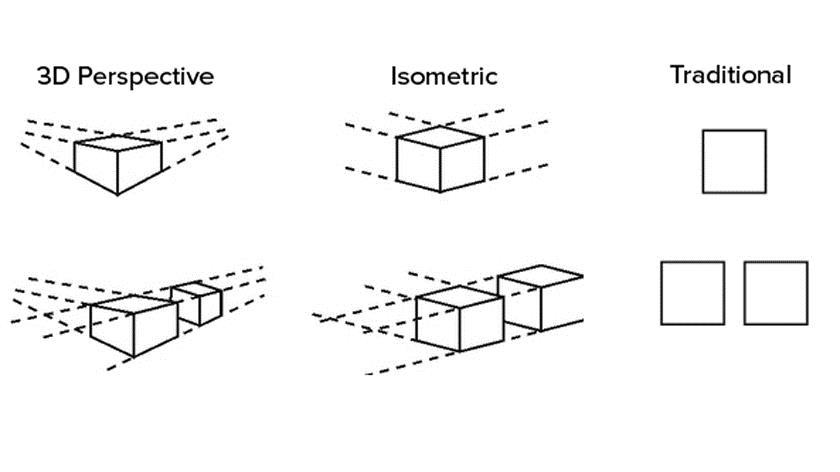
We offer traditional views and accept perspective or isometric views.
The views show precisely the same Design. It mainly applies to colour. As colour usually adds a visual feature to the Design.
The representations should be consistent enough to work properly if your application includes a statement for newness with distinctiveness.
Key points for drawings
Drawings should be accurate, not sketches, and should work on A4 size paper.
It should show the Design in question with no descriptive wording or dimensions. However, the labelling views come with ‘perspective view’ or ‘rear views.
It uses broken or dashed lines when highlighting product elements that bear the design’s visual features. It covers the parts of the Design that refer to the newness and distinctiveness.
It provides a pattern that applies to part of a surface, stitching and perforations features established in an environmental context.
It covers shading and cross-hatching used as a visual feature of the Design.
Key points for photographs or digital images
Photographs or digital images should be in a clear form.
It should show the product against a contrasting background and avoid matter that’s irrelevant to the Design for A4 or mounted on A4 white paper.
Other details
It adds multiple design applications for each Design that indicates each Design showing a separate sheet.
Complex products
Sometimes a design applies to a part of a complex product that is readily assemble and disassembled from that product. Suppose the position qualifies as a product, then broader protection gains by defining it as a stand-alone part. As Australian Design and drafting, we help clients from Australia with patent design and drafting services. Our strict NDA agreement allows for protecting innovator rights. Contact us for more information.
James has 14 years of hands-on experience delivering CAD design, structural drafting, and engineering documentation across Australia’s mining, oil & gas, and manufacturing sectors. He specialises in SolidWorks, Autodesk Inventor, and AutoCAD for complex multi-discipline projects.
This is 2 part series for patent application guide for Australia and Drawing specification for the patent application
Part 1: Patent Application Guide for Australia
Patent Benefits:
The protection provided by the Australian patent system is a major contributor to the success of new inventions and the millions of dollars in earnings that they generate.
Some of the benefits are:
It gives you the right to stop others from manufacturing, using and/or selling your invention in Australia without your permission.
It lets you license someone else to manufacture your invention on agreed terms or take legal action against people who are using your invention without your permission.
It encourages Australians to continue their research, to develop new and innovative products, exploit new technology and promotes the transfer of technology to Australia.
It gives our trading partners the incentive to provide similar rights and thereby protect our exports in markets overseas.
If you want to protect the way your invention works then patenting may be the most appropriate option.
If your invention is new, not publicly disclosed and has commercial potential, then you are ready to consider what type of patent will suit your needs.
Types of patents:
There are two types of patents granted in Australia – standard and innovation. You need to research them thoroughly before deciding which one suits your needs.
There are differences in the cost of the patents, the length of protection they offer, the time they take to process and the type of invention they seek to cover.
In order to have a patent granted on your invention, you need to file what is known as a complete application. Prior to filing a complete application, you can also file a provisional application. While a provisional application will not result in an enforceable granted patent it can be useful in establishing an early priority date.
Provisional applications
As a general rule, the priority date for your invention is the date on which you first filed a patent application that described your invention in detail. To get the earliest possible priority date on your invention, you can file a provisional application.
A provisional application doesn’t give you patent protection on its own (there are no ‘provisional patents’), but it’s useful in establishing an early priority date if you operate in a highly competitive industry where constant innovation requires you to get the jump on competitors.
A provisional application also gives you time to determine whether your invention is worthy of further time, money and effort associated with filing a complete application for a patent. It is also cheaper to file a provisional application than a standard complete application. You can read more information on time and costs.
Although the technical or scientific details of your provisional application are not published, we will publish details (the invention title and applicant name) in the Australian Official Journal of Patents at filing.
If you wish to claim priority from your provisional application you must file a complete standard or innovation application within 12 months of lodging your provisional application.
Remember – filing a provisional application on its own does not give you patent protection
All provisional applications lapse after 12 months. If you do not file a complete application associated with the provisional or file a PCT application within this 12 month period, you will lose any priority that your provisional application may have provided.
Standard patent
the standard patent gives long-term protection and control over an invention. It lasts for up to 20 years from the filing date of your complete application (or up to 25 years for pharmaceutical substances).
The invention claimed in a standard patent must be new (novel), involve an inventive step and be able to be made or used in industry.
An inventive step means that the invention is not an obvious thing to do for someone with knowledge and experience in the technological field of the invention.
Your invention must differ in some way from existing technology, but the difference must have resulted from something more than the simple application of published information and/or standard background knowledge.
Before a standard patent is granted, the complete application has to be examined by IP Australia. Examination before the grant of a standard patent is mandatory and can take from six months to several years (depending on the circumstances).
Innovation patent
An innovation patent lasts up to 8 years and is designed to protect inventions that do not meet the inventive threshold required for standard patents. It is a relatively quick and inexpensive way to obtain protection for your new device, substance, method or process.
An innovation patent is usually granted within a month of filing the complete application. This is because there is no examination before it is granted.
The innovation patent requires an innovative step rather than an inventive step, to protect an incremental advance on existing technology that may not qualify for standard patent protection rather than a groundbreaking invention.
An innovative step exists when the invention is different from what is known before and the difference makes a substantial contribution to the working of the invention.
If you want protection for an invention with a short market life that might be superseded by newer innovations, such as computer-based inventions, an innovation patent is worth considering.
Important: Examination of an innovation patent will only occur if requested by the patentee, a third party or if the Commissioner of Patents decides to examine the patent. An innovation patent is only legally enforceable if it has been examined by us, been found to meet the requirements of the Patents Act, and has been certified.
Benefits of the innovation patent
If it is examined and certified, the innovation patent offers the same level of protection as a standard patent in preventing others from copying your invention.
Unlike a standard patent, you only pay to have an innovation patent examined when you need to stop others from copying your invention.
Limitations of the innovation patent
The innovation patent is granted without examination, which means the validity of the application is not verified by us. This may make the patent more difficult to sell or license until the patent has been examined and certified.
Also, you are unable to go to court to enforce the innovation patent until it has been examined and certified.
An innovation patent can only be applied for in Australia. You have to apply separately to other countries if you want to enforce the patents overseas.
Standard vs innovation patent
There are three main differences between standard and innovation patents.
The innovation patent is a relatively inexpensive form of IP protection. It is quick and easy to obtain for inventions that have a short commercial life or that offer comparatively small advances over existing technology but which do not have the inventive step required to get a standard patent.
The standard patent provides longer protection for inventions that have a longer development and commercialisation cycle. An innovation patent may be granted for the same subject matter as a standard patent but it has a shorter term of protection – 8 years as opposed to 20.
It is not necessary to have an innovation patent examined before grant (or even at any time after grant). However, an innovation patent must be examined and certified before you can enforce your rights. A standard patent application must be examined and a patent then granted before you can enforce your rights. In both cases, a fee must be paid prior to examination. Failure to pay the examination fee results in the standard patent application lapsing or the innovation patent ceasing.
Can an innovation patent be converted to a standard patent?
You can convert an innovation patent to a standard patent application in the period before it is accepted, but you have to be quick. That’s because an innovation patent is accepted after a brief formalities check, which is usually within one month.
The quick guide to innovation versus standard patents
Innovation patent
Standard patent
Your invention must:
Be new, useful and involve an innovative step
Be new, useful and involve an inventive step
The application should include:
A title, description, up to 5 claims, drawings (if applicable), an abstract and forms
A title, description, any number of claims, drawings (if applicable), an abstract and forms
A patent is granted if:
The application satisfies formality requirements (note: a ‘granted’ innovation patent cannot be enforced unless examined)
The application is examined and found to satisfy the relevant requirements of the Patents Act 1990
Examination:
Optional. Examination can be requested by you or anyone else
Mandatory. The relevant requirements of the Patents Act 1990 must be met before a patent is granted. Can only be requested by the applicant.
Certification:
If the innovation patent complies with the relevant requirements of the Patents Act 1990 in examination; only after certification can the patent be enforced
N/A
Publication in the Australian Official Journal of Patents:
At grant and again at certification
18 months from earliest priority date and again at acceptance
Protection period:
Up to eight years, if annual fees paid
Up to 20 years, if annual fees paid (or up to 25 years for pharmaceuticals)
How long does the process take?
Approximately 1 month for grant. Six months for examination if you make a request.
Six months to several years depending on circumstances
Applying for a patent can be a complex and time-consuming process.
We have outlined all the steps that need to be taken in order to ensure that the process is smooth.
Search patent databases, sales brochures and magazines to ensure your invention has not been created by someone else. If your invention was publicly known before you apply for a patent, you won’t be able to get a patent.
Decide which type of patent best suits your invention. You may wish to file a provisional application first; then decide between filing a standard, innovation or an international patent (PCT) application.
Once it is filed, your application is checked and published. Please note that fees are payable at different stages of the patent process. An innovation patent is checked to ensure it satisfies the formality requirements, then granted and published in the official journal. A standard patent is normally published in the official journal before the examination.
The examination is mandatory before a standard patent can be granted and must be requested by the applicant. An innovation patent will be examined if the examination is requested but this is not a requirement for an innovation patent to be granted. Examination of an innovation patent can only happen after it is granted. For either innovation or standard patent to be enforceable, it must have been examined. The examination can also be expedited for standard patents or expedited under the Global Patent Prosecution Highway (GPPH).
Acceptance and grant of an innovation patent occur if it has satisfied the formality requirements. It is then published as such in the official journal. If the examination is requested and found successful then the innovation patent will be certified and published once again. A standard patent application is accepted once it has been examined and is then published. The standard patent is then granted if it is not opposed.
Pay annual fees to maintain your patent. Innovation patents can be renewed for up to eight years and standard patents can be renewed for up to 20 years (up to 25 years for pharmaceuticals).
Some common problems
Many patent applications that are filed without professional help are not successful for one or more of the following reasons:
The original patent specification, whether provisional or complete, does not describe the invention properly.
The invention is not new because the applicant disclosed it to the public before applying for a patent.
The invention is not new because the applicant disclosed it to the public after filing a provisional application that did not adequately describe the invention; i.e. the provisional application did not provide an effective priority date.
The invention is not new when compared with things that are already known; e.g. it has been published in an earlier patent document.
The application is for something that is not patentable, such as a principle or idea, rather than its practical adaptation.
Standard patent application process
Applications for standard patents are called complete applications. A complete application is necessary to actually have a patent granted whereas a provisional application provides you with a priority date and signals your intention to lodge a complete application.
The subject matter of a complete application for a standard patent needs to be new (novel), inventive, and useful. The term of the standard patent is 20 years.
The invention will be referenced against background knowledge in its technical field. This is sourced from common work practices as well as standard texts and handbooks, technical dictionaries and other material in the field.
To be eligible for patent protection your invention must:
involve novelty (be new)
the invention has not been publicly disclosed in any form, anywhere in the world before the earliest priority date (the date at which the application is first filed)
involve an inventive step
the invention must not be obvious for someone with knowledge and experience in the technological field of the invention
The process of granting a standard patent usually takes up to 5 years.
Filing the application
You can request a patent for your invention using eServices or by using a Patent Request form.
In order to keep the priority date of a provisional application, you need to apply for your standard patent with 12 months of filing your provisional. If you have a patent application overseas (a convention application) and want similar protection in Australia, you will need to file your patent application within 12 months of filing your overseas application.
Your application form needs to be accompanied by a patent specification.
Publication of details
Details (including the invention title) of the unexamined standard patent application (level AU-A) is published in the Australian Official Journal of Patents about 18 months after the application’s earliest priority date.
Published patent applications are made available to the public through our website and are sent to certain libraries and overseas patent offices.
The publication is an important step for two reasons:
It sets the date after which anyone using your invention without permission is unlawfully infringing your patent. That is, once you have a granted standard patent, you can take legal action for any infringements that occurred on and after the publication date
The contents of your standard patent application are no longer confidential. Your invention becomes part of the knowledge of the general public and may therefore subsequently assist in advancing industry and technology.
Note: Publication of a patent does not guarantee that the patent is valid.
If your standard application is accepted, the patent is republished as an AU-B level publication. If your accepted standard application is subsequently amended, it is republished as an AU-C level publication.
Requesting examination of standard patent applications
After a standard patent application is submitted you must request examination within 5 years of the filing date. Typically, after 4 years from filing your application, we will direct you to request examination if you have not done so already. You must request examination within 2 months of the date of this direction or your application will lapse.
You can request examination (either voluntarily or after being directed to do so) by completing and submitting a Request for Examination and paying fees.
Once the examination is requested you can normally expect a reply within about 12 months, depending on our workload.
After examination, either an adverse report or a notice of acceptance is mailed. If it is an adverse report, you will have the opportunity to make changes to your application to overcome the objections in the report.
In response to your changes, subsequent adverse reports may be issued until all objections have been overcome. Once all objections are overcome, your application will be accepted.
If no response is filed within 21 months from the date of the first adverse report, your complete application will lapse.
Similarly, if you have not successfully addressed all the issues in the adverse reports within 21 months from the date of the first adverse report, your complete application will lapse
Important: If you request an examination on or after 15 April 2013, you will only have 12 months from the date of the first adverse report to overcome the objections or your application will lapse.
Acceptance, opposition and grant of the standard patent
Once all objections in the examination report are overcome, your application for a standard patent is accepted. Before the patent is granted, other parties (opponents) have three months to start opposition proceedings.
The most common reasons for opposing the grant of standard patents are:
the application is identical or very similar to another patent application
the patent applicant is not the true owner of the application
The opponent must show that your standard patent if granted, would be invalid.
When an opposition is filed, the patent applicant and the opponent each have an opportunity to submit evidence.
A hearing is then held before a Hearing Officer, who decides whether or not the opposition succeeds. If the opposition is successful, the patent applicant is usually given an opportunity to amend their patent application to overcome the problems.
If either party disagrees with the Hearing Officer’s decision, they can file an appeal with the Federal Court of Australia.
Less than 2% of accepted standard applications are opposed, but if your application is opposed, you should consider consulting an IP professional.
If no opposition is filed and the acceptance fees are paid, your accepted standard application is sealed and a patent deed is sent to you.
What happens if I miss a deadline?
You may need to apply for an extension of time to restore a patent or patent application that has lapsed or ceased because you failed to pay a fee or take some other action in time.
For example, perhaps you have lost your priority rights because you did not file a complete application within 12 months of your provisional application.
To gain an extension of time you must explain in a declaration the chain of events that caused you to fail to take the action you should have done. You will need to pay any fees associated with your extension of time request and pay any unpaid fees (e.g. renewal fees). The outcome of this request will be assessed on a case by case basis. There is no guarantee that you will get the extension of time you requested.
Applications for innovation patents are called complete applications. A complete application is necessary to actually have a patent granted whereas a provisional application provides you with a priority date and signals your intention to lodge a complete application.
An innovation patent provides fast protection and is suitable for a device, substance, method or process that does not have the inventive step requirement needed to obtain a standard patent.
The owner of any new and useful invention that involves an innovative step can file an innovation patent application. The process to get a granted innovation patent is not as astringent a process as for a standard patent.
To be eligible for an innovation patent protection your invention must:
involve novelty (be new); which means that the invention has not been publicly disclosed in any form, anywhere in the world before the earliest priority date (the date at which the application is first filed)
involve an innovative step; which means the invention is different from what is known before and the difference makes a substantial contribution to the working of the invention
A simple formalities check is conducted to ensure your application is in order. Generally, within 1 month you’ll receive notification formally granting you an innovation patent (provided you with the filing fees are paid).
Please note that the innovation patent is granted without substantive examination. We do not assess whether the patent is valid, which may make it more difficult to sell or licence.
Filing the application
You can request a patent for your invention using eServices or by using a Patent Request form.
In order to keep the priority date of a provisional application, you need to apply for an innovation patent within 12 months of filing your provisional. If you have an overseas patent application (a convention application) and want similar protection in Australia, you will need to apply for your innovation patent within 12 months of filing your overseas application.
PATENT SPECIFICATIONS
The purpose of a specification is to describe your invention.
It should contain as much detail as possible, including:
the technical features that are essential to the way your invention works
the best way or ways you know of putting your invention into practice
examples or drawings if they help describe the invention
end with claims that define your invention.
You can search for examples of specifications online through AusPat. AusPat will allow you to search by filters including patent application number or accepted patent numbers.
Stay tuned for Part No. 2 Drawing specification for a patent application in Australia
Australian Design and drafting helping clients all over from Australia for patent design and drafting needs. We have a strict NDA agreement that allows protecting innovator rights. Contact us for more details.
James has 14 years of hands-on experience delivering CAD design, structural drafting, and engineering documentation across Australia’s mining, oil & gas, and manufacturing sectors. He specialises in SolidWorks, Autodesk Inventor, and AutoCAD for complex multi-discipline projects.
Create a fast and accurate design by using the electrical cabinet of ducts and rails for routing of wires & cables. It’s mainly used for mounting other components. It primarily represents 2D line art symbols and SOLIDWORKS parts in 3D. The 2D symbol is connected along with manufacturer data by using the database. However, the manufacturer’s database comes with several standard ones. Additionally, one needs to add a custom one and better applicable requirements.
If we look at creating a 3D part, it will adjust the length and profile dimensions which suit our needs better than stock size. Also, to begin with, several rules need to be observed, such as the ability of the software to make the adjustments depending on it.
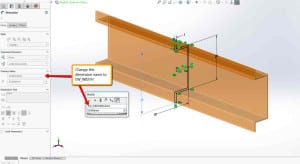
Also, the base configuration is named EW_CONFIG. The name changed by default configured from “Default” to “EW_CONFIG” when the part is first created. The base sketch mainly uses the base extrusion named “EW_SKETCH”.
The base extrusion feature is called “EW_EXTRUDE”. The dimension for the base extrusion is known as “EW_DEPTH”. It is critical to make an adjustable length and use the Change Length command. In our profile sketch, the height and width of the profile should have their dimensions called “EW_WIDTH” and “EW_HEIGHT”.
It adds the format parts on insertion that need mate references named “throwback” with a single face. It mounts other parts and the top and front faces called “trewrail35”. They are mainly used to create the Electrical Component Wizard. Open a new position in SOLIDWORKS by setting the configuration name as “EW_CONFIG”. Also, create a 2D sketch and profile with dimensions for the height and width.
Solidworks Electrical 2D and 3D Services
SolidWorks Electrical 2D: This component of the software focuses on creating 2D schematics, wiring diagrams, and documentation for electrical systems. It offers a user-friendly interface with various symbols, libraries, and automated features to simplify the design process. Engineers and designers can easily draw electrical schematics and add information like wire numbers, component tags, and connection points. The software also helps in generating bills of materials and other relevant documentation necessary for the electrical system.
SolidWorks Electrical 3D: Building upon the 2D module, this part of the software allows users to integrate the electrical design into the 3D mechanical model. This synchronization between electrical and mechanical designs enables better collaboration between electrical and mechanical teams and ensures that the electrical components fit seamlessly within the overall product design. The 3D aspect helps in visualizing and resolving potential clashes or interferences between electrical and mechanical elements.
2D and 3D Services
Industries that benefit from SolidWorks Electrical include manufacturing, aerospace, automotive, industrial machinery, electronics, and more. It streamlines the design process, reduces errors, and enhances overall project efficiency.
As with any software, it’s essential to check for updates and new features beyond my last knowledge update in September 2021, as the software might have evolved or received new functionalities since then. For the most accurate and up-to-date information, I recommend visiting the official SolidWorks website or contacting their representatives.
What is SOLIDWORKS electrical 3D?
SOLIDWORKS Electrical 3D is a component of the SOLIDWORKS suite of software products, designed to integrate electrical design with mechanical design in a unified environment. It allows users to create and manage electrical systems and schematics in SOLIDWORKS Electrical and then integrate them directly into their SOLIDWORKS 3D mechanical models.u003cbru003eHere are some key features and functions of SOLIDWORKS Electrical 3D:u003cbru003eu003cstrongu003eIntegration with SOLIDWORKSu003c/strongu003e: SOLIDWORKS Electrical 3D seamlessly integrates with SOLIDWORKS CAD software, enabling electrical designers and mechanical engineers to collaborate more effectively. Electrical components and wiring harnesses created in SOLIDWORKS Electrical can be imported directly into SOLIDWORKS 3D models.u003cbru003eu003cstrongu003eElectrical routingu003c/strongu003e: The software provides tools for routing electrical wires, cables, and harnesses within the SOLIDWORKS 3D environment. Users can define routing paths, specify bundle sizes, and ensure proper clearances to avoid interference with mechanical components.u003cbru003eu003cstrongu003eAutomatic 3D model creationu003c/strongu003e: SOLIDWORKS Electrical 3D can automatically generate 3D models of electrical components, including connectors, terminals, and cables, based on the schematic design created in SOLIDWORKS Electrical. This streamlines the process of incorporating electrical systems into mechanical assemblies.u003cbru003eu003cstrongu003eCollaborative designu003c/strongu003e: By synchronizing electrical and mechanical designs, SOLIDWORKS Electrical 3D facilitates collaboration between electrical and mechanical design teams. Changes made in either the electrical or mechanical design are automatically updated in the integrated model, ensuring consistency and accuracy across disciplines.u003cbru003eu003cstrongu003eVirtual prototypingu003c/strongu003e: Users can perform virtual prototyping and validation of electrical systems within the SOLIDWORKS 3D environment. This allows designers to identify and resolve potential issues, such as clearance violations or assembly conflicts, before physical prototypes are built.u003cbru003eu003cstrongu003eBill of Materials (BOM) generationu003c/strongu003e: SOLIDWORKS Electrical 3D enables the generation of comprehensive Bills of Materials (BOMs) that include both electrical and mechanical components. This ensures that all necessary parts are accounted for and ordered correctly during the manufacturing process.
How do I enable 3D in SOLIDWORKS electrical?
To enable 3D in SOLIDWORKS Electrical, you need to ensure that you have the necessary licenses and modules installed, and then follow these general steps:u003cbru003eu003cstrongu003eInstall SOLIDWORKS Electrical 3D Moduleu003c/strongu003e: Ensure that your SOLIDWORKS Electrical installation includes the 3D Module. This module allows you to integrate SOLIDWORKS Electrical with SOLIDWORKS 3D CAD software.u003cbru003eu003cstrongu003eConfigure SOLIDWORKS Electrical settingsu003c/strongu003e: Open SOLIDWORKS Electrical and go to the settings or options menu. Ensure that the necessary settings related to 3D integration are configured correctly. These settings may include file paths, default templates, and integration preferences.u003cbru003eu003cstrongu003eSet up project propertiesu003c/strongu003e: Within your SOLIDWORKS Electrical project, verify that the project properties are configured to enable 3D integration. You may need to specify the SOLIDWORKS Electrical 3D project settings, such as the target SOLIDWORKS 3D model template and location.u003cbru003eu003cstrongu003eCreate or open a SOLIDWORKS Electrical projectu003c/strongu003e: Start a new SOLIDWORKS Electrical project or open an existing one. Ensure that your electrical schematics, components, and wiring are accurately defined within the project.u003cbru003eu003cstrongu003eIntegrate with SOLIDWORKS 3Du003c/strongu003e: Once your electrical design is complete, you can integrate it with SOLIDWORKS 3D CAD software. Depending on your workflow and preferences, you can either export the electrical design to SOLIDWORKS 3D or open SOLIDWORKS 3D directly from within SOLIDWORKS Electrical.u003cbru003eu003cstrongu003eImport electrical components into SOLIDWORKS 3Du003c/strongu003e: In SOLIDWORKS 3D, use the appropriate tools or commands to import the electrical components, wires, cables, and harnesses from your SOLIDWORKS Electrical project. This may involve using the SOLIDWORKS Electrical 3D add-in or other integration features.u003cbru003eu003cstrongu003eManage the 3D modelu003c/strongu003e: Once the electrical components are imported into SOLIDWORKS 3D, you can manipulate, position, and route them within the 3D environment as needed. Ensure that the electrical components are properly aligned and integrated with the mechanical design.u003cbru003eu003cstrongu003eReview and finalize the integrated designu003c/strongu003e: Perform a thorough review of the integrated electrical and mechanical design to verify accuracy, clearances, and functionality. Make any necessary adjustments or revisions to ensure that the design meets your requirements.
James has 14 years of hands-on experience delivering CAD design, structural drafting, and engineering documentation across Australia’s mining, oil & gas, and manufacturing sectors. He specialises in SolidWorks, Autodesk Inventor, and AutoCAD for complex multi-discipline projects.
Temporary outsource services for 3D CAD modeling are often required by manufacturing companies, during busy times. In this type of service, the manufacturers look for companies with CAD and 3D Modeling know-how along with someone who understand the way they do business, meaning a focus on Modeling, Assembly, Drafting, Die Design, Tool Design, Sheet Metal Design and analysis of products is priority.
Additionally, manufacturers require the CAD operators with whom they work to be able to integrate mechanical engineering into the CAD and 3D Modeling technology. Most often this requires additional knowledge of CAM. CAM refers to Computer Aided Manufacturing, and in this context is most often referred to in conjunction with CAD, i.e.; CAD/CAM. CAD / CAM is a term that refers to computer systems that are used to both design and manufacture products. CAM software is most often used for product development, machine-tooling, and manufacturing, and is another area that continues to demand expert 3D Modeling Services.
Often the organizations that utilize CAD/CAM technologies also require extremely high accuracy. Industries such as aerospace, shipbuilding and automobile manufacturers have stringent accuracy requirements. These types of designers/manufacturers employ manufacturing processes that use three-dimensional models to determine the viability and tolerances of their designs, and exceptionally high accuracy is required.
Residency Requirements
For certain Australian manufacturers, such as aerospace, finding an outsource company that meets certain bidding requirements, often including security-clearance or 3D modeling outsource services within the Australia requires additional vetting. Just being CAD experts is not enough!
One way to insure that the service you choose for 3D Modeling meets all of these criteria is to deal only with a CAD services company that has been awarded with the Quality certificate and who is authorized and certified by the Australian Department of Defense for CAD Conversion work. This certification ensures accuracy, company integrity and knowledge.
Software Requirements
While you may need proficiency in only one 3D CAD software program, when you choose a 3D Modeling company that is experienced in a variety of 3D programs such as Revit; SolidWorks; Catia; and any other specialty that your firm requires, you’re more likely dealing with a company that has a large knowledge base, many technicians, and the ability to address nearly any 3D modeling problem.
This type of high-quality CAD outsourcing and 3D Modeling services can help you reduce expenses, improve workflow, have a better-managed business infrastructure, be more competitive, profitable and successful.
Can Outsourcing 3D Modeling Services Help your Company?
If you’re struggling to keep up with deadlines, need higher productivity, and want to improve your bottom line, then your company may be a candidate for 3D CAD Model outsourcing. Using a Australia based company will help to ensure a positive outcome. Staying in the Australia will help to reduce your worries about what will happen when you outsource CAD projects.
The internet makes finding CAD outsource companies easy. It may take you a bit more time to winnow out the off-shore companies, but it’s worth the effort. When you’re evaluating how to improve your company, consider how much time you’ll get back by outsourcing. Then, consider how much easier it will be if there’s no language barrier, no time difference and no worries about the way you do business. Make sure you ask if the company is based in the Australia!
Outsource your Drafting requirements to ASTCAD today and experience freedom from mundane recruitment, payroll or infrastructure related hassles.
3D Modeling Services in the Australia
As an AI language model, I don’t have real-time data, and my knowledge only goes up until September 2021. However, I can provide you with some general information about 3D modeling services in Australia.
Australia has a thriving creative industry, and 3D modeling services are no exception. There are various companies and freelancers that offer 3D modeling services across different sectors, including architecture, product design, gaming, animation, and more. These services may include:
Architectural 3D Modeling: Creating 3D models of buildings, interiors, and landscapes for architectural visualization and planning purposes.
Product Design 3D Modeling: Developing 3D models of consumer products, industrial equipment, and prototypes for design and manufacturing purposes.
3D Animation and Visual Effects (VFX): Producing 3D animations and visual effects for films, commercials, and video games.
Character Modeling: Designing 3D characters for video games, animation, and virtual reality applications.
Medical and Scientific 3D Visualization: Creating anatomical and scientific models for medical training, research, and educational purposes.
Virtual Reality (VR) and Augmented Reality (AR) Experiences: Building immersive 3D environments and experiences for VR and AR applications.
3D Modeling Services in the Australia
To find 3D modeling services in Australia, you can use online platforms, industry directories, or search engines to discover various companies and freelancers specializing in this field. When choosing a service provider, consider their portfolio, experience, client reviews, and pricing to ensure they meet your specific project requirements. Additionally, check if they have experience working in your industry or with projects similar to yours.
Keep in mind that the 3D modeling industryis dynamic, and new companies and freelancers may emerge, while others may change their services or offerings over time. Therefore, it’s best to conduct up-to-date research to find the most suitable 3D modeling service for your needs.
If you were to outsource today, which drafting service would you prefer to start with? Have you outsourced drafting before? If yes, how did it go? If you have a question on outsourcing or want to express your views, just leave a comment in the box below. We, at ASTCAD love to hear from you!
What are 3D modeling services?
D modeling services involve creating three-dimensional digital representations of objects, characters, environments, or architectural structures using specialized software. These services are utilized across various industries such as animation, gaming, architecture, engineering, u003cstrongu003emanufacturing, and advertising. Here are some common types of 3D modeling services:u003c/strongu003eu003cbru003eu003cstrongu003eProduct Modeling:u003c/strongu003e This involves creating 3D models of physical products or prototypes. It’s often used in product design, manufacturing, and marketing to visualize and iterate on product concepts before production.u003cbru003eu003cstrongu003eCharacter Modeling:u003c/strongu003e Character modeling focuses on creating 3D models of characters for use in animation, gaming, virtual reality, and other digital media. Character modelers typically focus on details like anatomy, clothing, facial expressions, and rigging for animation.u003cbru003eu003cstrongu003eArchitectural Visualization:u003c/strongu003e Architects and designers use 3D modeling services to create realistic renderings and visualizations of architectural designs. This allows stakeholders to better understand and evaluate proposed buildings or interior spaces before construction begins.
What is 3D modeling vs rendering?
3D modeling and rendering are two distinct but interconnected processes within the realm of computer graphics:u003cbru003eu003cstrongu003e3D Modeling:u003c/strongu003eu003cbru003e3D modeling involves creating a digital representation of objects or environments in three dimensions using specialized software.u003cbru003eModelers use various techniques to construct these digital models, including polygonal modeling (using vertices, edges, and faces to create shapes), sculpting (manipulating digital clay-like materials to form shapes), and procedural modeling (generating models algorithmically).u003cbru003eThe purpose of 3D modeling is to define the geometry, structure, and appearance of objects or scenes within a virtual environment. Modelers often work with wireframes, surfaces, and textures to bring their creations to life.u003cbru003eu003cstrongu003eRendering:u003c/strongu003eu003cbru003eRendering is the process of generating a 2D image or animation from a 3D model by simulating the effects of light, materials, and camera settings within a virtual scene.u003cbru003eRenderers use specialized software to calculate the interaction of light rays with surfaces, textures, and environments to produce realistic or stylized images.u003cbru003eThe rendering process takes into account factors such as light sources, shadows, reflections, refractions, textures, and camera angles to create the final visual output.u003cbru003eRendered images or animations can be used for various purposes, including visualizing architectural designs, creating special effects for films or games, and producing marketing materials for products.
James has 14 years of hands-on experience delivering CAD design, structural drafting, and engineering documentation across Australia’s mining, oil & gas, and manufacturing sectors. He specialises in SolidWorks, Autodesk Inventor, and AutoCAD for complex multi-discipline projects.
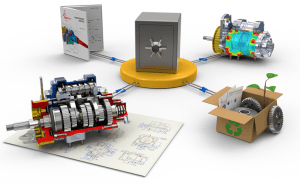
It is no secret that managing Gigabytes of CAD data can be tough. Especially if you’re a new comer to a company that contains years of legacy data, you’ll probably be spending at least 2 hours a day on non-essential task, which is sorting out your files.
Solidworks Cad
What’s more, every department in a company (or dare I say every employee in a company), has their own way of sorting their files. Yes, a company may enforce a rule that any files checked into the server of the company follows a certain nomenclature, but who is going to enforce it?
Poor Data Management leads to many issues such as:
Poor Decisions based on faulty or poor information
Duplicated efforts because one users did not know that the work he is doing was already done by someone else and it was in the company’s data storage
Lost of sales because customer’s cant get the information in time and leaves in frustration
Lost of productivity as employees disturbs other employees for data that is already there but can’t find them
This is where a data management needs to be more than just a security center. It needs to be an intelligent vault. Introducing an intelligent PDM system, called SOLIDWORKS Product Data Management(PDM).
Nothing screams horror than sifting through an assembly with 1000s of parts just so that you pull it out replace with another. Another concern would also be to pinpoint where a particular standard part is used (Important if you need to replace a part thought to be standard with a revised version).
The default Microsoft search function may not be able to help you find you the parts you want as search function are based on how the OS indexes the files. With SOLIDWORKS PDM, all your CAD files are promptly indexed to make the search function more powerful and accurate. With the ability to give you where the files has been used and the history of the file, you can quickly and efficiently get the information you need!
If you are in an organisation whereby a few engineers work on a same project, you would most likely fall in the trap of working on a file in which someone else is working on at the same time. At the end of the day when it comes to putting it all together, nothing fits! Back to the drawing board….
Solidworks Cad Data Management
PDM controls the flow of all the documents, making sure each users knows the status of the file. If one person is working on a file, others may still view it, but not work on it until the initial user is done. Think of PDM as your friendly traffic police, making sure the flow of documents keeps moving without a hiccup.
Sometimes when a particular step goes idle, due to:
Awaiting confirmation on the green light
Awaiting confirmation that a correction is needed
Awaiting for other departments to make a move
The user may also forget about his/her own movement in the project, and they are not aware of the status of the steps mentioned above.
With PDM, the process workflow defined in the PDM system keeps you updated about what steps are currently in progress and who is in charge. Built in is also the Notification Capability, which reminds the person-in-charge to keep the process going, so that no time is wasted!
The biggest concern about any data management solution is whether:
Is it easy to manage?
Do I need to hire an IT person to constantly look over it?
Be assured that the PDM solution will keep your data safe, organised and compliant.
One of the biggest roadblocks to adopting a data management systems is the fear that users may not get used to the system, which locks them out from the pool of data. Well that is not the case with PDM. With its tight integration with Windows, accessing files is as easy as using Windows explorer, opening folders to access the files. With its structured way of checking in/out of files, you will be assured that any files being opened or entered the vault is following company protocol.
It’s a step-by-step method which keeps all your files organised and populated with essential date.
File history is always difficult to track unless the right discipline is instilled in the user. By default, most users when it comes to editing an old file will just save the new version over it, completely destroying the older version of the file. What happens is that:
Nobody knows what changes were made
Nobody knows who made the changes
And if the new version is not acceptable and need to revert back, its not possible! (Time wasted in recreating the old version)
So why not let PDM do that with you? It keeps track of the entire history of your files, AUTOMATICALLY! Let engineers do the designing, and PDM on the file management.
SOLIDWORKS Enterprise PDM includes:
> File management: centralised file vaulting capabilities to manage and control electronic intellectual property and product design data
> Revision management: track changes, maintain a complete revision history of a design’s evolution, and avoid the errors of manual approaches
> Bill of materials (BOM) management: a range of tools for making BOM information management more efficient, enabling you to export BOM data in multiple ways to use in downstream applications and systems
> Distributed collaboration: keep people connected, up to date, and working on the same set of data, regardless of their location
> Regulatory compliance: helps you comply with government regulatory requirements or industry standards for controlled development processes and product documentation
> Design reuse: create a framework for quickly locating and reusing or repurposing existing design data
> Engineering change management: significantly reduce the time needed to complete your design approval and engineering change order (ECO) processes with the automated electronic workflow system
> Secure file vaulting: securely control access to sensitive or proprietary product information
> Enterprise scalability: easily connect the design data needs of your entire enterprise, whether for just a few users in a single location or hundreds of contributors working in multiple locations around the world
If you would like to know more about PDM, CAD Data Management please feel free to contact us at +61 731 493 547 or email info@astcad.com.au, and our EPDM experts would be happy to help!
ASTCAD provides quality solidworks drafting service around Brisbane, Sydney, Melbourne, Perth, GoldCoast. We also provide affordable contract Solidworks drafter, Solidworks designer with short notice!..
What is CAD data management?
CAD data management refers to the process of organizing, storing, and controlling computer-aided design (CAD) files and related data throughout their lifecycle. This includes managing various types of CAD files, such as 2D drawings, 3D models, assemblies, and associated documents.u003cbru003eu003cstrongu003eThe goals of CAD data management typically include:u003c/strongu003eu003cbru003eu003cstrongu003eOrganizationu003c/strongu003e: Ensuring that CAD files are stored in a logical and structured manner so that they can be easily located and accessed when needed.u003cbru003eu003cstrongu003eVersion Controlu003c/strongu003e: Tracking different versions of CAD files to avoid confusion and ensure that the latest version is always being used.u003cbru003eu003cstrongu003eAccess Controlu003c/strongu003e: Controlling who can access, view, edit, and delete CAD files to maintain data security and prevent unauthorized changes.u003cbru003eu003cstrongu003eCollaborationu003c/strongu003e: Facilitating collaboration among team members by providing tools for sharing CAD files, tracking changes, and managing concurrent design activities.u003cbru003eu003cstrongu003eData Integrityu003c/strongu003e: Ensuring the accuracy, consistency, and completeness of CAD data throughout its lifecycle, including during creation, modification, and archiving.u003cbru003eu003cstrongu003eIntegrationu003c/strongu003e: Integrating CAD data management with other systems and processes, such as product lifecycle management (PLM), enterprise resource planning (ERP), and document management systems, to streamline workflows and improve efficiency.
What is solidworks product data management?
SolidWorks Product Data Management (PDM) is a software solution provided by Dassault Systèmes SolidWorks Corporation for managing SolidWorks CAD files and other related design data. It is designed to streamline the process of managing design and engineering data throughout its lifecycle, from initial creation to final production.u003cbru003eu003cbru003eu003cstrongu003eSolidWorks PDM offers a range of features and capabilities, including:u003c/strongu003eu003cbru003eu003cstrongu003eFile Managementu003c/strongu003e: Organizing SolidWorks CAD files, assemblies, drawings, and other documents in a centralized repository, making it easy to locate, access, and share data.u003cbru003eu003cstrongu003eVersion Controlu003c/strongu003e: Tracking different versions of files and managing revisions to ensure that the correct and up-to-date versions are always being used.u003cbru003eu003cstrongu003eRevision Controlu003c/strongu003e: Managing revisions to files, including assigning revision numbers, tracking changes, and maintaining a history of revisions for audit purposes.u003cbru003eu003cstrongu003eWorkflow Managementu003c/strongu003e: Defining and automating workflows for design processes, such as review and approval workflows, to ensure that tasks are completed efficiently and according to established procedures.u003cbru003eu003cstrongu003eAccess Controlu003c/strongu003e: Controlling access to files and data, including defining user permissions and access rights to ensure data security and prevent unauthorized changes.u003cbru003eu003cstrongu003eCollaborationu003c/strongu003e: Facilitating collaboration among team members by providing tools for sharing files, communicating feedback, and coordinating design activities.u003cbru003eu003cstrongu003eIntegrationu003c/strongu003e: Integrating with other SolidWorks products, such as SolidWorks CAD software, as well as with third-party applications and systems, to streamline data exchange and improve interoperability.
James has 14 years of hands-on experience delivering CAD design, structural drafting, and engineering documentation across Australia’s mining, oil & gas, and manufacturing sectors. He specialises in SolidWorks, Autodesk Inventor, and AutoCAD for complex multi-discipline projects.
In recent times, TV shows have been so inspiring that they made me think about how the future is shaped by adding new technology. Once we realise that, it won’t be science fiction anymore, but it will be reality. The entire generation expects certain things from future technology.
Additionally, the movies feature pieces of imaginary technology that later become a reality. It comes with a compact communications device, face-to-face voice chat, and other voice recognition. It uses a few concepts that mostly appear on the show in the real world. Talking about Holograms, it’s another instance of a technology that appeared in the movie and uses one piece of tech. The companies are continuously trying hard to develop a better design.
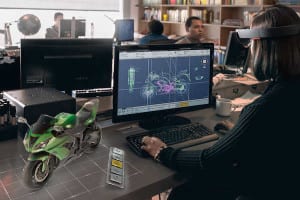
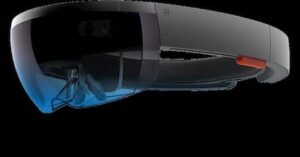
Oculus Rift and other augmented reality combined with Google Glass are the closest to bringing holograms into the world.Moving on, Microsoft’s Kinect developed a new platform that brings a simulated reality into both the workplace and living rooms. This new system is called HoloLens, which takes the shape of a pair of goggles rather than a holo suite. Unlike Oculus Rift, HoloLens does not attempt to trick your brain into thinking it’s someplace else. At the same time, it uses augmented reality (AR) to overlay holograms into your everyday space.
To use it every day, we add holograms everyone uses, from mechanics to brain surgeons. Some teachers find numerous ways to leverage holographic technology at every level of education. No doubt, there is an entertainment industry that might discover ways to use the technology for video games. We know it’s cool, but 3D printing is a king. What do you think about why we care about the HoloLens? HoloLens comes with new opportunities for 3D design. It sketches 3D images on a 2D surface with the HoloLens, designers, and engineers that design and develop using 3D parts in 3D.
Microsoft realises how much potential it needs to design the new platform. It includes instances for 3D design, including demos and other video marketing. One shouldn’t be surprised if the HoloLens shipped with 3D design software comes with haptic feedback tools. Users can add a pair of haptic gloves that suddenly comes with the ability to mould new parts, including a 3D mouse or stylus.
The Possibilities of HoloLens for Engineering Design
Design
The design of HoloLens is inspiring. Also, the design engineers will go beyond traditional 3D monitors that are controlled via mouse or touch. It gives immersive 3D in the real world that uses gestures and voice. Holograms allow to visualise how something would look in the physical world. It can benefit of 3D editing and authoring capabilities, mimicking how you would interact with something in real life.
We create a physical mock-up or prototype just by using foam, clay and various other mediums for modelling. This is what we design with HoloLens. It comes with more tools and fewer constraints, adding it to the real world. One can share it with all holograms by collaborating it remotely. Users can even turn them into physical objects and HoloStudio’s 3D print compatibility.
Fix
To think about all the possibilities, one needs to find the field service and repair the products and machines. Withstanding next to an aircraft or vehicle, users can have digital instructions pinned as holograms. The 3D animation within the actual physical context available right in front of you brings remote colleagues or advisors along with HoloNotes on Skype. It allows them to see the environment from their tablet to troubleshoot and collaborate on a repair on the spot. The user has to draw instructions that appear as animations and helps through walk a new process.
Simulate
It comes with new ways to learn the powerful capability of HoloLens. In both field and design service training scenarios, users can learn, visualise and examine in 3D. Additionally, one can understand how a product works in the actual environment. It’s a different inspection performed on a product or individual tests that meet the product with safety standards. Moreover, it simulates an unsafe environment that practices what you’d do in that situation.
3D Design Service
For additional information about professional CAD drafting services, connect to ASTCAD Services company. Call on 1800 287 223 or 07 3149 3547 today and discuss your requirements.
What are 3D Design Services?u003cbru003e
3D design services involve the creation of three-dimensional digital models, visualizations, and simulations to depict objects, products, buildings, or environments in a virtual space. These services are offered by professionals and firms specializing in computer-aided design (CAD), 3D modeling, rendering, and animation.u003cbru003eu003cbru003eu003cstrongu003eHere are some common types of 3D design services:u003c/strongu003eu003cbru003eu003cbru003eu003cstrongu003eProduct Designu003c/strongu003e: 3D design services are often used to develop virtual prototypes of products, allowing designers and engineers to visualize, iterate, and refine their designs before manufacturing. This includes consumer products, industrial equipment, machinery, automotive components, and more.u003cbru003eu003cstrongu003eArchitectural Visualizationu003c/strongu003e: Architects and real estate developers use 3D design services to create realistic renderings and walkthroughs of buildings, interiors, and landscapes. These visualizations help clients and stakeholders better understand the design concept, spatial layout, and aesthetic appeal of architectural projects.u003cbru003eu003cstrongu003eInterior Designu003c/strongu003e: Interior designers utilize 3D design services to create virtual models of interior spaces, including residential homes, commercial offices, retail stores, restaurants, and hospitality venues. These models allow designers to experiment with different layouts, furniture arrangements, materials, and lighting effects to achieve the desired ambiance and functionality.u003cbru003eu003cstrongu003eAnimation and Visual Effectsu003c/strongu003e: 3D design services are employed in the entertainment industry to produce animated films, video games, special effects, and virtual simulations. This involves creating lifelike characters, environments, and dynamic sequences through 3D modeling, texturing, rigging, animation, and rendering techniques.u003cbru003eu003cstrongu003eEngineering and Prototypingu003c/strongu003e: Engineers and manufacturers use 3D design services to develop detailed models of mechanical components, assemblies, and prototypes. These models facilitate design analysis, testing, and validation of engineering concepts, helping to identify and resolve potential issues early in the product development process.u003cbru003eu003cstrongu003eMedical and Scientific Visualizationu003c/strongu003e: In the fields of medicine and science, 3D design services are utilized to create anatomical models, surgical simulations, and scientific visualizations. These models aid in medical education, research, diagnosis, treatment planning, and public outreach.u003cbru003eu003cstrongu003eVirtual Reality (VR) and Augmented Reality (AR)u003c/strongu003e: With the growing popularity of VR and AR technologies, 3D design services are increasingly used to develop immersive experiences and interactive applications. This includes virtual tours, training simulations, gaming experiences, and marketing presentations that leverage the capabilities of VR and AR platforms.
What is 3D services?
u00223D servicesu0022 is a broad term that encompasses a range of offerings related to three-dimensional (3D) design, modeling, visualization, and animation. These services are provided by professionals, agencies, studios, or freelancers with expertise in computer-aided design (CAD), 3D modeling software, rendering, and animation techniques. Here are some common types of 3D services:u003cbru003eu003cstrongu003e3D Modelingu003c/strongu003e: This involves creating digital representations of objects, products, characters, environments, or architectural structures in three-dimensional space. 3D modelers use specialized software to sculpt, manipulate, and refine geometric shapes, surfaces, and textures to achieve the desired form and detail.u003cbru003eu003cstrongu003e3D Renderingu003c/strongu003e: Rendering is the process of generating photorealistic images or animations from 3D models. Render artists use rendering software to simulate lighting, materials, shadows, reflections, and other visual effects to create lifelike representations of virtual scenes.u003cbru003eu003cstrongu003eArchitectural Visualizationu003c/strongu003e: Architectural firms and real estate developers utilize 3D services to create visualizations, renderings, and virtual tours of architectural designs. This helps clients and stakeholders visualize proposed buildings, interiors, landscapes, and urban developments before construction begins.u003cbru003eu003cstrongu003eProduct Visualizationu003c/strongu003e: Companies in various industries, such as consumer goods, automotive, electronics, and furniture, use 3D services to create digital prototypes and marketing visuals of their products. This includes 3D product modeling, rendering, and animation for promotional materials, packaging, websites, and advertisements.u003cbru003eu003cstrongu003eAnimation and Motion Graphicsu003c/strongu003e: Animators and motion graphics artists employ 3D services to produce animated sequences, visual effects, and motion graphics for films, television shows, commercials, video games, and multimedia presentations. This involves character animation, rigging, keyframing, particle effects, and compositing techniques.u003cbru003eu003cstrongu003eVirtual Reality (VR) and Augmented Reality (AR)u003c/strongu003e: With the rise of VR and AR technologies, 3D services are increasingly used to develop immersive experiences and interactive applications. This includes creating 3D models, environments, simulations, and interactive interfaces for VR/AR platforms, training programs, educational content, and marketing campaigns.u003cbru003eu003cstrongu003eMedical and Scientific Visualizationu003c/strongu003e: In the fields of medicine, biology, and science, 3D services are employed to create anatomical models, medical illustrations, scientific visualizations, and educational materials. This helps researchers, educators, and healthcare professionals visualize complex biological structures, processes, and data.
James has 14 years of hands-on experience delivering CAD design, structural drafting, and engineering documentation across Australia’s mining, oil & gas, and manufacturing sectors. He specialises in SolidWorks, Autodesk Inventor, and AutoCAD for complex multi-discipline projects.
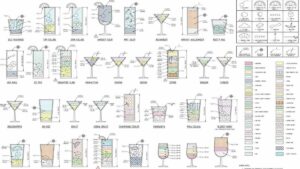
Autodesk Introduces Whisky Drinks for AutoCAD and CAD Drinks for Engineers – Helping Them Plot Their Own Cocktails. Now Autodesk users can download their own copy of CAD drinks, and learn to mix cocktails with precision.
The DWG files contain all the information about the technique of mixing your drinks – simply by shaking them or by stirring with/without cracked ice. The schematics also suggest what glass to use, which ingredients go first and lists all the details of what to put in your glass and how, drawn right there – orange segment, pineapple chunk, onions, cherry, mint leaves, ice cubes, finely granulated sugar and the list goes on, all have a different recognizable graphics.
The drafts are drawn to scale in elevation, here alcoholic and non alcoholic drinks are color coded and rendered and the files are available in downloadable DWG file formats. The info graphics are prepared to appeal to an architect/ engineers brain and are replete with instructions for mixing and consumption of the drinks.
CAD drinks promises fun hour for architects and engineers as they meet after work, and design their cocktails just like they design buildings and machines. Designed by an engineer Shaan Herley, the chart codes more than 70 cocktails in their classic form right from the traditional Martini, to the popular Pina Colada.
Download Whiskey Drinks AutoCAD DWG File
Engineer’s CAD Drinks for industries
It seems like you are looking for information about CAD (Computer-Aided Design) software used in the context of designing drinks for industries. However, the concept of “CAD Drinks” might be a bit unclear. Let me try to provide some information based on the given context.
In the food and beverage industry, including the beverage industry, CAD software is commonly used for various purposes, such as designing packaging, manufacturing equipment, and even planning layout and workflow in processing plants. Here are some potential applications of CAD in the drink industry:
Packaging Design: CAD software can be used to create 2D and 3D models of beverage containers, such as bottles, cans, and tetra packs. Engineers and designers can use these models to optimize the shape, size, and functionality of the packaging.
Equipment Design: CAD is utilized to design machinery and equipment used in the production and processing of beverages. This includes components like mixers, pumps, conveyors, and filling machines. Designers can model and simulate these machines to ensure efficient and safe operation.
Factory Layout: CAD software can assist in planning and designing the layout of a beverage manufacturing facility. Engineers can create detailed floor plans that optimize space usage and workflow efficiency.
Process Simulation: CAD tools with additional capabilities for process simulation can help engineers evaluate and optimize the beverage production processes. This may include heat transfer simulations for pasteurization or CFD (Computational Fluid Dynamics) for mixing and flow analysis.
Label and Branding Design: CAD software can be used to create label designs for beverage bottles or packaging. Designers can visualize and iterate on label designs before production.
Quality Control and Testing: CAD can be used to create test fixtures and molds for quality control testing of beverage products.
It’s important to note that while CAD software is widely used in various industries, specific applications may vary depending on the unique requirements and processes of each industry and company.
Computer-Aided Design (CAD) has become an indispensable tool in the beverage industry, providing engineers, designers, and manufacturers with a wide range of applications to streamline and optimize their processes. From conceptualizing the initial design to final production, CAD software plays a vital role in enhancing product development, improving efficiency, and ensuring quality in the beverage manufacturing process.
One of the primary areas where CAD is extensively utilized is in packaging design. Engineers and designers can create intricate 3D models of beverage containers, exploring various shapes, sizes, and materials to find the most functional and visually appealing packaging solutions. These digital prototypes enable rapid iteration, cost-saving, and a reduction in material waste during the physical prototyping stage.
Moreover, CAD software aids in the development of machinery and equipment used in beverage production. Engineers can design complex processing equipment, such as blenders, filtration systems, and carbonation units, with precision and accuracy. By simulating the equipment’s performance in the CAD environment, potential issues can be identified and rectified before they become costly problems during actual production.
In large-scale beverage manufacturing plants, factory layout planning is critical for optimal workflow and resource management. CAD tools enable engineers to create comprehensive floor plans, visualizing the placement of machinery, production lines, storage areas, and employee workstations. This ensures that the plant’s layout maximizes space utilization and minimizes bottlenecks, leading to increased productivity and reduced downtime.
What type of engineers use CAD?
Several types of engineers use Computer-Aided Design (CAD) software in their work, including:u003cbru003eu003cstrongu003eMechanical Engineersu003c/strongu003e: They use CAD to design mechanical systems, machinery, components, and products.u003cbru003eu003cstrongu003eCivil Engineersu003c/strongu003e: CAD helps them design infrastructure projects such as roads, bridges, dams, and buildings.u003cbru003eu003cstrongu003eElectrical Engineersu003c/strongu003e: CAD is used in the design of electrical systems, circuits, and components.u003cbru003eu003cstrongu003eAerospace Engineersu003c/strongu003e: CAD is vital for designing aircraft, spacecraft, and related components.u003cbru003eu003cstrongu003eArchitectural Engineersu003c/strongu003e: CAD assists in designing architectural structures, including buildings and interior spaces.u003cbru003eu003cstrongu003eAutomotive Engineersu003c/strongu003e: CAD is used extensively in designing vehicles, their components, and systems.u003cbru003eu003cstrongu003eEnvironmental Engineersu003c/strongu003e: CAD aids in designing environmental systems and solutions, such as wastewater treatment plants and pollution control devices.u003cbru003eCAD software allows engineers from various disciplines to create detailed digital models of their designs, facilitating visualization, analysis, and collaboration throughout the design process.
Do engineering students use CAD?
Yes, engineering students often use CAD software as part of their academic curriculum. Many engineering programs include courses specifically dedicated to teaching CAD skills. These courses aim to familiarize students with CAD software and its applications in their respective fields of study.u003cbru003eu003cstrongu003eUsing CAD software allows engineering students to:u003c/strongu003eu003cbru003eu003cstrongu003eGain practical skills: u003c/strongu003eCAD software is widely used in industry, so learning it during their studies prepares students for their future careers.u003cbru003eu003cstrongu003eVisualize concepts:u003c/strongu003e CAD enables students to create digital models of engineering designs, helping them visualize complex concepts and understand how different components interact.u003cbru003eu003cstrongu003eDesign projects:u003c/strongu003e Engineering students often have design projects as part of their coursework, and CAD software provides them with the tools to create detailed and accurate designs.u003cbru003eu003cstrongu003eCollaborate with peers:u003c/strongu003e CAD software allows students to collaborate with their classmates on group projects by sharing digital models and working on them together.
James has 14 years of hands-on experience delivering CAD design, structural drafting, and engineering documentation across Australia’s mining, oil & gas, and manufacturing sectors. He specialises in SolidWorks, Autodesk Inventor, and AutoCAD for complex multi-discipline projects.
Intelligent P&IDs for piping systems are 2D Piping & Instrumentation Diagrams generated using symbols for equipment, instruments, components etc. and lines representing pipelines, instrumentation signal lines etc. as well as general elements, customized as per each client’s requirements. The information stored with each Intelligent P&ID consists of minimum required attributes for design, analysis, procurement, maintenance etc. The inputs for such intelligence would be from process flow sheets, instrumentation schematics, equipment data sheets, valve and instrumentation specification sheets, piping material specifications, etc. and can also be in the form of drawings and documents.
The P&ID database so generated from Intelligent P&IDs for the entire plant / project, when linked to the Central Database, the integrated Plant Information Management System, leads to numerous advantages over conventional non-intelligent P&IDs, as listed below.
Benefits for new “green-field” plants:
As project progresses, Intelligent P&IDs
Captures, organizes and updates data related to design, procurement, construction etc.
Provides single data entry with outputs such as Line List, Valve List, Equipment List, etc.
Associates engineering data, drawings and documents to graphics.
Checks the integrity between the processes captured in that and the corresponding intelligent 3D Plant model at all times and helps in resolving discrepancies between them.
Alerts layout designers about process changes.
Generates standard AutoCAD files with built-in intelligence. Highlights graphically in Intelligent P&ID the equipment, valves, instruments and specialties that are placed in the 3D Plant model.
Generates reports on items placed in intelligent 3D Plant model in line with Intelligent P&IDs.
Benefits for operating “brown-field” plants:
From database, plant operating and maintenance (O&M) personnel could at any time rapidly retrieve attributes of equipment, nozzles, pipe lines, valves etc.
The plant O&M personnel could use it to arrive at alternate processes in case of failure of any equipment (such as a pump), leakage of a valve etc.
The database can be extended to include customized inspection / maintenance management functions or can be linked directly to the client’s in-house database systems.
This will also help in any future retrofit / expansion project.
What are the advantages of Pu0026amp;ID diagram?
u003cstrongu003ePu0026amp;ID (Piping and Instrumentation Diagram) diagrams offer several advantages in various engineering disciplines, particularly in process engineering and industrial settings:u003c/strongu003eu003cbru003eu003cstrongu003eClarity and Understandingu003c/strongu003e: Pu0026amp;IDs provide a clear visualization of the process flow, equipment, and instrumentation involved in a system, aiding in understanding the entire process at a glance.u003cbru003eu003cstrongu003eStandardizationu003c/strongu003e: Pu0026amp;IDs follow standard symbols and conventions recognized globally, ensuring consistency across different projects and industries. This standardization facilitates communication among engineers, operators, and stakeholders.u003cbru003eu003cstrongu003eDocumentationu003c/strongu003e: Pu0026amp;IDs serve as essential documentation for the design, construction, operation, and maintenance of a process plant or system. They provide a comprehensive reference for engineers, operators, and maintenance personnel.u003cbru003eu003cstrongu003eSafetyu003c/strongu003e: By depicting safety features such as relief valves, interlocks, and emergency shutdown systems, Pu0026amp;IDs help identify potential hazards and mitigate risks, enhancing overall safety in the process.u003cbru003eu003cstrongu003eTroubleshooting and Maintenanceu003c/strongu003e: Pu0026amp;IDs assist in troubleshooting issues and planning maintenance activities by providing a detailed overview of the system’s components and their interconnections.u003cbru003eu003cstrongu003eDesign Optimizationu003c/strongu003e: Engineers can use Pu0026amp;IDs to optimize the design of a process by analyzing the flow of materials, energy consumption, and equipment performance, leading to more efficient operations.u003cbru003eu003cstrongu003eRegulatory Complianceu003c/strongu003e: Pu0026amp;IDs aid in demonstrating compliance with regulatory requirements by documenting the design and operational aspects of a process, facilitating audits and inspections.u003cbru003eu003cstrongu003eTraining and Educationu003c/strongu003e: Pu0026amp;IDs serve as valuable educational tools for training operators and new employees, helping them understand the process and its components in a structured manner.u003cbru003eu003cstrongu003eIntegration with Control Systemsu003c/strongu003e: Pu0026amp;IDs provide the basis for developing control strategies and programming logic for automation and control systems, enabling efficient operation and monitoring of the process.u003cbru003eu003cstrongu003eCommunicationu003c/strongu003e: Pu0026amp;IDs act as a common language for communication among engineers, operators, contractors, and other stakeholders involved in the design, construction, and operation of a process plant.
James has 14 years of hands-on experience delivering CAD design, structural drafting, and engineering documentation across Australia’s mining, oil & gas, and manufacturing sectors. He specialises in SolidWorks, Autodesk Inventor, and AutoCAD for complex multi-discipline projects.
Paper Sketches to 3D Models – I’ve heard troubling talk over the use of sketches as a viable form of pre-design planning, and I’ve seen several experts, whose talent I respect greatly, make proclamations that performing a hand sketch prior to earnest software-based design work is a waste of time and energy.
The consensus seems to be that if you have the time to put pen to paper and sketch out a model, then you have time to sit down at your workstation, open up your CAD program, and start modeling correctly. I disagree. I think sketching out your ideas initially is a smart use of time.
First of all, it’s faster and easier than doing the same thing in software. Well, let me qualify that, it’s easier for me – maybe there are some hardcore CAD users out there who can model faster than I can sketch, but I don’t see how.
Paper Sketch to 3D Model
etching out a model before I start drawing lines in CAD helps me get the get a proper mental picture of whatever it is I’m modeling. As I sketch, I can flip the object around freely in my mind – and I know there’s no one out there who can CAD faster than I can think! This helps me out a lot when it comes time to actually start building the object in software, since I’ve already got a series of snapshots lined up in my head.
Also, one other thing… I hate to try and romanticize my work, but isn’t this exactly why we started doing 3D modeling in the first place? Speaking for myself, the process of taking an object from my imagination and seeing it through the entire modeling process, seeing it come to life, and then actually holding a finished model in my hand is a rush. I still remember the first thing I drafted – it was just some architectural widget that I’ll probably never see again, but I was amazed that I could actually hold in my hand something that had sprung from my imagination.
Paper Sketch to 3D Model Service for industries
Providing a “Paper Sketch to 3D Model Service” for industries can be a highly valuable offering, as it can bridge the gap between traditional design processes and modern computer-aided design (CAD) technologies. This service would involve transforming hand-drawn sketches or 2D drawings into detailed and accurate 3D models that can be used for prototyping, visualization, manufacturing, and more.
Here’s how such a service might function:
Submission of Sketches: Clients from various industries (e.g., manufacturing, architecture, product design) can submit their hand-drawn sketches or 2D drawings to your service. This can be done through a web portal or email.
Consultation and Clarification: To ensure accuracy and clarity, your team may engage in consultations with the clients to understand their requirements better. During this stage, any ambiguities in the sketches can be clarified.
CAD Conversion: After the initial consultation, your team of skilled CAD designers and engineers will convert the 2D sketches into 3D models. The choice of CAD software may vary depending on the complexity of the project and the industry-specific requirements.
Iterative Process: Feedback is crucial in this service. You should offer the clients the opportunity to review the initial 3D models and provide feedback for improvements or adjustments. Iterative revisions may be necessary to fine-tune the design.
Quality Control: Thorough quality control checks should be performed at various stages to ensure that the final 3D models are accurate, complete, and match the client’s expectations.
Delivery of 3D Models: Once the 3D models are approved, they can be delivered to the clients in their preferred format, such as STL (stereolithography) for 3D printing, STEP (Standard for the Exchange of Product model data) for manufacturing, or other industry-specific formats.
Optional Services: To add value to the service, you can offer additional features, such as rendering the 3D models for visualization purposes, creating assembly instructions, or integrating the models into virtual or augmented reality environments.
Data Security and Confidentiality: Since industries might be dealing with proprietary designs and sensitive information, ensuring data security and confidentiality is of utmost importance. Implement robust security measures to protect client data.
Pricing Model: Define a transparent and competitive pricing model based on factors like project complexity, turnaround time, and additional services requested.
Customer Support: Provide responsive customer support to address any queries or issues that clients might have during and after the project.
To market your “Paper Sketch to 3D Model Service,” reach out to potential clients in various industries, attend trade shows and conferences, create a user-friendly website to showcase your expertise, and consider offering trial projects to showcase the quality of your work.
Remember that accuracy, efficiency, and creativity are crucial in providing this service, as industries will be relying on your 3D models for their product development and manufacturing processes.
Paper Sketches to 3D Models Service
To me, sketching is the first part of that realization process, and the process of moving something out of my imagination and into reality is the entire reason I fell in love with 3D modeling.
MY position is that there are many designers who still respect the purity – even the artistry – of professional 3D modeling, and I happen to be one of them.
Contact ASTCAD for Paper
Sketch to 3D Model service…
Can I convert 2D drawing to 3D model?
Yes, you can convert a 2D drawing into a 3D model using various software tools designed for computer-aided design (CAD) and 3D modeling. Here’s a general process you can follow:u003cbru003eu003cstrongu003eChoose a Softwareu003c/strongu003e: There are many software options available for 3D modeling, such as AutoCAD, SolidWorks, Blender, SketchUp, and many others. Choose one that fits your needs and skill level.u003cbru003eu003cstrongu003eImport the 2D Drawingu003c/strongu003e: Most software allows you to import 2D drawings in common formats like .jpg, .png, .svg, or .pdf. Once imported, you can use it as a reference to create your 3D model.u003cbru003eu003cstrongu003eTrace or Extrudeu003c/strongu003e: Depending on the complexity of your drawing, you may need to manually trace the outlines of the drawing in 3D space or use tools like extrusion to create 3D shapes from the 2D lines.u003cbru003eu003cstrongu003eAdd Depth and Detailu003c/strongu003e: Once you have the basic shapes in place, you can add depth and detail to your model by extruding, chamfering, filleting, or using other modeling techniques available in your chosen software.u003cbru003eu003cstrongu003eRefine and Editu003c/strongu003e: Continuously refine and edit your model until you achieve the desired result. This may involve tweaking dimensions, adjusting shapes, or adding additional features.u003cbru003eu003cstrongu003eExport the 3D Modelu003c/strongu003e: Once you’re satisfied with your 3D model, export it in a format suitable for your intended use, such as .obj, .stl, or .fbx.u003cbru003eu003cstrongu003eOptional: Rendering and Visualizationu003c/strongu003e: If you want to create realistic images or animations of your 3D model, you can use rendering software to add materials, lighting, and textures.
Can you 3D print from a sketch?
Yes, you can 3D print from a sketch. In fact, many 3D printing workflows start with a sketch or a digital design. Here’s a general process for turning a sketch into a 3D printed object:u003cbru003eu003cstrongu003eCreate or Import the Sketchu003c/strongu003e: Start by creating a sketch of the object you want to 3D print. You can do this using traditional methods like drawing on paper or digitally using drawing software. Alternatively, you can use CAD software to create a digital sketch directly.u003cbru003eu003cstrongu003eConvert Sketch to 3D Modelu003c/strongu003e: Once you have your sketch, you’ll need to convert it into a 3D model. This typically involves tracing or extruding the sketch to create a three-dimensional representation of the object. You can do this manually using CAD software or by using specialized tools that can convert 2D sketches into 3D models.u003cbru003eu003cstrongu003eRefine the 3D Modelu003c/strongu003e: After creating the basic 3D model from your sketch, you may need to refine it to ensure that it’s suitable for 3D printing. This might involve adjusting dimensions, smoothing surfaces, or adding additional details.u003cbru003eu003cstrongu003ePrepare for 3D Printingu003c/strongu003e: Once your 3D model is finalized, you’ll need to prepare it for 3D printing. This involves tasks such as checking for errors, setting the appropriate size and orientation for printing, and adding support structures if necessary.u003cbru003eu003cstrongu003eExport the 3D Modelu003c/strongu003e: After preparing the model, export it in a file format that is compatible with your 3D printer. Common file formats for 3D printing include .stl, .obj, and .3mf.u003cbru003eu003cstrongu003ePrint the Objectu003c/strongu003e: Load the exported 3D model file into your 3D printer’s slicing software, which generates the instructions (G-code) for the printer. Follow the instructions to set up your printer, load the filament, and start the printing process.u003cbru003eu003cstrongu003ePost-Processingu003c/strongu003e: After the object is 3D printed, you may need to perform post-processing steps such as removing support structures, sanding rough surfaces, or applying finishes to achieve the desired final appearance.
James has 14 years of hands-on experience delivering CAD design, structural drafting, and engineering documentation across Australia’s mining, oil & gas, and manufacturing sectors. He specialises in SolidWorks, Autodesk Inventor, and AutoCAD for complex multi-discipline projects.
A common problem for parents who are raising teenage children is to pull them away from computer games so that they would do homework and other assignments. It may not be far-fetched to say that many teenagers are addicted to computer games. The APA (The American Psychiatric Association) has determined that enough evidence exists to propose the potential disorder of video game addiction as a “condition requiring further study”. Furthermore, the APA found out that excessive use of video games may have some or all of the symptoms of drug addiction or other proposed psychological addictions.
What could be the addictive element in computer gaming which controls teenage habits and behavior? It is probably due to the element of Virtual Reality (VR), which makes a teenager feel immersed in a real environment in which gaming events occur.
The use of VR in gaming technology could be responsible for computer game addiction, and there are other possible uses of VR which could have negative results for society. However, there are many other uses of VR which could be useful and beneficial.
How Is VR Being Implemented?
Research work is ongoing at Microsoft®, Google®, Facebook®, and other leading technical organizations to design electronic headsets that create high-definition holograms. The person who wears the headset will be immersed in a “real environment” in which a plethora of events could occur.
Because almost all human sensations such as smell, taste, pleasure, pain, will be simulated in addition to visual ability, the wearer of the headset will actually experience the “reality” of being in the simulated environment.
Positive types of events could include a trip to another planet, to a fancy restaurant to an amusement park, or to an imaginary paradise of fun and pleasure. Negative types of events could include escapism, isolation, and behavior modification, virtual sex, committing a crime, or doing evil to an enemy.
When the line of demarcation between what is real versus what is virtual reality disappears, it does not take much motivation for a VR-addicted person to carry out fantasies, even if they are evil, in the real world. Could the mass shootings which appear frequently in the news foreshadow a troublesome future for society?
This article looks primarily at the positive uses of VR on CAD design, although the negative implications are also acknowledged. Specifically, the article addresses these questions:
How is VR being used for CAD work?
How is VR being used to control manufacturing tasks?
How is VR being used in non-CAD applications?
How is VR being used for CAD DESIGN work?
VR in CAD design provides the ability to “walk around” 3D renderings of mathematical models as if they actually exist in space. The wearer of the VR helmet can actually view all details of a 3D simulation of a design in a manner that is not possible even with powerful CAD workstations.
This capability provides virtual prototyping solutions which speed up the product development cycle.
As CAD-related VR technology matures to the point of accurately checking design quality and accuracies, the need for actual prototyping will be eliminated, and the time to market will be greatly accelerated.
The probability that CAD-related VR prototyping will become available is quite likely. The company Virtalis® is working with leading CAD providers like PTC, Siemens, Dassault Systems, and Autodesk to integrate VR into their software offerings.
According to Virtalis, two customers of CAD-based VR technology (BAE Systems® and Paccar Trucks®) report that VR has enabled them to do away with physical prototyping entirely.
How Is VR Being Used To Control Manufacturing Tasks?
Ford® has already used CAD-driven VR for automotive design and prototyping. The automotive design engineer who wears a VR headset is now able to spot design flaws that would otherwise be impossible to detect. Furthermore, the need to build physical prototypes has been reduced because of CAD-related VR technology.
BAE Systems uses VR in prototyping submarine subsystems.
Law enforcement is using VR to create virtual and realistic models of crime scenes without requiring the presence of detectives and investigators on the crime scene.
How Is VR Being Used In Non-CAD Applications?
Architects and the building construction industry can construct and evaluate virtual buildings and structures before committing time and money to the actual construction.
The petroleum industry is using virtual environments for training workers before assigning them to offshore sites such as platforms and offshore drilling rigs.
Medical schools are using VR to train doctors and dentists to perform “hands on” operations on virtual patients in a risk free environment, and to learn from their mistakes.
Paramedics are taught life-saving skills by placing them in simulated, high-pressure emergency environments.
Patients and soldiers are trained to deal with phobia by placing them in simulated pressure environments.
VR is used in flight simulation training of air force and civilian pilots.
VR is used to create simulated driving conditions when training truck drivers.
What Are Known Disadvantages Of VR?
These symptoms are possible side effects of computer-driven VR:
Behavior modification, addiction,
Escapism and isolation,
Blurring of the distinction between the real world and virtually created environments.
These symptoms have been reported by the wearing of VR-driven headsets:
Motion sickness,
Headaches, drowsiness, dizziness, nausea.
Conclusions
There are clear and indisputable advantages to be gained by using VR for CAD design. Elimination of design flaws and inaccuracies will benefit both the product manufacturer and the consumer. The manufacturer spends less time and money on developing a reliable product, and the consumer pays less for a well-designed, less expensive, and reliable product.
Granted, there will be misuse of VR technology, and it will be necessary for legislative bodies and law enforcement to protect society from criminal behavior.
Although harmful effects of VR on the human brain have been reported, they have not been studied sufficiently in order to deal with the effects. It is optimistic to assume that VR technology will mature without many adverse side effects.
What is the future scope of CAD design engineer?
u003cstrongu003eThe future scope of CAD design engineering appears promising, driven by technological advancements, industry demands, and evolving job requirements. Here are some key factors contributing to the future outlook of CAD design engineering:u003c/strongu003eu003cbru003eu003cstrongu003eTechnological Advancements:u003c/strongu003e CAD software continues to evolve, offering new features, capabilities, and integrations. Advancements in areas such as parametric modeling, generative design, virtual reality (VR), and cloud-based collaboration are enhancing the efficiency and effectiveness of CAD design processes.u003cbru003eu003cstrongu003eIndustry Demand:u003c/strongu003e CAD design engineering plays a crucial role across various industries, including manufacturing, construction, aerospace, automotive, electronics, and healthcare. As these industries continue to innovate and evolve, the demand for skilled CAD professionals to design and develop products, structures, and systems is expected to remain strong.u003cbru003eu003cbru003eu003cstrongu003eAdoption of 3D Printing and Additive Manufacturing: u003c/strongu003eThe increasing adoption of 3D printing and additive manufacturing technologies is driving the demand for CAD design engineers who can create complex 3D models optimized for these processes. CAD design engineers with expertise in additive manufacturing principles and techniques are likely to be in high demand.u003cbru003eu003cbru003eu003cstrongu003eIntegration with Industry 4.0 Technologies:u003c/strongu003e CAD design engineering is becoming increasingly integrated with Industry 4.0 technologies such as the Internet of Things (IoT), artificial intelligence (AI), and digital twin simulation. CAD professionals who can leverage these technologies to streamline design processes, optimize product performance, and facilitate data-driven decision-making are well-positioned for the future.u003cbru003eu003cbru003eu003cstrongu003eSustainability and Green Design: u003c/strongu003eThere is growing emphasis on sustainability and green design practices across industries. CAD design engineers who can develop eco-friendly designs, optimize material usage, and minimize environmental impact are likely to be sought after as organizations prioritize sustainability initiatives.u003cbru003eu003cbru003eu003cstrongu003eCross-Disciplinary Collaboration:u003c/strongu003e CAD design engineering often involves collaboration with professionals from diverse disciplines, including mechanical engineering, electrical engineering, architecture, and industrial design. CAD professionals who can effectively collaborate across disciplines, communicate technical concepts, and integrate feedback from stakeholders are valuable assets in multidisciplinary teams.
Is CAD designer a good career?
Whether CAD design is a good career depends on various factors, including individual interests, skills, job market conditions, and industry trends. Here are some considerations to help you evaluate whether a career as a CAD designer is a good fit for you:u003cbru003eu003cbru003eu003cstrongu003eInterest in Design and Technology:u003c/strongu003e CAD designers typically work with computer-aided design (CAD) software to create detailed drawings, models, and plans for products, structures, or systems. If you have a passion for design, technology, and problem-solving, a career in CAD design may be fulfilling.u003cbru003eu003cbru003eu003cstrongu003eJob Market Demand: u003c/strongu003eThe demand for CAD designers can vary by industry and region. While some sectors may experience growth in CAD design opportunities due to technological advancements, infrastructure projects, or manufacturing needs, others may see slower growth or even declines. Researching the job market in your area and understanding industry trends can provide insights into job prospects.u003cbru003eu003cbru003eu003cstrongu003eCareer Pathways:u003c/strongu003e CAD design offers opportunities for specialization and career advancement. With experience and additional training, CAD designers can pursue roles such as senior designer, design engineer, CAD manager, or specialized designer in fields such as automotive design, aerospace engineering, architecture, or product design.u003cbru003eu003cbru003eu003cstrongu003eSkills Development: u003c/strongu003eCAD design requires proficiency in CAD software, as well as strong spatial reasoning, attention to detail, and problem-solving skills. Continuous learning and skills development are essential for staying updated with new software features, industry standards, and design techniques.u003cbru003eu003cbru003eu003cstrongu003eSalary Potential:u003c/strongu003e The salary potential for CAD designers can vary based on factors such as experience, specialization, geographic location, and industry. Entry-level positions may offer lower salaries compared to more experienced roles or positions in high-demand industries. Researching salary ranges for CAD design positions in your area can help you assess earning potential.u003cbru003eu003cbru003eu003cstrongu003eJob Satisfaction:u003c/strongu003e Job satisfaction in CAD design can depend on factors such as the nature of the work, workplace culture, opportunities for creativity and innovation, and work-life balance. Assessing your interests, preferences, and values can help you determine whether a career in CAD design aligns with your personal and professional goals.
James has 14 years of hands-on experience delivering CAD design, structural drafting, and engineering documentation across Australia’s mining, oil & gas, and manufacturing sectors. He specialises in SolidWorks, Autodesk Inventor, and AutoCAD for complex multi-discipline projects.