
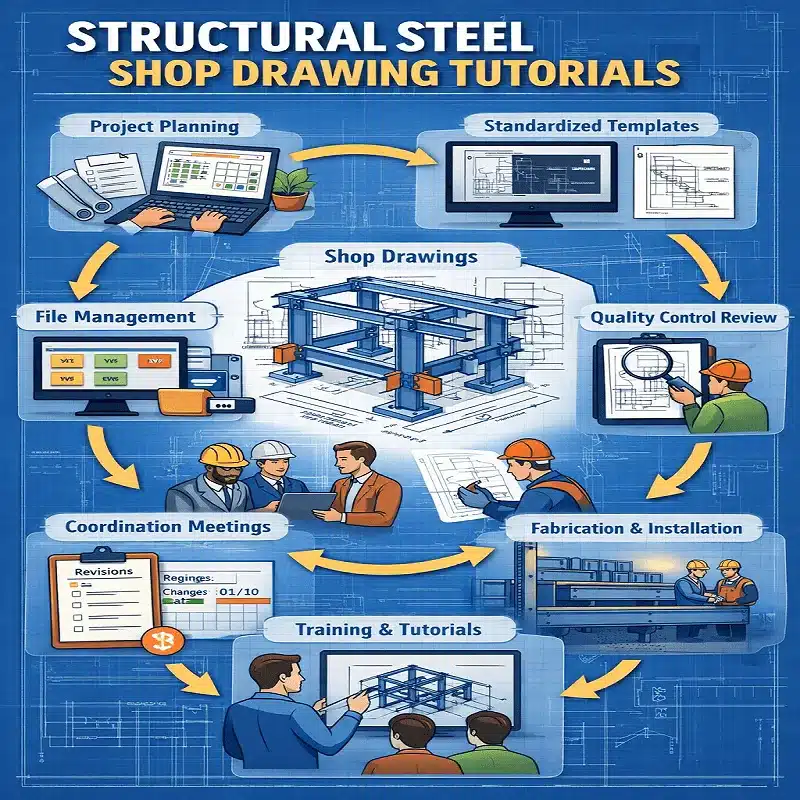
Structural steel shop drawings are essential in the construction and fabrication process. Good structural steel drafting habits keep them accurate. They serve as a bridge between design and construction, ensuring that structural components are accurately fabricated and installed. However, managing these projects efficiently can be challenging due to the complexity and volume of information involved. Proper organisation not only saves time but also reduces errors, improves communication, and ensures project deadlines are met.
In this guide, we explore practical tips for organising structural steel shop drawing projects efficiently, with a focus on best practices for beginners and professionals alike.
1. Understand the project scope before you start
Before starting a structural steel shop drawing project, review all architectural and structural plans, specifications, and client requirements. Understanding the type of steel components, connections, and materials involved helps you plan the drawing process more effectively and break complex structural plans into manageable segments.
2. Build a structured project plan with milestones
A well-structured project plan is the foundation of efficient organisation. Create a detailed timeline that includes milestones such as initial drafts, client reviews, and final approvals. Assign clear responsibilities to team members, especially on larger projects. Project management tools like Autodesk BIM 360, Procore, or even well-structured spreadsheets can track progress, deadlines, and revisions effectively. Create a checklist for each stage to ensure no step is missed.
3. Use standardised structural steel drafting templates and CAD standards
Consistency is essential when dealing with multiple shop drawings. Using standardised templates for title blocks, scales, and symbols ensures clarity and reduces the likelihood of errors. Apply consistent CAD standards for line types, layer names, and dimension styles — this streamlines the workflow and facilitates smoother collaboration between designers, engineers, and fabricators.
4. Choose the right software
Popular software includes AutoCAD, Tekla Structures, Revit, and Advance Steel. These tools allow precise detailing, 3D modelling, and collaboration across teams. Ensure your chosen platform supports the file formats required by your fabricator and project stakeholders.
5. Implement rigorous file management and version control
Organise your CAD files with a clear folder structure, separating drawings by type, stage, or project segment. Use standardised file naming conventions with version indicators (e.g., Rev A, Rev B) to avoid confusion over revisions. Maintain a revision log detailing the version, date, changes made, and responsible team member. This ensures everyone is always working from the latest version.
6. Communicate early and often
Efficient structural steel shop drawing projects rely heavily on communication. Regular meetings, progress updates, and feedback sessions help identify issues early and prevent costly mistakes. Use cloud-based platforms to share drawings and comments in real time. Collaborate closely with fabricators — minor adjustments in drawings can often lead to significant cost savings and faster turnaround times.
7. Build in a thorough quality review process
Even with a well-organised system, errors can occur. Establish a multi-stage review process where drawings are checked for dimensional accuracy, compliance with project specifications, and consistency with related drawings before submission. Document all review comments and track their resolution systematically.
Key software tools for structural steel shop drawings
- AutoCAD — widely used for 2D drafting and documentation
- Tekla Structures — purpose-built for steel detailing with 3D modelling and fabrication output
- Advance Steel — AutoCAD-based tool purpose-built for steel detailing
- Revit — for BIM-coordinated structural documentation
Need professional structural steel shop drawings delivered to Australian Standards? Contact ASTCAD for a free, no-obligation quote. Our team delivers structural steel shop drawing services across Brisbane, Sydney, Melbourne, and Perth.
Our team delivers accurate, standards-compliant drawings across all disciplines — fast turnaround, no obligation.